
What Are Coordination Meetings and How to Schedule Them


Create your free booking page

Bringing people together—whether that’s your colleagues or clients—to work on the same project sounds simple. In practice, it rarely is.
As a freelance content writer, I’ve been on plenty of projects where everyone was doing their part, but conversations were happening in different places. One person thought a decision was final. Another hadn’t seen it yet. Timelines were mostly agreed on—until they weren’t.
At some point, it becomes obvious that we all really need to meet to align on priorities, dependencies, and next steps. And that meeting is called a coordination meeting.
Like any meeting, though, it only works if it’s planned and run with intention. In this guide, we’ll walk through:
- What a coordination meeting is
- When to hold one
- How to run it effectively so everyone leaves aligned and ready to move forward
A coordination meeting is a working meeting focused on aligning people, timelines, and tasks when multiple parties are involved in the same project. Its purpose is to make sure everyone understands what’s happening now, what’s coming next, and how their work connects to others.
Unlike status meetings, which often revolve around individual updates, coordination meetings focus on dependencies and logistics. They surface blockers, clarify ownership, and help teams adjust plans before small issues turn into delays. These meetings are especially useful when work spans teams, roles, or external stakeholders, such as clients or partners.
Coordination meetings are most valuable when work involves multiple people, moving parts, or handoffs. Rather than holding them by default, it helps to be intentional about when they’re needed.
Coordination meetings are especially useful at key moments, such as kicking off a project, moving from planning to execution, or preparing for delivery. These points often introduce new dependencies, timelines, or responsibilities that need to be aligned before work continues.
Some teams benefit from recurring coordination meetings, like daily standups or weekly syncs. A regular meeting cadence can help teams stay aligned over time, as long as the meeting has a clear purpose and doesn’t turn into a routine status update.
Missed deadlines, repeated questions, duplicated work, or unclear ownership are all signs that your team may need better coordination. If progress feels slower than it should, or decisions keep getting revisited, it’s often time to bring everyone together to realign.
Knowing when to hold coordination meetings is only half the equation. When it comes to attendance, who you invite is just as important.
Coordination meetings typically include a mix of people responsible for planning, execution, and decision-making. This often means:
- Project managers, who track timelines, dependencies, and overall progress
- Team leads, who represent specific functions or workstreams, and can speak to constraints
- Contributors, when their input is needed to unblock work or confirm feasibility
- Stakeholders or clients, when approvals, priorities, or trade-offs need to be discussed
That said, not every coordination meeting needs the same group. Attendance should reflect what decisions need to be made and what dependencies need to be resolved in that session.
Smaller meetings are almost always more effective. When too many people attend, coordination meetings tend to drift into status updates or side discussions. A focused group makes it easier to surface blockers, resolve issues in real time, and leave with clear ownership.
If someone doesn’t need to contribute to decisions or next steps, they’re often better kept informed afterward through meeting minutes or a follow-up message.
The RACI framework—Responsible, Accountable, Consulted, and Informed—offers a simple way to decide who should attend. People who are Responsible or Accountable usually need to be in the meeting. Those who are Consulted may join as needed, while Informed participants can receive updates asynchronously.
🤔 New to the RACI framework? Check out our guide to improving meeting productivity to learn more about the RACI approach.
No meeting should run without an agenda. And look, it doesn’t have to be a three-page detailed one. But you should really have some plan for the meeting; otherwise, it won’t be productive. And the whole point of coordination is to be productive.
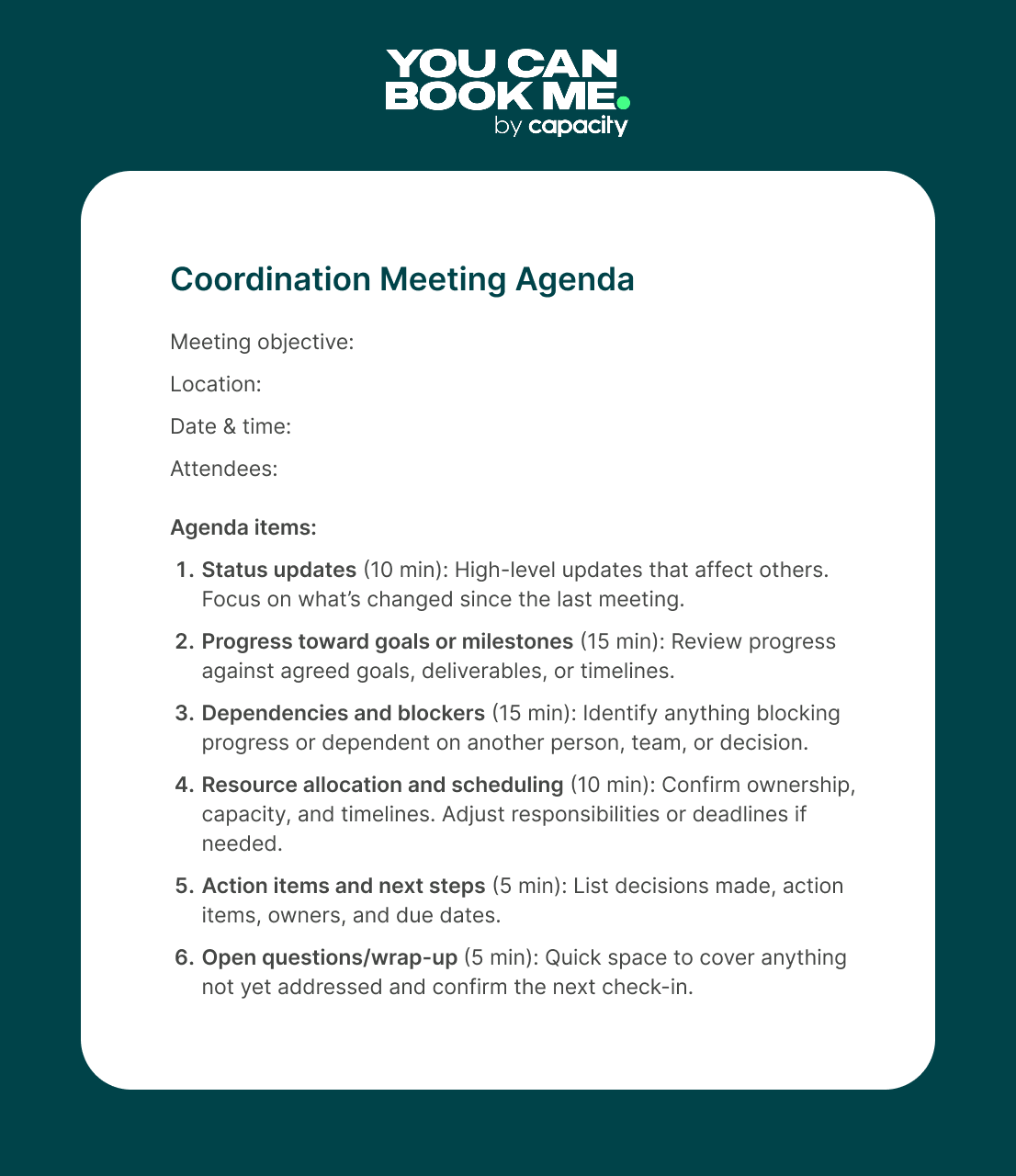
Some ideas what to include in your coordination meeting agenda template: 👇
- Status updates: Use this section to share brief, high-level updates that affect the rest of the group. Focus on what’s changed since the last meeting, rather than detailed reports that can be shared asynchronously.
- Progress toward goals or milestones: Connect current work back to agreed goals or project milestones. This helps the team see whether things are on track and makes it easier to adjust priorities before problems escalate.
- Identifying dependencies and blockers: Call out anything that’s slowing progress or relies on input from someone else. The goal is to surface issues early and agree on what’s needed (and from whom) to keep work moving.
- Resource allocation and scheduling: Review who’s responsible for what and whether timelines are still realistic. If workloads or priorities have shifted, this is the time to rebalance responsibilities and update schedules.
- Action items and next steps: End the meeting by clearly documenting decisions, owners, and deadlines. This ensures everyone leaves knowing exactly what they’re responsible for before the next coordination meeting.
📄 Need a template? Grab our free coordination meeting agenda below to use as a starting point.
|
🗓️ Running frequent meetings with clients? Here’s what to include in an effective client meeting agenda. |
Right, let’s get into the nitty-gritty—the real success formula for running coordination meetings, because you don’t want to walk away from one feeling even more confused.
Before you schedule a coordination meeting, take a moment to define exactly what it’s meant to accomplish. This makes it much easier to keep the conversation focused and walk away with clear outcomes.
Be clear about two things:
- The goal you’re all working toward. This could be a quarterly OKR, a marketing campaign, or rolling out a new product or service to clients. Keeping the bigger picture in mind helps guide decisions during the meeting.
- The objective of each coordination meeting you book. Every meeting should have a specific outcome, whether that’s unblocking work, aligning on timelines, or agreeing on next steps. A clear objective prevents the discussion from drifting.
Coordination meetings only create value if what’s discussed actually carries through after the call. That’s why you should always document decisions and follow up afterwards. It’s best to assign a note-taking role to a specific person—preferably not the one leading the discussion.
During the meeting, it’s important to capture:
- Decisions made
- Action items
- Owners
- Deadlines
Notes don’t need to be exhaustive, but they should be clear and easy to reference.
Follow-up is just as important as documentation. Share meeting notes promptly so everyone leaves with the same understanding, including anyone who couldn’t attend. Action items should be tracked and revisited in the next coordination meeting to ensure accountability.
|
💡 Pro tip: Make meeting documentation and follow-up a habit—whether that’s your responsibility or someone else’s on your team. You don’t want to keep rehashing the same discussions over and over. With properly documented meetings, you can pick up where you left off and keep work moving forward. |
Using the right tools to facilitate coordination meetings is just as important to success. As a bare minimum, you should invest in 👇
Video conferencing
A dependable video conferencing tool like Zoom is foundational for coordination meetings, especially when teams or clients aren’t in the same location. Features like screen sharing help teams walk through timelines, documents, or blockers together, rather than talking abstractly about them.
Shared documents
Shared documents, such as those created in Google Docs, are essential for agendas, notes, and action items. They give everyone a single, up-to-date reference point instead of scattered notes across inboxes and chat threads.
Using one shared document during the meeting also helps keep discussions focused. As decisions are made or blockers identified, they can be captured in real time, reducing the chance of misunderstandings later.
Project management software
Coordination meetings should connect directly to how work is tracked day to day. At YouCanBookMe, we use Notion to manage projects, documentation, and tasks in one place. Other productivity tools like Asana are another popular option for task tracking.
The most important part isn’t the tool itself—it’s making sure decisions from the meeting are reflected in your project system. Updating owners, timelines, or priorities right after the meeting helps turn discussion into execution.
Scheduling software
Scheduling coordination meetings shouldn’t require long email threads to figure out each attendee’s availability or to find the best time to meet. You should really offload these logistics to a dedicated scheduling app.
For example, a meeting scheduler like YouCanBookMe (YCBM) helps teams and clients find time to meet without back-and-forth, especially when multiple calendars or time zones are involved. Features like calendar overlay, pooled availability, automatic time zone detection, and meeting polls make it easier to coordinate meetings with the right people, at the right time, without tedious planning.
Automated confirmations, reminders, and follow-ups also reduce no-shows and keep recurring coordination meetings running smoothly. Instead of chasing responses or rescheduling at the last minute, teams can rely on a consistent setup that just works in the background.
Make scheduling one less thing to think about
Coordination meetings work best when they’re easy to set up. YCBM removes the back-and-forth, reduces no-shows, and keeps meetings running on schedule—without extra admin.

AI note takers
You should also consider adding AI note takers to your meeting tech stack. Tools like Bluedot can support coordination by capturing summaries, decisions, and action items automatically. This allows participants to stay engaged in the conversation instead of worrying about writing everything down.
Used thoughtfully, AI notes can complement human-written summaries by speeding up documentation and reducing the risk of missing key points.
Effective coordination meetings rely on input from the people closest to the work. When only a few voices dominate, important details and risks can be overlooked.
Set clear expectations at the start of the meeting that participation is encouraged. Actively invite updates or input from those responsible for specific tasks, dependencies, or decisions. Structured approaches, such as calling on agenda owners in order, help balance participation and keep discussions focused.
This is especially important in cross-functional meetings, where quieter contributors often hold critical context. Creating space for everyone to speak leads to better decisions, clearer alignment, and stronger accountability across the team.
Even well-run coordination meetings should be reviewed from time to time. What worked a few weeks ago may no longer be the best use of everyone’s time as priorities and workloads change.
Periodically check in with attendees to see whether the meeting is still effective. Ask if the agenda needs adjusting, if the frequency makes sense, or if certain topics could be handled asynchronously instead. In some cases, the right decision may be to pause or cancel the meeting altogether.
This is especially important for recurring meetings like daily standups or weekly syncs. It is easy to keep running them out of habit, even when they are no longer delivering value.
This might seem like a small detail, but it can make a big difference. Leaving at least five minutes at the end of a coordination meeting creates intentional space for topics that surface during the discussion but were not part of the original agenda (As you can see, we’ve added this to the agenda template above!).
Coordination meetings often uncover new moving parts, risks, or follow-up questions as conversations unfold. Having a dedicated moment to capture and address these items helps prevent them from getting lost or pushed into separate meetings or conversations later.
Even with the right agenda, coordination meetings can lose their impact if a few common issues creep in. Be aware of the following pitfalls 👇
- Meetings without clear outcomes: If it’s unclear what the meeting is meant to achieve, the conversation often drifts. Every coordination meeting should have a defined objective.
- Too many participants or off-topic discussions: Inviting too many people can dilute the conversation and slow decision-making. Keep attendance tight and gently steer discussions back to the agenda when they drift into topics that don’t affect the wider group.
- No time limits on agenda items: Some topics naturally take longer than expected, but unchecked discussions can derail the entire meeting. Try adding a time cap to agenda items to keep things moving and ensure the most important topics get proper attention.
- Lack of preparation: Coordination meetings are far more effective when participants come prepared. Sharing the agenda in advance (and asking people to review updates or data beforehand) reduces the need for lengthy explanations during the meeting.
- Poor follow-through on action items: Even a productive meeting loses value if decisions aren’t acted on. Always document action items, assign clear owners, and confirm deadlines so progress continues after the meeting ends.
An easy way to schedule coordination meetings
Well-run coordination meetings don’t happen by accident. They’re the result of clear goals, thoughtful preparation, and habits that support alignment before, during, and after the meeting.
If coordination meetings are part of your regular workflow, simplifying how they’re scheduled can make a noticeable difference. Instead of long email threads just to land on a meeting time, tools like YouCanBookMe can handle the process for you. And when you need to coordinate across multiple people, meeting polls offer a simple way to agree on a time without the usual back-and-forth.
Try YouCanBookMe for free today!
FAQs
What is the purpose of a coordination meeting?

The main purpose of a coordination meeting is to align people, timelines, and responsibilities when multiple parties are involved in the same work. These meetings focus on how tasks connect, what dependencies exist, and what might block progress. Rather than sharing general updates, coordination meetings help teams clarify ownership, surface risks early, and adjust plans as needed.
How to assign and track action items after meetings?
Action items should be assigned clearly before the meeting ends to avoid confusion later. Every task needs enough detail so there is no ambiguity about who is responsible for what.
Make sure each action item includes:
- An owner who is accountable for completing the task
- A clear outcome so expectations are aligned
- A deadline to keep work moving forward
Capture action items in shared meeting notes or a project management tool the team already uses. After the meeting, send a short summary highlighting key decisions and assigned actions, including owners and due dates.
Who should attend a coordination meeting for projects?
Coordination meetings should include only the people needed to move the project forward. This usually means project managers, team leads, and contributors responsible for key deliverables or dependencies. Stakeholders or clients should attend when decisions, approvals, or priority changes are required.

Written by
Paulina Major
Paulina Major is a freelance B2B content writer who has spent the last two years deep in the world of scheduling — writing about booking best practices, time management, and the tools that help small businesses run more efficiently. She writes from experience: as a solopreneur managing her own clients and calendar, she lives the challenges her readers are trying to solve.
Get started today
Join thousands of coaches, consultants, and entrepreneurs who use YouCanBookMe to power their business. Get your first booking in a few minutes.


 4.7 / 5 — Trustpilot

