
How to Reduce Meeting Fatigue Without Impacting Your Business


Create your free booking page

78% of workers say meeting overload prevents them from getting their work done, and 76% feel drained on heavy meeting days. But for service-based business owners, “just have fewer meetings” isn’t realistic. When you’re a consultant, coach, therapist, or service provider, meetings are the business. That means the solution isn’t cancelling calls or having “focus time” blocks in your calendar, it’s designing them more intentionally.
In this article, you’ll learn:
- What meeting fatigue really is and why it happens
- Why service businesses experience meeting burnout differently
- How to reduce meeting fatigue without losing revenue
Meeting fatigue is the mental and physical exhaustion that comes from attending too many meetings or poorly structured ones. It happens when constant interaction, context switching, and decision-making drain your cognitive energy over time.
Not to mention, if you’re having virtual meetings, Zoom fatigue is an additional factor to consider. Research has shown that virtual, camera-on meetings adds even more exhaustion because:
- Constant eye contact feels unnatural. In person, we look away regularly. On video, staring at faces (and having them stare back) for extended periods is cognitively draining.
- Seeing yourself on screen is exhausting. That little box showing your own face creates self-consciousness and requires mental energy that should be focused on the conversation.
- Your brain works harder to read social cues. Slight audio delays, limited body language visibility, and flat 2D images make it harder to interpret reactions, forcing your brain into overdrive to fill in the gaps. What actually causes meeting fatigue?
It’s not just that you’re in meetings all day or feeling socially drained. There’s real cognitive science behind why meeting overload builds up so quickly, especially in client-facing roles.
From virtual meeting fatigue to constant context switching, the structure of your day may be working against your brain. Here’s what’s really happening.
If most of your work happens on video, your brain is working harder than you realize. Research from Stanford University found that excessive close-up eye contact, constantly seeing yourself on screen, and reduced mobility all increase mental strain.
On top of that, video calls require more effort to interpret nonverbal cues and stay visibly engaged. For service-based professionals delivering back-to-back virtual meetings, that extra cognitive load compounds quickly, leading to exhaustion by the end of the day.
Meeting fatigue isn’t just about time spent in calls. It’s about what happens between them.
When you jump from one client to another, your brain has to reset goals, recall details, and shift emotional tone. Research by Harvard Business Review found that the average digital worker toggles between apps nearly 1,200 times per day and spends almost four hours per week simply reorienting after switching tasks. Over a year, that equals roughly five working weeks lost to context switching.
For service-based professionals moving between different personalities, industries, and problems, the cognitive reset is even heavier. Without buffer time, that mental friction compounds, leaving you drained.
When meetings are stacked without breaks, your brain never gets time to process, prepare, or reset. That gap matters more than most people realize.
Researchers at the University of Illinois found that even brief mental breaks can prevent what’s known as a vigilance decrement, the drop in focus and performance that happens over sustained attention. Their study showed that short diversions from a task dramatically improved concentration over time.
In practical terms, your brain needs space between meetings to capture notes, close mental loops, and emotionally recalibrate. Without that reset, attention splinters, details blur together, and decision quality declines.
Even if each individual meeting is productive, the cumulative load can still exhaust you.
Studies on the psychology of meeting overload suggest that too many meetings create a persistent sense of time pressure and reduced autonomy. When your day is fragmented into call after call, it becomes harder to focus deeply, think strategically, or feel in control of your work.
“Just have fewer meetings” sounds like simple advice for reducing meeting fatigue. But for service-based business owners, it misses the point.
If meetings are how you deliver value, build trust, and generate revenue, cutting them outright can harm your business. The challenge is not eliminating meetings. It is making them sustainable.
Here’s why fewer meetings isn’t always the solution:
- Your revenue depends on client meetings: For many service providers, meetings are the product. Client sessions, strategy calls, onboarding meetings, and reviews are how value is delivered, and income is earned. Reducing meetings without a plan can directly reduce revenue.
- Visibility and relationship-building require face time: Trust is built through conversation. Clients stay longer when they feel heard, understood, and supported. Those outcomes typically happen in real-time interaction.
- Some services are delivered entirely through meetings: Coaching, consulting, therapy, and advisory work often exist almost exclusively in scheduled sessions. Removing meetings doesn’t create efficiency. It removes the core service itself.
- Discovery calls and consultations fuel growth: Initial conversations qualify leads and convert prospects into paying clients. Without structured discovery calls, your pipeline slows, and growth becomes unpredictable.
🎯 The goal? Design better meetings instead of reducing their quantity.
If cutting meetings is not the answer, then what is? In this section, we’ll go over a couple of practical strategies to help you reduce meeting fatigue without compromising the quality of your work or the growth of your business.
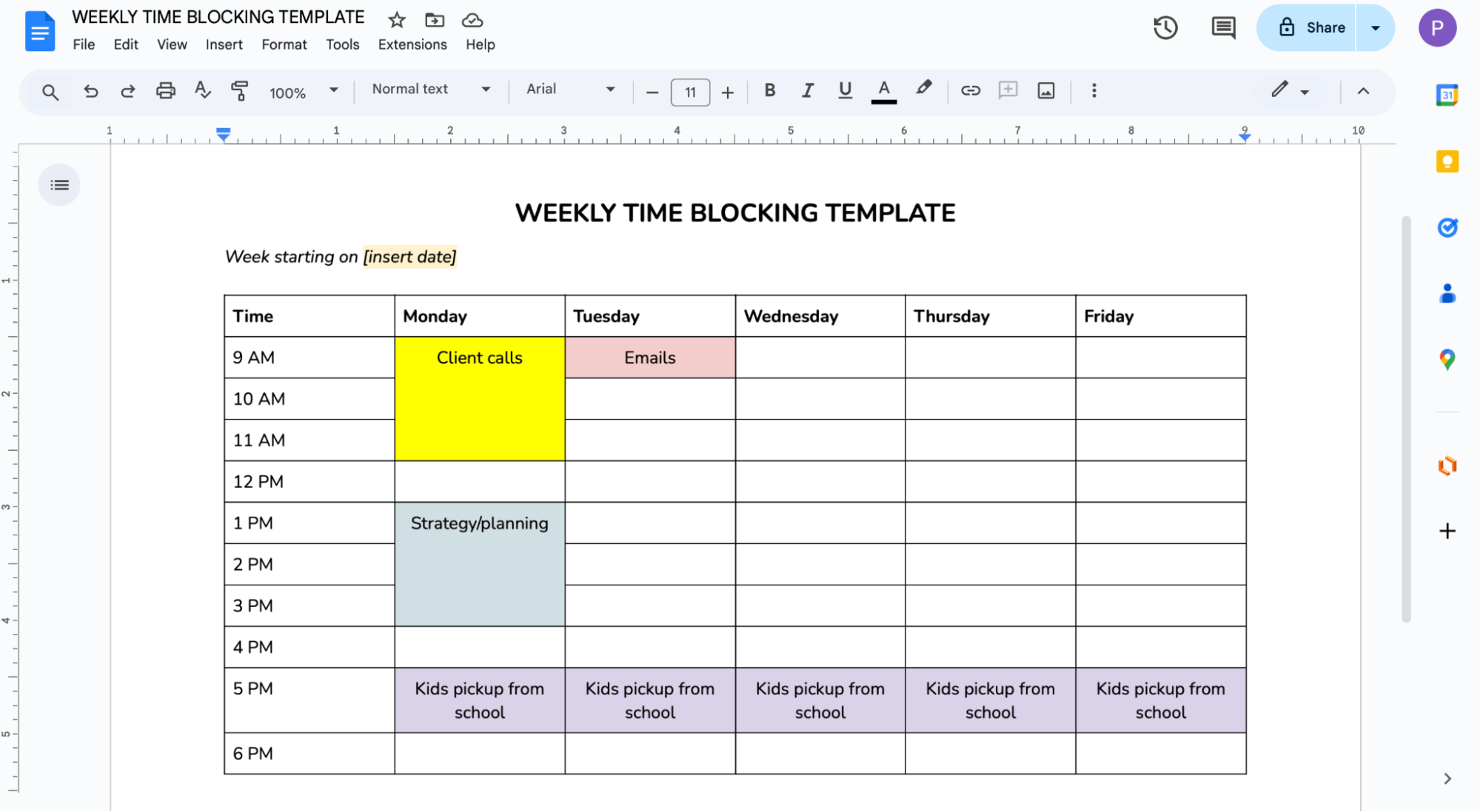
One of the most effective ways to reduce meeting fatigue is to stop scattering meetings randomly across your week. To achieve that goal, you’ll need to use a time-blocking technique, meaning batch similar meetings together.
For example, schedule all discovery calls on Tuesday afternoons and reserve Thursdays for client sessions. Grouping similar conversations reduces context switching and allows your brain to stay in the same mode longer.

Another way to do this? Having clear “meeting days” and “deep work days.” On meeting days, you focus on client interactions. On deep work days, you protect time for strategy, planning, content creation, or administrative work. This separation lowers mental friction and prevents your week from feeling fragmented.
New to time blocking? Grab one of our free time-blocking templates below.👇
Back-to-back meetings are one of the fastest ways to accelerate meeting fatigue. The solution is simple but powerful: build buffer time into your schedule automatically.
Add 10 to 15 minutes between every meeting. This small gap gives your brain time to close mental loops, capture notes, and reset before the next conversation. It also protects you from inevitable overruns and last-minute follow-up questions.
Use this time intentionally. Stand up and stretch. Grab water. Step outside for fresh air. Even short physical and mental resets dramatically improve focus and presence.
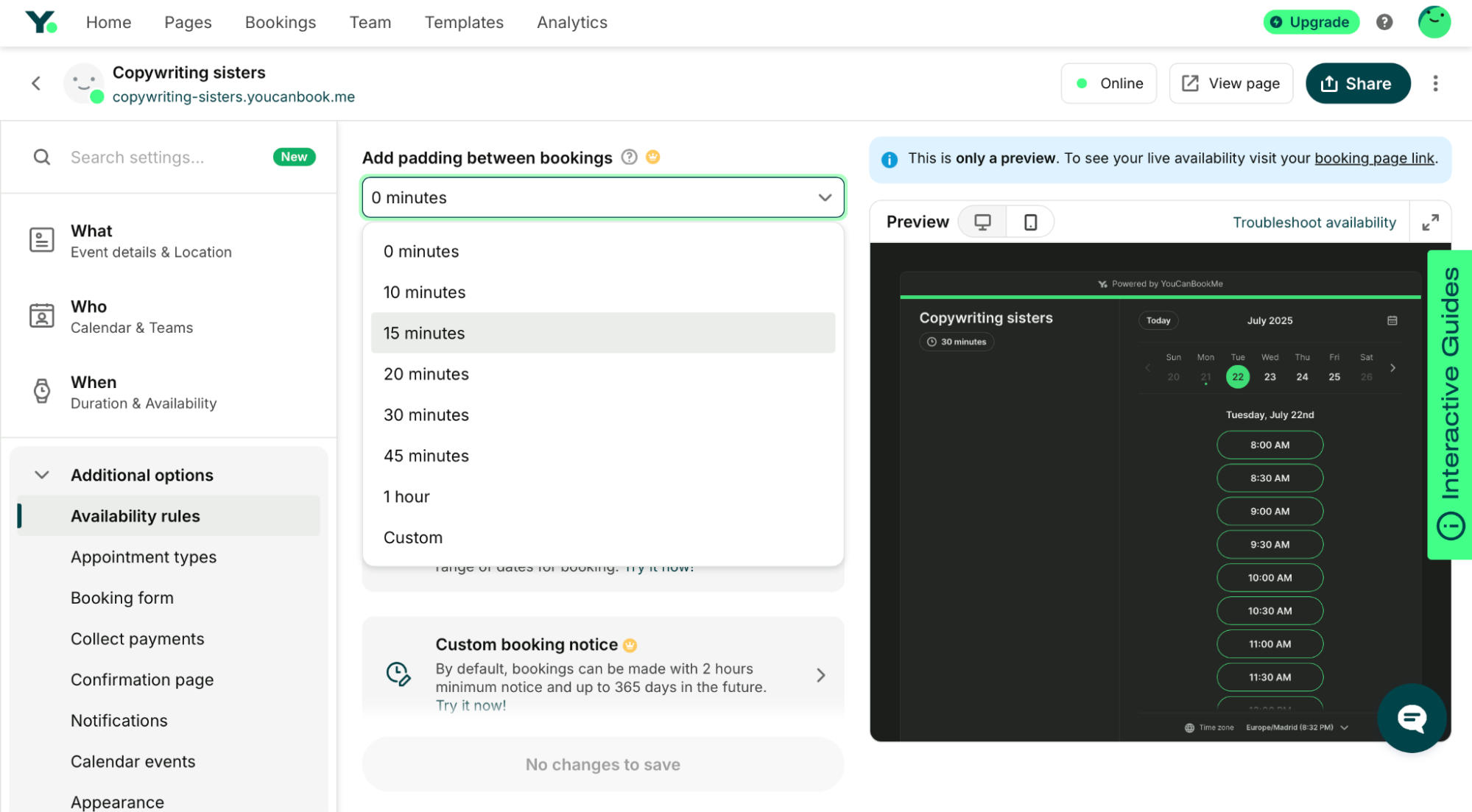
If you struggle to consistently build buffer time into your schedule, consider using a scheduling tool that does it for you. For example, YouCanBookMe (YCBM) lets you automatically add buffer time between meetings so you’re not relying on memory or willpower. Simply create a booking page with your real-time availability, enable the “Padding between bookings” option, and choose how much time you want before and/or after each appointment.
Take control of your calendar
Automate buffer time with YouCanBookMe and finally breathe between meetings.

Emily Claire Hughes, a freelance copywriter, swears by buffer time as a way to protect her calendar. She uses YCBM to build it directly into her schedule: “I do have the buffers. I turned that on, and that’s great.”
In a nutshell, energy mapping organizes your capacity. Instead of only thinking about when you’re available, consider when you’re at your best. Most people have predictable energy patterns throughout the day. Some feel sharp and focused in the morning. Others hit their stride in the afternoon.
Schedule high-stakes or emotionally demanding client sessions during your peak energy hours. This includes:
- Strategy calls
- Pricing or contract negotiations
- Onboarding calls with new clients
- High-visibility presentations to stakeholders
- Sensitive conversations that require your clearest thinking and strongest presence
Reserve lower-energy windows for administrative meetings or less intensive sessions. This reduces the strain of trying to perform at full capacity when your brain and body are not aligned.
Pay attention to patterns. When do you feel most drained? After how many meetings does your focus start to slip? Track it for a week and adjust your availability accordingly.
Look, even with better scheduling, unstructured meetings can still drain your energy. The solution is simple: design meetings to be clearer, shorter, and more intentional.
Here’s how to design meetings that are focused and easier to run.👇
Meetings become draining when you’re forced to think, gather information, and make decisions in real time. You should spend a bit of time preparing for your meetings, and that usually involves things like:
- Send pre-meeting questionnaires or intake forms. Collect key context in advance so you’re not spending valuable session time clarifying the basics. If you use a scheduling tool like YouCanBookMe, you can collect this information at the time of booking with customizable booking forms. You can simply add required or optional fields, use multiple-choice or long-answer questions, qualify leads with blocking questions, and even personalize follow-ups based on responses.
- Share a meeting agenda ahead of time. Send an email with the agenda, letting clients know what will be covered, what decisions need to be made, and what outcomes you’re aiming for. Having some sort of structure in place helps to keep conversations focused.
- Ask clients to submit questions beforehand. This prevents surprises and gives you time to prepare thoughtful responses instead of thinking on the spot.
Start every meeting prepared
Use YouCanBookMe to collect the key client details upfront and ensure every meeting is intentional and productive.
.png?width=1035&height=880&name=FP_%20Booking%20Forms%20-%20Get%20the%20data%20you%20need%20(1).png)
Just as important as when you schedule meetings is the format you choose to run them. The structure, length, and delivery method of a meeting directly affect how much cognitive energy it requires. Here are a few tricks and tips:
- Mix video and phone-only calls. Video calls demand more mental effort because you’re interpreting facial cues, maintaining eye contact, and often monitoring your own image. For status updates, follow-ups, or lower-stakes conversations, switch to phone-only. Removing the visual layer reduces cognitive load and allows you to move more naturally.
- Try walking meetings when appropriate. For brainstorming sessions or informal check-ins, take the call while walking. Gentle movement improves circulation, boosts alertness, and can make conversations feel more dynamic and less draining than sitting in front of a screen.
- Use asynchronous options when possible. Not every update requires a live discussion. Loom videos, voice notes, or written updates can replace routine status meetings and free up time for higher-value client work.
- Shorten default meeting lengths. Instead of automatically booking 60 minutes, experiment with 30- or 45-minute sessions. Clear time boundaries encourage focus and eliminate unnecessary tangents.
- Use a note taker. Still taking notes manually? Stop! 🚫 Instead, use an AI note-taking tool to automatically capture action items and key points. These tools are real time-savers and can significantly reduce meeting fatigue while helping you stay more present during client meetings.
What you do during the meeting also matters! You need to build in small habits to further lower your cognitive strain and help you stay present from the first call to the last. These are:
- Starting with a quick check-in. Open your client meeting with something simple like, “How are you doing today?” or “What’s been keeping you busy this week?” A brief personal moment helps both of you settle in, transition mentally, and build rapport before diving into work.
- Keeping a water bottle visible and taking sips. Hydration supports focus and gives you natural pauses in conversation. Those micro-breaks help regulate your pace and reduce cognitive strain.
- Standing up occasionally on video calls if appropriate. Changing posture boosts circulation and energy. Even standing for part of a session can prevent the sluggish feeling that builds during long screen days.
- Using a second monitor to avoid staring at faces constantly. Keep notes or documents on another screen so you are not locked into constant eye contact. Reducing visual intensity can ease video-related fatigue.
- Having the camera off if possible. If appropriate, turn your camera off for part of the meeting. Constantly monitoring your expressions adds mental strain. Short camera breaks reduce self-consciousness, ease video fatigue, and help you focus more fully on listening and thinking clearly.
As much as we talk about improving meeting logistics and using a scheduling tool to automate energy-draining tasks, most meeting fatigue starts with weak boundaries. As a business owner, you want to accommodate your clients’ needs, but accommodation should not mean unlimited access.
If you don’t define your availability, your clients will. Set clear calendar boundaries that specify exactly when you’re available and when you’re not. For example:
- Block off lunch hours and treat them as non-negotiable. A true midday reset improves focus and prevents afternoon burnout. If it’s not blocked, it will get booked.
- Limit total meeting hours per day. Decide in advance how many client-facing hours you can sustainably handle. Cap your availability so your energy is not stretched thin.
- Create “office hours” instead of open-all-day availability. Offer specific booking windows rather than 9-to-5 access. This concentrates meetings and preserves deep work time.
- Take one meeting-free day per week if possible. Block it in your calendar or update your scheduling settings so it cannot be booked. Protect that day for strategy, admin, or recovery.
Meeting burnout often builds outside the meeting itself—in constant Slack pings, last-minute client requests, and unclear expectations about when you’re available. When communication norms are undefined, everything can start to feel urgent, which leads to more reactive scheduling and unnecessary calls.
A few practical strategies to help you set client communication boundaries include:
- Set clear response time expectations. Let clients know when they can expect a reply, whether that’s within 24 hours or two business days. This removes pressure to respond instantly and discourages urgent-but-not-urgent calls.
- Use email templates for common questions. If you find yourself typing the same responses repeatedly, create standardized replies. Templates save energy and reduce the need for clarification calls.
- Create an FAQ or resource library. Guides, recorded tutorials, and onboarding documents can answer common questions before they turn into meetings.
- Ask whether the meeting is necessary. Before scheduling, consider if the issue could be resolved with a thoughtful email or shared document.
- Audit your meeting cadence—the frequency, timing, and duration of all your client meetings—and cut what isn't earning its slot and could be handled async.
Not every meeting request deserves a yes. Protecting your energy sometimes means protecting your calendar from the wrong commitments.
- Not every potential client is worth the energy drain. Revenue matters, but so does sustainability. Sometimes you have to fire a client who is no longer the right fit—maybe they reschedule too frequently, disrupting your schedule, or maybe they don’t respect your boundaries. It’s completely okay to evaluate whether a relationship is aligned and, in some cases, to professionally part ways. Protecting your time allows you to serve the right clients better.
- It’s okay to have minimum booking requirements. Free access often leads to overbooking and low commitment. Setting a minimum notice period, charging for consultations upfront, or requiring clients to complete an application helps filter out casual inquiries and ensures they value your time.
- You can decline meetings with people who don’t respect your time. If someone repeatedly ignores policies, pushes boundaries, or demands immediate access, you are allowed to say no. Respect is a prerequisite for a healthy client relationship.
Meeting fatigue isn’t solved by cancelling client calls—it’s solved by designing smarter systems around them. When you protect your calendar, clarify expectations, and structure meetings intentionally, you create a business that feels sustainable instead of exhausting.
With YouCanBookMe, you can connect your calendar to keep your availability accurate, add buffer time, collect client information upfront, and control who books your time—all without extra back-and-forth.
FAQs
How can I reduce meeting fatigue without canceling client meetings?

You reduce meeting fatigue by improving how meetings are scheduled and structured, not by eliminating them. Start by batching similar calls together to reduce context switching. Also, consider adding buffer time between sessions so your brain can reset and capture notes. Shorten default meeting lengths where possible and use intake forms to gather information in advance. You can also replace some updates with asynchronous communication, such as voice notes or recorded videos. Finally, set clear boundaries around availability and response times.
What's the best meeting length to prevent fatigue?
There is no single perfect meeting length, but shorter meetings generally reduce fatigue. Instead of defaulting to 60 minutes, consider 30- or 45-minute sessions. Tighter time limits encourage focus, reduce unnecessary tangents, and make it easier to stay mentally engaged.
The right length also depends on the purpose of the meeting. A quick check-in or update may only need 15 to 30 minutes, while an onboarding call might require more time.
What if my clients expect immediate or constant availability?
If clients expect constant availability, that is a signal that expectations were never clearly defined. As a business owner, you set the standard for how access to you works. Communicate response times, office hours, and emergency protocols upfront, and, most importantly, put them in your contract and onboarding materials.
How do I create buffer time between meetings without losing business?
The simplest way to create buffer time between meetings is to use scheduling software that automatically enforces it. Your clients will not even notice it exists. Set your availability so meetings can only be booked at :00 or :30, with your actual meetings ending at :50 or :20.
Most clients are flexible when booking. They simply want a convenient time, not necessarily back-to-back slots. Buffer time actually improves your service quality because you show up more present, prepared, and focused. Scheduling tools like YouCanBookMe make it easy to protect your energy without reducing availability. By adding automatic padding between bookings, you ensure every meeting has space around it without manual adjustments.

Written by
Paulina Major
Paulina Major is a freelance B2B content writer with six years of experience. Since 2024, she has written 100+ articles on scheduling and personally tested and reviewed 30+ booking tools, helping small business owners choose software and simplify their booking processes. As a solopreneur managing her own clients and calendar, she brings firsthand experience to her advice on scheduling, time management, and running a business.
Get started today
Join thousands of coaches, consultants, and entrepreneurs who use YouCanBookMe to power their business. Get your first booking in a few minutes.


 4.7 / 5 — Trustpilot

