
How to Run an Effective Team Meeting (Before, During & After)


Create your free booking page

Team meetings are supposed to be where the work gets done: the planning, the decisions, the alignment. And yet, according to Atlassian's research across 5,000 knowledge workers, 72% of meetings are ineffective—even though we spend three times longer in them than before Covid. 😱
If you’ve recently noticed that your team meetings aren’t as productive, whether that’s due to how long it takes to prepare for them or how they go on the day in terms of what you actually accomplish, you’re in the right place.
In this guide, we’ll walk you through exactly how to run an effective team meeting, from the prep work that happens days before to the follow-up that determines whether anything actually gets done. You’ll learn what to do before, during, and after the meeting, along with two ready-to-use agenda templates and the most common mistakes to avoid.
An effective team meeting delivers clear outcomes, respects everyone’s time, and gives everyone a voice. It does three things well:
- It has a purpose. Everyone in the room (or on the call) knows why they're there and what needs to be decided or discussed.
- It respects time. The meeting runs efficiently, with a focused agenda and no unnecessary drift.
- It's inclusive. Every team member has a real opportunity to contribute, not just the loudest voices.
When all three are present, your team walks away aligned, energized, and clear on what happens next. When even one is missing, the meeting tends to drift—and your team starts wondering why they're there at all.
Great meetings are won or lost before they start. The 40/20/40 rule is a useful way to think about this: spend 40% of your effort on preparation, 20% on the meeting itself, and 40% on follow-up.
Here is what intentional preparation looks like for a team meeting.👇
Before you send a calendar invite, answer one question: By the end of this meeting, our team will have ___. If you can’t complete that sentence, you aren’t ready to schedule it.
Some updates don’t need a meeting at all. If you’re sharing information that doesn’t require discussion or a decision, a Slack message or shared doc will serve your team better and give them back time they will thank you for.
For the meetings that do need to happen, knowing the type upfront helps you write a better agenda and invite the right people. A few common meeting types include:
- Weekly team sync: Align on priorities, surface blockers, and keep everyone moving in the same direction.
- Daily standup: Answer three questions: What did I work on yesterday? What am I working on today? Any blockers? For some teams, a well-structured Slack thread in your shared channel can often replace this entirely.
- Project kickoff: Establish scope, roles, and timelines before work begins.
- Quarterly planning: Review what is working, set goals for the next quarter, and agree on the team's top priorities.
When setting up a meeting, it’s important to keep Parkinson's Law in mind: work expands to fill the time available. If you schedule a 60-minute meeting, your team will likely use all 60—even if the real work could be done in 35.
With that in mind, be intentional about your meeting length. Then build an agenda that keeps things focused and gives each topic the right amount of time.
A strong meeting agenda includes:
- The meeting goal at the top (one sentence max)
- Topics with time blocks, not just what you are discussing, but how long each item gets
- Who leads each section, so everyone knows their role before they walk in
Once you have your agenda, send it to your team at least 24 hours in advance and invite them to add items to make it more collaborative, rather than something that’s simply passed down from the top.
By the way, if you continue reading this article, you’ll find below a few team meeting agenda templates that you can copy for free!
We’re all professionals here, so there’s a reasonable expectation that your team will add the meeting to their calendars and show up. But we also know how busy teams get, and a well-timed reminder email never hurts.
More importantly, a reminder is an opportunity to include what each person should prepare or review in advance, flag any decisions that will need to be made, and link to the agenda. That way, your team arrives ready to hit the ground running rather than spending the first ten minutes getting up to speed.
If you’d rather not send these manually, an online scheduling tool like YouCanBookMe (YCBM) can handle meeting confirmations and reminders for you automatically. You can customize everything from the subject line and message content to timing and frequency, so the right information reaches your team at the right time, without it becoming another thing on your to-do list.
Reduce no-shows with email reminders
Let YCBM automate meeting confirmations, reminders, and follow-ups, so your team remembers, prepares, and attends on time.


With a clear goal, a solid agenda, and a prepared team, the meeting becomes much easier to run. Let’s quickly go over what you should focus on during the meeting itself.
Team meetings function best when you establish clear roles, specifically:
- Facilitator: guides the discussion and keeps the meeting on track.
- Note-taker: captures key points, decisions, and action items. An AI note-taker can handle this automatically if you would rather keep all hands free.
- Timekeeper: watches the clock and gives the facilitator a heads-up when time is running low on a topic.
- Participation monitor: notices when certain voices are dominating or going quiet, and flags it to the facilitator.
It’s also wise to rotate these roles across your team over time. That way, you can build shared ownership and keep everyone more engaged. When each person knows they’ll eventually be in the facilitator seat, they pay closer attention. This isn’t something you’d do in a client meeting—it’s distinctly a team practice.
When the same two or three people dominate every team meeting (🙋♀️ I’ve personally been in plenty of those), the rest of the team disengages. Over time, you lose the diverse perspectives that make a team valuable in the first place.
A few facilitation techniques that can help:
- Round-robin for decisions. When you need input from everyone rather than whoever speaks first, go around the room or the call and ask each person directly.
- Direct invitations. If a team member has been quiet, call them in with curiosity rather than pressure. "Sam, you have been working closest to this—what is your read?" lands very differently from "Sam, you have not said anything yet."
- The parking lot. When a tangent or new topic comes up mid-meeting, acknowledge it, write it down in a visible parking lot section, and commit to returning to it after the meeting or at a future session. This keeps the conversation on track without dismissing the idea entirely.
One of the most common ways meetings fail is that everyone feels like decisions were made, but no one agrees on what they were. Fix this by naming decisions out loud as they happen:
“Okay, so we all agree—we’re going to launch the pilot in Q3, with a review at the six-week mark. Is everyone aligned on that?”
Then, for every action item that comes out of the discussion, make sure three things are captured:
- What is being done
- Who owns it
- When it needs to be done by
|
⚠️ Vague statement |
✅ Clear action item |
|
“We should do that.” |
"Gabi will pull the numbers from Q1 and share them in Slack by Thursday." |
Using an AI note-taker makes this significantly easier, surfacing action items automatically and sending them to the right people after the call so nothing slips through. Also, if you’re tasked to write up meeting minutes, again, you can just use an AI summary to help you out with that.
The meeting ends. Most teams close the tab on their laptops (or leave the meeting room if it’s in person) and move on. High-performing teams do one more thing: they close the loop. This means you (or whoever is in charge of organizing your team meetings) need to follow up and make sure all attendees are aware of their action items.
Your post-meeting follow-up does not need to be long. In fact, shorter is better. It should cover three things:
- The decisions made during the meeting
- Action items with named owners and deadlines
- Any parked topics and what happens next with them
|
💡 Pro tip: Share the summary with the entire team, not just the people who attended. For remote or distributed teams, especially, this keeps everyone aligned even if they couldn’t make it or joined late. It also creates a written record that prevents "but I thought we decided..." conversations further down the line. |
Don’t wait for the next meeting to track progress or spot delays. Send a quick mid-cycle check-in, whether that is a DM, a Slack message, or an email, to make the team accountable and remind them of their responsibilities.
A simple habit that works: set a personal reminder 48 hours before the next session to review open items.
- Which actions are complete?
- Which are blocked and need attention before the group reconvenes?
A quick ten-minute review will help you ensure that the action items are being tackled by the team, and come better prepared for the meeting.
Tools like Bluedot, Otter.ai, Krisp, and Fireflies can make follow-up easier by automatically generating meeting summaries and sending action items to the right people.
Alright, as promised, here are the team meeting agenda templates you can copy and use for free!
They will give you a ready-to-use structure to work from, but treat them as a baseline, not a rulebook. Things will come up. Your team might be navigating a period of change, a new round of funding, or a big company launch on the horizon. Use the structure as your foundation and adapt it when the situation calls for it.
If you’re looking for a simple agenda to run your recurring team meetings, this one will help you stay aligned on priorities, surface blockers early, and leave every session with clear next steps.
For each agenda item, we’ve included a brief explanation to clarify its purpose.
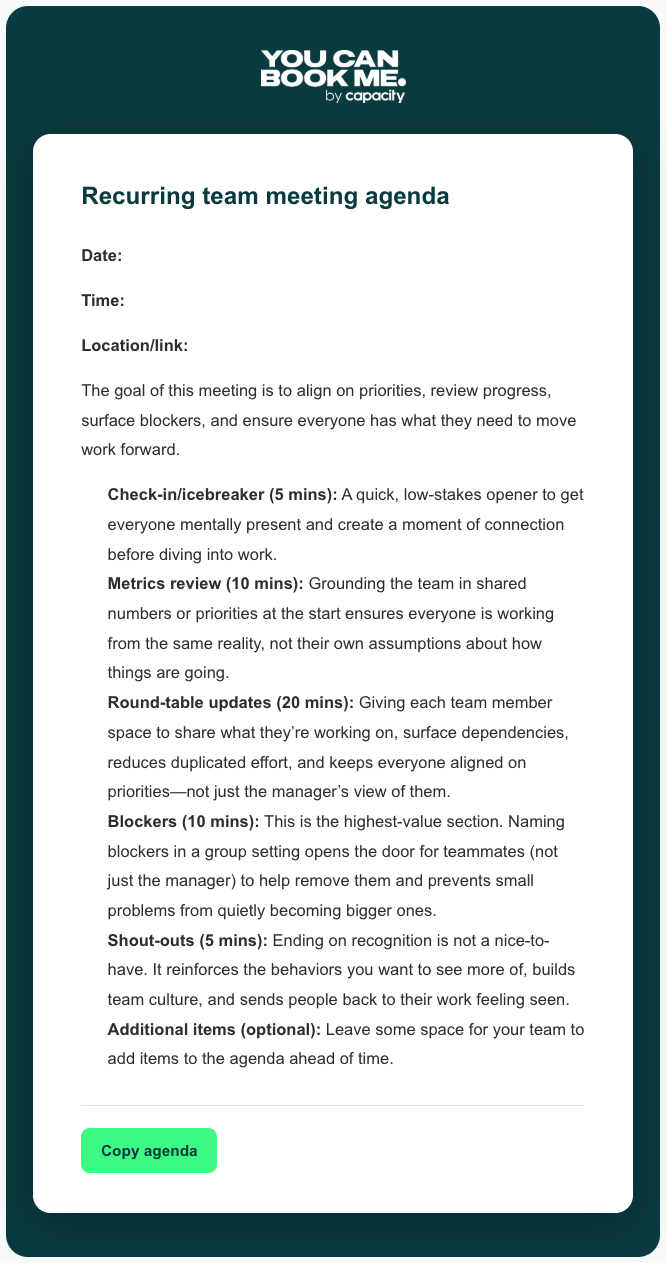
Recurring team meeting agenda
Date:
Time:
Location/link:
The goal of this meeting is to align on priorities, review progress, surface blockers, and ensure everyone has what they need to move work forward.
- Check-in/icebreaker (5 mins): A quick, low-stakes opener to get everyone mentally present and create a moment of connection before diving into work.
- Metrics review (10 mins): Grounding the team in shared numbers or priorities at the start ensures everyone is working from the same reality, not their own assumptions about how things are going.
- Round-table updates (20 mins): Giving each team member space to share what they're working on, surface dependencies, reduces duplicated effort, and keeps everyone aligned on priorities—not just the manager's view of them.
- Blockers (10 mins): This is the highest-value section. Naming blockers in a group setting opens the door for teammates (not just the manager) to help remove them and prevents small problems from quietly becoming bigger ones.
- Shout-outs (5 mins): Ending on recognition is not a nice-to-have. It reinforces the behaviors you want to see more of, builds team culture, and sends people back to their work feeling seen.
- Additional items (optional): Leave some space for your team to add items to the agenda ahead of time.
If you’re planning a project kickoff or quarterly planning session, this agenda will help your team align on goals, clarify ownership, and leave the meeting with a clear, shared plan.
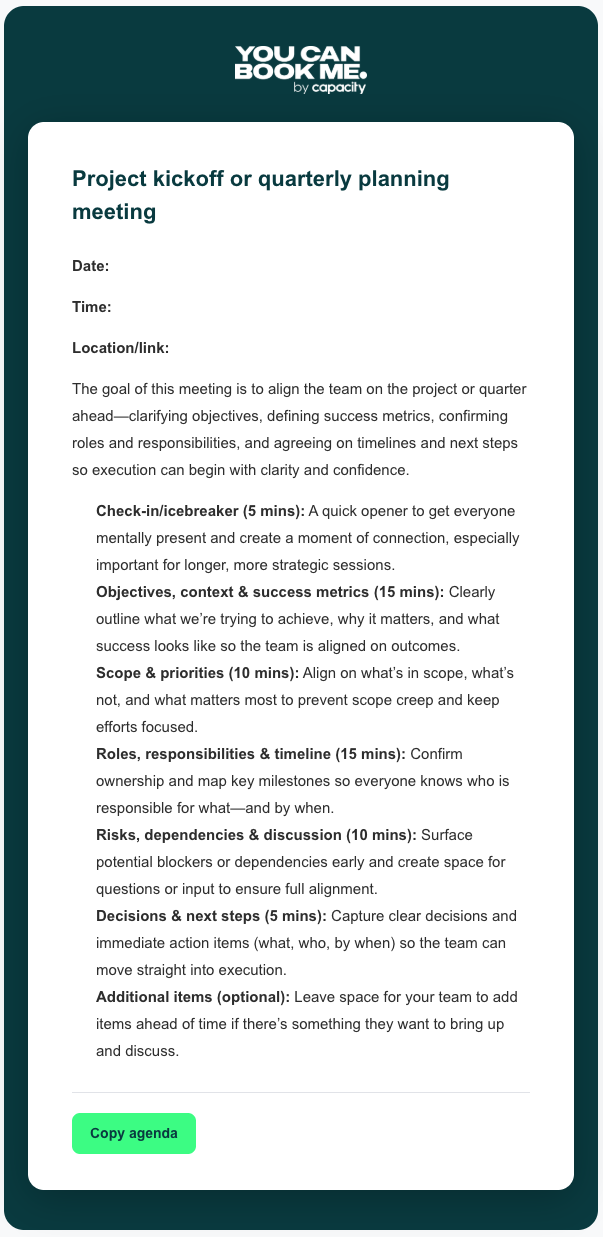
Project kickoff or quarterly planning meeting
Date:
Time:
Location/link:
The goal of this meeting is to align the team on the project or quarter ahead—clarifying objectives, defining success metrics, confirming roles and responsibilities, and agreeing on timelines and next steps so execution can begin with clarity and confidence.
- Check-in/icebreaker (5 mins): A quick opener to get everyone mentally present and create a moment of connection, especially important for longer, more strategic sessions.
- Objectives, context & success metrics (15 mins): Clearly outline what we're trying to achieve, why it matters, and what success looks like so the team is aligned on outcomes.
- Scope & priorities (10 mins): Align on what's in scope, what's not, and what matters most to prevent scope creep and keep efforts focused.
- Roles, responsibilities & timeline (15 mins): Confirm ownership and map key milestones so everyone knows who is responsible for what—and by when.
- Risks, dependencies & discussion (10 mins): Surface potential blockers or dependencies early and create space for questions or input to ensure full alignment.
- Decisions & next steps (5 mins): Capture clear decisions and immediate action items (what, who, by when) so the team can move straight into execution.
- Additional items (optional): Leave space for your team to add items ahead of time if there's something they want to bring up and discuss.
And despite all the meeting preparation you do and good intentions, it’s still easy to fall into some common traps. Here is what to watch for:
- No agenda or a last-minute one. Sending an agenda ten minutes before the meeting is nearly as bad as having none. Your team needs time to prepare. Aim for 24 hours minimum.
- Inviting too many people to avoid hurt feelings. Invite the people who are essential to the decisions being made and share the summary with everyone else afterward.
- Status updates taking over with no real decisions made. If your team meeting is mostly people reporting what they did last week, that’s a problem. Updates can be async. Meetings are for decisions and problem-solving.
- Letting one or two voices dominate. Facilitation is a skill. Use it. If the same people are talking 80% of the time, the meeting isn’t serving the team.
- Walking out with no clear action items. If no one knows what happens next, nothing will. Every meeting should end with someone reading the action items out loud to confirm them.
- Revisiting the same issues week after week without resolving them. If the same blocker appears on your agenda three weeks running, that’s a signal. Not that you need another meeting, but that the issue needs to be escalated, resourced, or consciously deprioritized.
Running a great team meeting takes focus. The last thing you need is for the logistics around it to eat into the time and energy you should be spending on the meeting itself. Use scheduling automation instead!
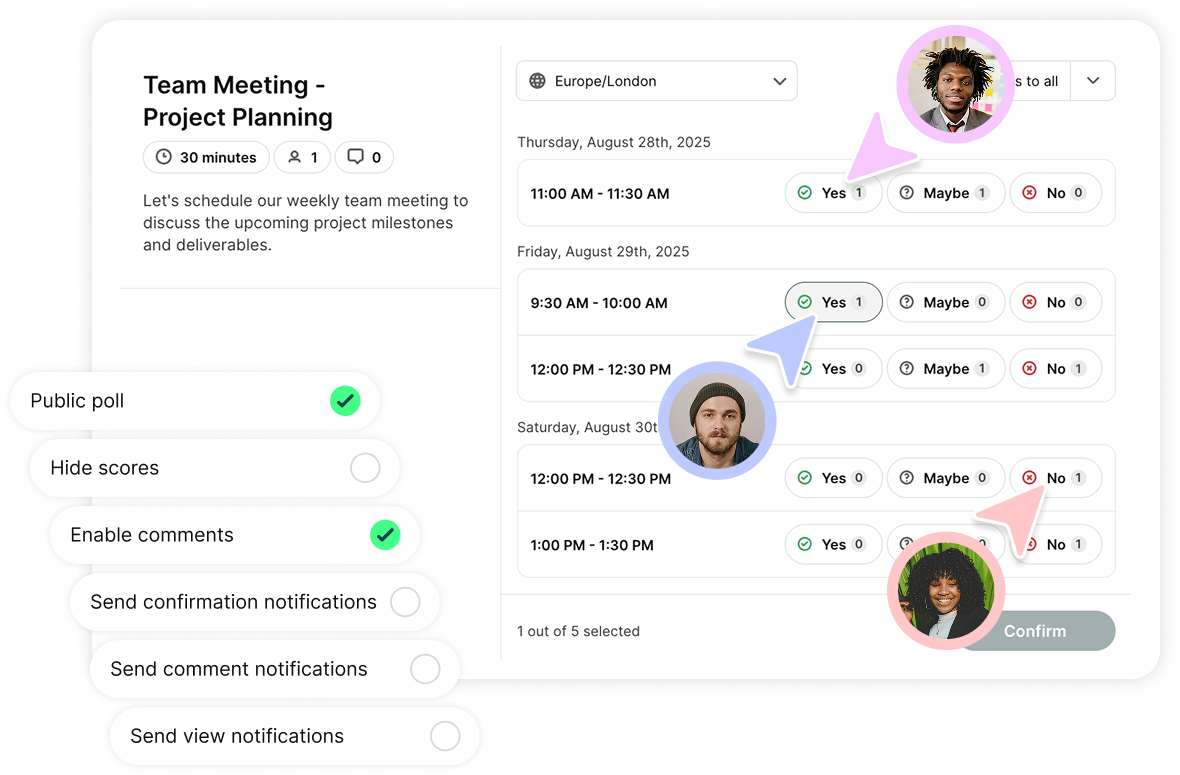
YouCanBookMe handles everything around the meeting so you can focus on what actually happens in it. It does so by:
- Eliminating scheduling back-and-forth. Finding a time to meet that works for everyone is one of those small frustrations that adds up fast. With YCBM's meeting polls, you can share available time slots with your team, collect everyone's availability in one place, and let the tool automatically suggest the best time. Once the time is decided, YCBM will automatically send a meeting invitation to all team members.
- Sending automated reminders. Reduce no-shows and make sure your team arrives prepared with automated email reminders that go out at exactly the right time, with exactly the right information included.
- Sending follow-up emails that lead somewhere. Include your booking link in every post-meeting follow-up so that when next steps are agreed, booking the next session is one click away rather than the start of another scheduling thread.
- Keeping availability accurate across every calendar. YouCanBookMe's calendar sync connects with Google, Microsoft, and Apple calendars so your availability is always up to date.
- Scheduling across time zones without the headache. If your team is distributed across different locations, YouCanBookMe's time zone planner automatically adjusts your availability to each team member's local time zone.
Ready to take the admin out of your team meetings?
YouCanBookMe handles the scheduling, time zones, and reminders, so you can put your energy into running meetings your team actually values. Set up your booking page in minutes and see the difference it makes.
Feeling better equipped to run your team meetings?
We hope you found this guide useful and that it serves as a practical reference you can come back to whenever you need it.
Running great team meetings takes some perfecting, and getting everyone on board can take time, too, especially if you are introducing new processes. Remember, you don’t need to implement everything at once. Pick the parts that are most relevant to where your team is right now and layer in the rest as you go. Good luck! 🤝
FAQs
What are the 5 Ps of an effective meeting?

The 5 Ps are a simple framework to run through before scheduling any meeting:
- Purpose: Why the meeting exists and what outcome you need
- Participants: The right people to achieve that outcome
- Preparation: What needs to be done before the meeting
- Process: How the meeting will be structured and run
- Payoff (or Progress): What decisions are made and what happens next
When all five are clear, meetings become focused, efficient, and outcome-driven.
How long should a team meeting be?
The ideal length of a team meeting depends on its purpose, but most should fall between 30 and 60 minutes. Daily standups should stay short (10–15 minutes), while weekly team meetings or planning sessions may need closer to an hour. Ultimately, it’ll depend on how many agenda items you need to discuss.
How often should teams have team meetings?
Most teams benefit from a weekly all-hands sync, plus any project-specific check-ins as needed. Daily standups make sense for fast-moving, interdependent work, but you should always consider whether a meeting is necessary. The right cadence depends on your team's pace and how much real-time alignment is genuinely needed.
How do you run a team meeting when remote members are included?
The single most effective principle for hybrid meetings is simple: if anyone is joining remotely, have everyone dial in individually. When some people are together in a room, and others are on a call, side conversations happen, remote participants miss non-verbal cues, and the dynamic becomes uneven. Having everyone on their own device creates a level playing field regardless of where people are located.
What is the 40/20/40 rule for meetings?
The 40/20/40 rule suggests spending 40% of your total meeting effort on preparation, setting the agenda, defining the goal, and briefing participants; 20% on the meeting itself; and 40% on follow-up, sharing notes, executing on decisions, and checking in on action items. Most teams invert this without realizing it, which is why so many meetings feel like they lead nowhere.

Written by
Paulina Major
Paulina Major is a freelance B2B content writer who has spent the last two years deep in the world of scheduling — writing about booking best practices, time management, and the tools that help small businesses run more efficiently. She writes from experience: as a solopreneur managing her own clients and calendar, she lives the challenges her readers are trying to solve.
Get started today
Join thousands of coaches, consultants, and entrepreneurs who use YouCanBookMe to power their business. Get your first booking in a few minutes.


 4.7 / 5 — Trustpilot

