
Meeting Prep: A Practical Guide for Better Meetings


Create your free booking page

The purpose of any meeting is simple: bring the right people together to make decisions, solve problems, or get aligned.
We schedule meetings because we assume they’ll move work forward faster than sending another email and waiting for everyone to respond. But that only happens when meeting prep is done well. And quite frankly, that involves more than just sending a meeting invite.
Every meeting should have:
- A clear goal and defined outcome
- The right attendees
- A structured agenda
- Relevant context and materials shared in advance
- A plan for capturing decisions and next steps
Without those elements, your meetings won’t achieve their outcome and will be a total waste of time. In this no-fluff guide, we’ll teach you how to prepare for meetings with an eight-step prep framework that saves time, reduces stress, and helps you run focused, decision-driven conversations.
Meetings aren’t inherently unproductive. Poorly prepared meetings are.
According to Atlassian’s survey of 5,000 knowledge workers, meetings are considered ineffective 72% of the time. Even more concerning, 54% of workers frequently leave meetings without clarity on next steps or ownership, and 62% say meetings often don’t even state a goal in the invite.
Then there’s the cost of time. 78% of people say they attend so many meetings it’s hard to get their real work done, and 51% report working overtime due to meeting overload.
And when you work with clients, the stakes are even higher. Coming unprepared to a discovery call with a prospect—meaning not doing any research on the said prospect, not being ready to handle objections, and being a bit clueless—doesn’t really build trust, right?
Over the long term, that can negatively impact your revenue. And if you’re in a service business, one messy meeting may be enough to make a client hesitate to book with you again.
The ROI of effective meeting prep is measurable and immediate. When you prepare intentionally, you create:
👉 Shorter, more focused meetings: Clear goals and time boundaries reduce drift. Most meetings can be done in half the time.
👉 Increased participation and engagement: Agendas and context give quieter voices time to process and contribute. Prep creates psychological space for better discussion.
👉 Clearer action items and follow-through: With defined outcomes and documented decisions, fewer people leave wondering, “So… what’s next?”
👉 An improved professional reputation: Prepared leaders are perceived as organized, strategic, and respectful of others’ time. In client-facing work, especially, strong meeting prep signals competence.
But just as important as why you prepare for meetings is when you begin preparing. Let’s tackle the timing issue next!
One of the most common questions around meeting prep is timing. Should you prepare days in advance? The morning of? Five minutes before?
The honest answer: it depends on the type of meeting. For example:
- One-off or first meetings (24–48 hours before): If it’s a discovery call, kickoff meeting, stakeholder presentation, or any first-time interaction, aim to start preparing at least 24–48 hours in advance. This gives you time to research attendees, clarify the goal, build a focused agenda, anticipate objections, and share any necessary materials ahead of time. First impressions matter, especially in client work.
- Last-minute meetings (same day if possible): If a last-minute appointment lands in your calendar, you logically don’t have much time to prepare. However, you should still try to squeeze in at least 15–20 minutes to quickly gather the necessary information, outline key talking points, and make sure you have everything you need.
- Recurring meetings (ongoing preparation): Weekly team meetings, 1:1s, and regular check-ins shouldn’t require last-minute scrambling. Instead, treat preparation as ongoing. Capture discussion points throughout the week, update the agenda continuously, and review open action items before the meeting begins.
By now, it’s probably clear that good meeting prep takes intention. But here’s the part most people overlook: not all of that preparation needs to be manual.
A lot of the repetitive prep work (especially the logistical side) can be offloaded to a scheduling app.
Instead of trying to figure out availability, confirming details, and sending meeting confirmations and reminder emails, you can automate much of the process before the meeting even begins.
For example, YouCanBookMe (YCBM) is an online scheduling tool that completely eliminates the back-and-forth of scheduling. Rather than emailing “Does Tuesday at 3 PM work?” five times, clients or colleagues simply book a time that works for both of you. Your calendars stay in sync automatically.
But automation doesn’t stop at booking the slot. With YCBM, you can also streamline key meeting touchpoints, including:
- Confirmation emails: Automatically send a confirmation of key meeting details, like date, time, and video conference link. You can also add prep instructions, links to relevant documents, or even a short note asking attendees to come prepared with specific information.
- Reminder emails: Reduce no-shows and last-minute scrambling with automated reminders. These can restate the agenda, include the meeting link, and prompt participants to review materials in advance.
- Follow-up emails: After the meeting, YCBM can send a quick “thank you” message, outline next steps, or even prompt clients to leave a review.
Eliminate scheduling back-and-forth
Stop wasting time coordinating availability over email. Let clients and teammates book time instantly based on your real-time calendar, so you can focus on actual meeting prep—not logistics.

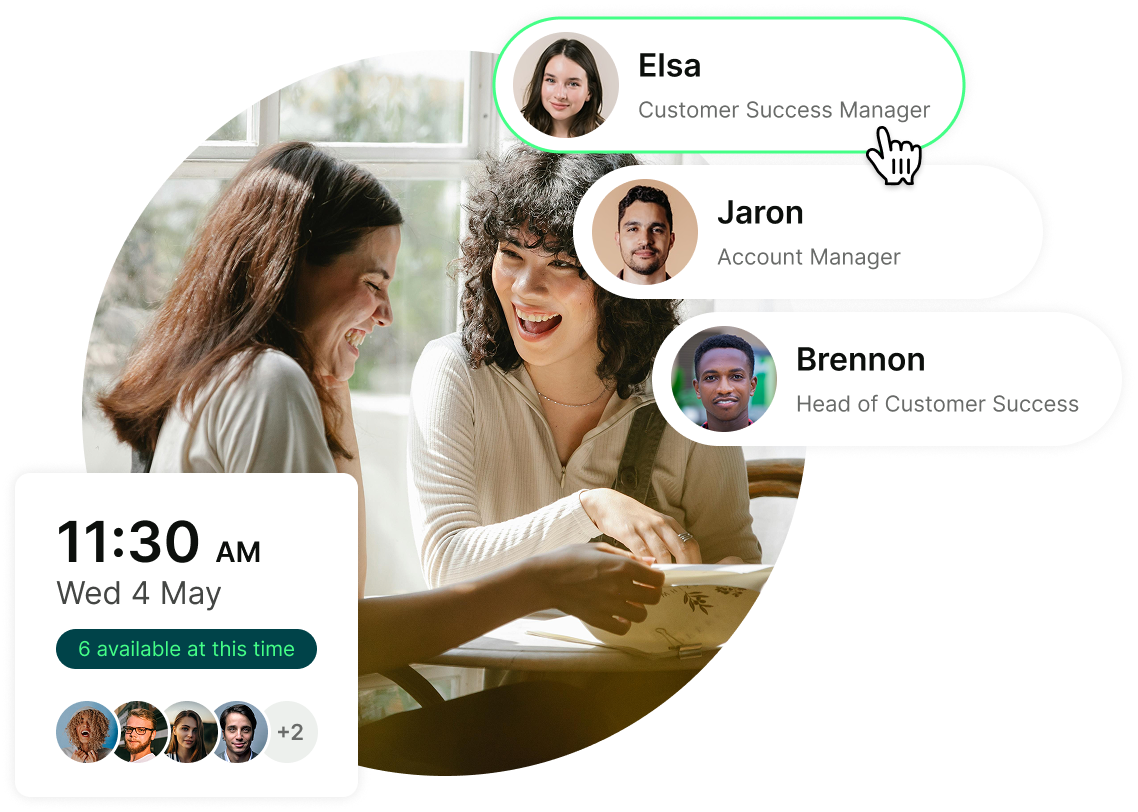
When scheduling is automated, you only need to focus on prep bits that can’t really be automated by a tool.
Now that you know why meeting prep matters (and when to start!), let’s get practical. What does good preparation actually look like?
We break it down into eight simple steps.👇
Before you prepare slides, draft an agenda, or invite attendees, get clear on one thing: What is this meeting meant to accomplish?
Define what success looks like. Is the goal to make a decision? Align on next steps? Approve a proposal? Gather feedback?
This is also the moment to ask: Does this even need to be a meeting? If the objective is simply to share information, a solid email or even a short update might be more effective.
Set clear, measurable goals. For example:
- “Agree on Q3 budget allocation.”
- “Finalize project timeline.”
- “Identify top three marketing priorities.”
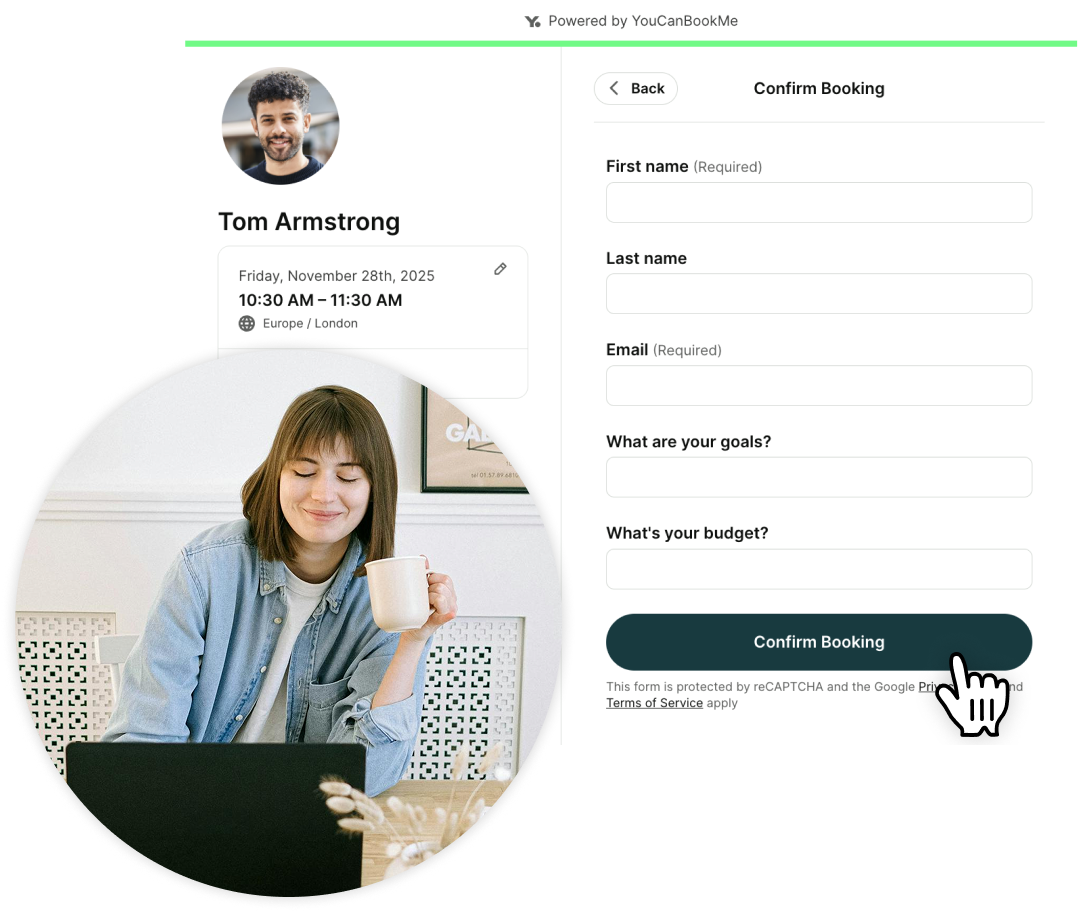
💡 Pro tip: If you’re seeing a client for the first time, you don’t have to guess what they want to discuss. You can use YouCanBookMe’s customizable booking forms to collect key information upfront, such as goals, budget, timeline, expectations, or specific challenges. The intake forms can also be incredibly useful in helping you qualify the leads before you meet them.
A meeting without an agenda is just a conversation with a calendar invite. At a minimum, your meeting agenda should include:
- The meeting goal
- Key discussion topics
- Time allocated to each item
- Who’s responsible for leading each section
Keep it simple and structured. For example:
- 10:00–10:10 AM Project update
- 10:10–10:20 AM Budget discussion
- 10:20–10:30 AM Decision + next steps
Send the agenda at least 24 hours in advance, especially for important or client-facing meetings. You want to give attendees time to review materials, prepare questions, and think strategically. Also, if there are reports, proposals, or data involved, share those ahead of time too.
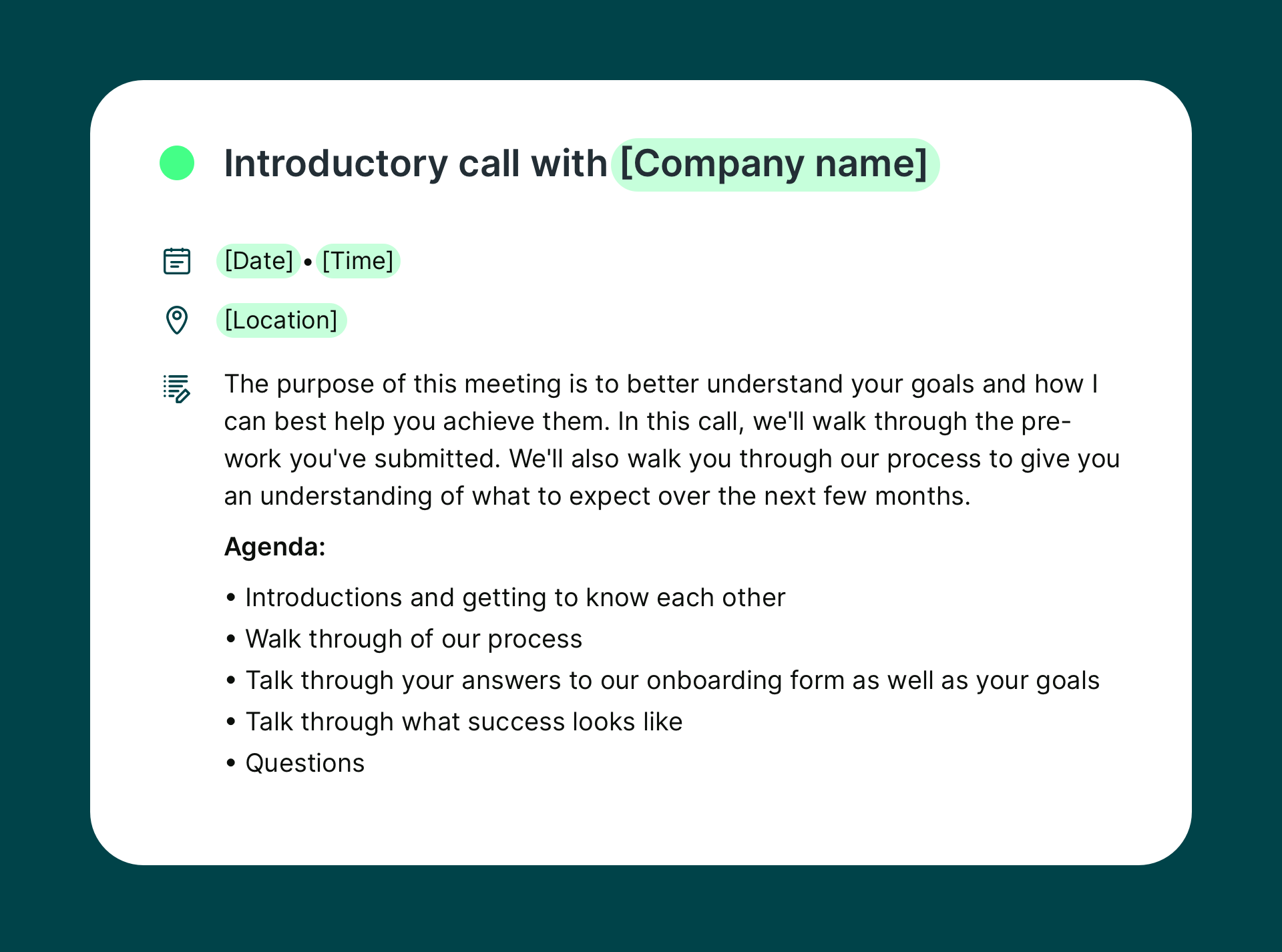
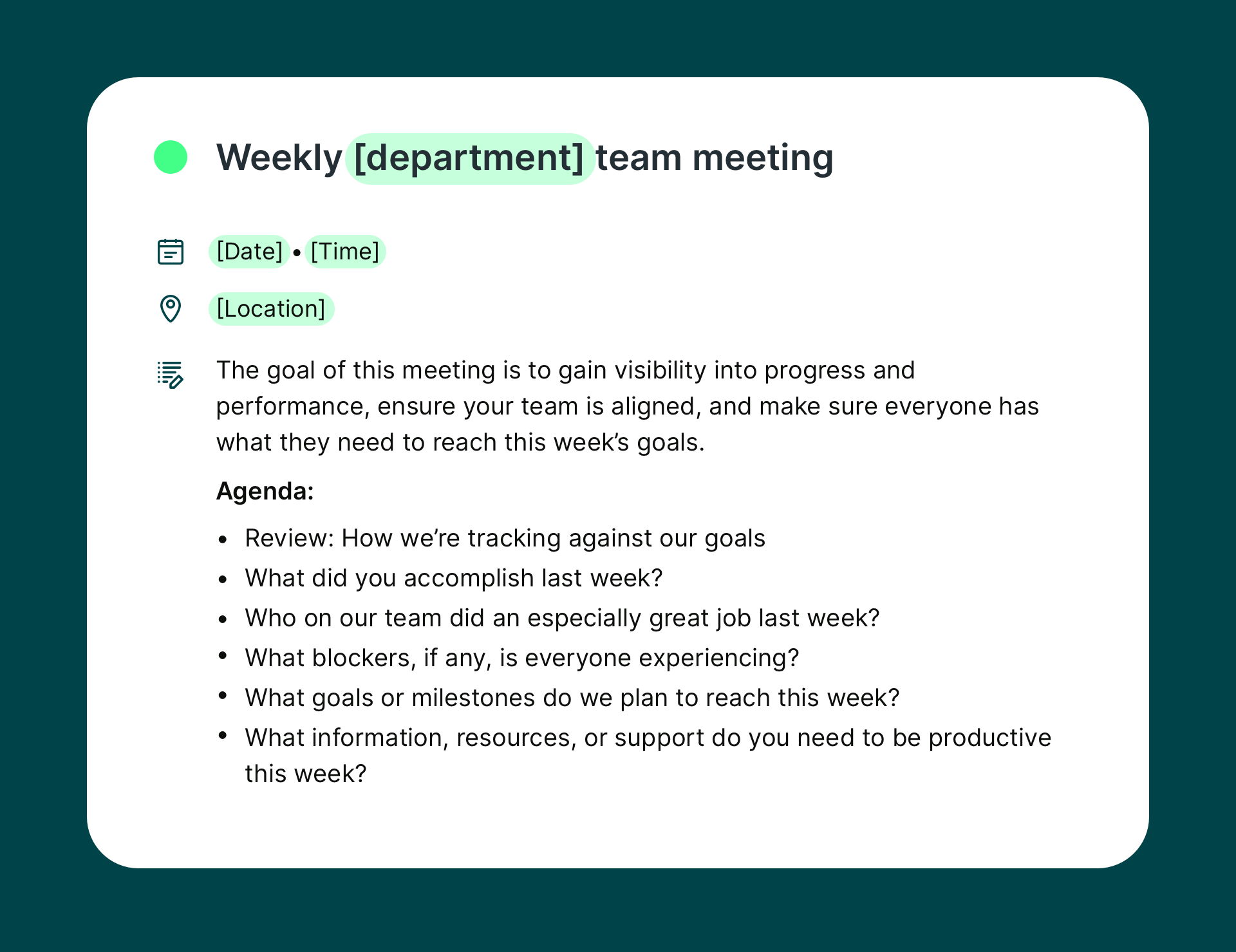
To speed up the process, we recommend keeping a few meeting agenda templates on hand. Don’t have any? Don’t worry—grab a few templates below. 👇
Meeting template for introductory calls
Meeting agenda template for weekly team meetings
Before sending out invites, pause and ask: who truly needs to be in this meeting?
Start by separating required attendees from optional participants. Required attendees are those without whom the meeting can’t move forward, whether that’s providing critical input or approving next steps. Optional participants may benefit from being included, but their presence isn’t essential to reaching an outcome.
Then, clarify the difference between decision-makers and stakeholders.
👉 Decision-makers have the authority to approve actions and commit resources.
👉 Stakeholders may offer valuable perspectives, but they’re not responsible for the final call.
👍 A good rule of thumb: if you can’t leave the meeting with a decision because someone’s missing, they should be invited. Otherwise, a follow-up summary may be sufficient.
A productive meeting depends on shared context. That’s why you need to make sure everyone has the information they need to contribute meaningfully and make decisions. This typically includes background research and supporting documents such as:
- Market insights
- Client history
- Project updates
- Internal notes
- Reports, dashboards, or performance data
If attendees are expected to analyze numbers, compare options, or approve next steps, send these materials in advance, so they have time to look at them.
Also, don’t forget to revisit previous meeting notes or action items to track progress and avoid repeating conversations.
Walking into a meeting and “seeing where it goes” is rarely a strategy. Before the call, outline the key points you need to communicate clearly and confidently.
Start by identifying the 3–5 most important things you want participants to leave with. For example: “I need to communicate that the project is behind schedule, explain why it happened, and present our recovery plan.” If time runs short, these core points must still be covered.
Next, prepare your questions in advance. Meetings are best used for discussions that benefit from real-time interaction rather than async back-and-forth. Complex decisions, nuanced feedback, or sensitive topics are usually better handled live.
Prioritize your questions by marking them as must-ask versus nice-to-ask. This ensures that if the conversation runs long, the essential issues are still addressed. And if you have extra time? You’ll know exactly how to use it.
Consider preparing different types of questions:
Clarifying questions:
- “Can you clarify the deadline for phase two?”
- “What does success look like from your perspective?”
- “Who will be responsible for final approval?”
- “Are there any constraints we should factor in?”
Decision-forcing questions:
- “Should we proceed with option A or B?”
- “Are we prioritizing speed or quality here?”
- “Do we move forward this quarter or postpone?”
- “Can we approve this direction today?”
Information-gathering questions:
- “What feedback have we received so far?”
- “What risks are you most concerned about?”
- “What resources are currently available?”
- “Have there been any similar past initiatives?”
Strategic questions:
- “How does this align with Q3 priorities?”
- “What impact will this have long-term?”
- “Is this the best use of our budget?”
- “How does this support our growth goals?”
Open-ended questions:
- “What are your thoughts on this approach?”
- “Where do you see potential challenges?”
- “How would you improve this plan?”
- “What concerns haven’t we addressed yet?”
💡 Pro tip: The more intentional your talking points and questions, the more focused, productive, and outcome-driven your meeting will be!
In meetings, one thing you should always anticipate is pushback. Not everyone will immediately agree with a proposal, timeline, or investment, and that’s normal. That’s exactly why it’s so important to prepare for the most common objections in advance rather than scrambling to respond in the moment.
Think through where resistance might show up and plan your responses calmly and strategically. For example:
- Cost concerns (“This feels too expensive.”): Be ready with ROI data, cost comparisons, or projections that demonstrate long-term value. Showing potential savings, revenue impact, or efficiency gains reframes the conversation from expense to investment.
- Timeline pushback (“This will take too long.”): Prepare a phased rollout plan or highlight quick wins that can be delivered early. If possible, show how the initiative actually improves efficiency over time.
- Risk aversion (“What if this doesn’t work?”): Have mitigation strategies ready. Outline pilot programs, testing phases, contingency plans, or clear success metrics. Reducing perceived risk increases confidence.
- Competing priorities (“We don’t have the bandwidth.”): Demonstrate how this aligns with current goals and why delaying could create higher costs or missed opportunities. Clarify required resources and show that the workload is manageable.
- Lack of buy-in (“I don’t think this is necessary.”): Come prepared with relevant data, case studies, or examples of competitors taking similar action.
The goal isn’t to “win” the argument. It’s to show that you’ve considered concerns seriously and have practical, well-reasoned responses ready.
Logistics might seem minor, but you should never deprioritize them. Preparing the environment in advance prevents avoidable distractions and delays.
In-person meeting preparation
If you're leading an in-person meeting, you'll need to handle the practical details before anyone walks into the room. This includes:
- Confirm the room booking: Double-check the time, location, and room capacity to avoid scheduling conflicts or overcrowding.
- Arrange the seating layout: Choose a boardroom, classroom, or collaborative setup based on the meeting’s objective.
- Test all equipment: Check the projector, screen-sharing tools, whiteboard, markers, speakers, adapters, and Wi-Fi connection.
- Prepare presentation materials: Open slides in advance, print handouts if necessary, and keep backup copies ready.
- Set up hybrid functionality (if needed): Ensure cameras and microphones properly capture the room for remote participants.
- Organize refreshments: Provide water, coffee, or light snacks for longer sessions.
- Include clear location details in invites: Use YCBM to automatically add the address, room number, and entry instructions to your calendar invitation.
Remote meeting preparation
If you're running a remote meeting, your focus shifts from room logistics to technical readiness. A few proactive checks can prevent awkward delays and keep the conversation professional from the start.
- Test your technology: Check your camera, microphone, speakers, and screen-sharing functionality ahead of time. Log in a few minutes early to troubleshoot if needed.
- Review your background and lighting: Choose a clean, distraction-free background and make sure your face is well-lit and clearly visible.
- Confirm link sharing and calendar details: Double-check that the correct meeting link is included in the calendar invite and that dial-in information works properly.
To streamline this process, you can use YouCanBookMe to automatically generate and send unique meeting links by integrating with popular video platforms like Zoom, Google Meet, and Microsoft Teams. Once connected, every booking includes the correct link without manual setup, reducing errors and back-and-forth emails.
Don’t make attendees fish for meeting links
Give your clients everything they need upfront. With automatic meeting links included in calendar invites, confirmation emails, and reminders, they can join with a single click.

A productive meeting doesn’t end when the call does (we wish! 😅). You now need to make sure all the decisions and next steps are properly documented and communicated.
Start by assigning a note-taker. This ensures key points, decisions, and action items are captured accurately. If you prefer automation, consider using an AI note-taker (more on these in the next section) to record and summarize discussions so nothing important gets missed.
Next, make sure your documentation system is ready. Whether you use a shared document, project management tool, or internal workspace, decide in advance where notes will live so they’re easy to access later. Plan specifically for capturing action items. Clearly define who is responsible, what needs to be done, and by when.
Finally, send a follow-up communication with clear next steps. A short recap email summarizing decisions, deadlines, and responsibilities keeps everyone aligned and accountable.
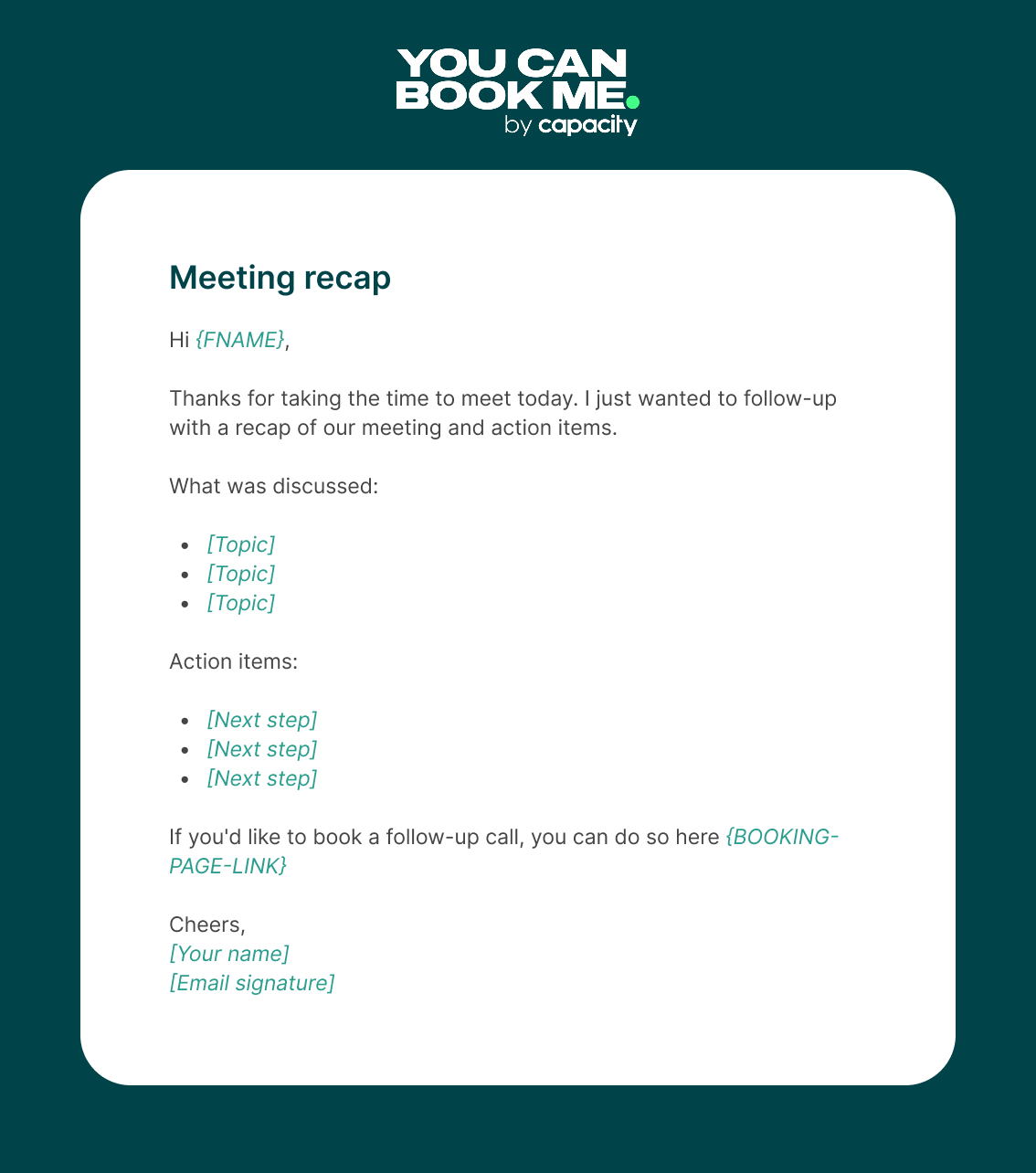
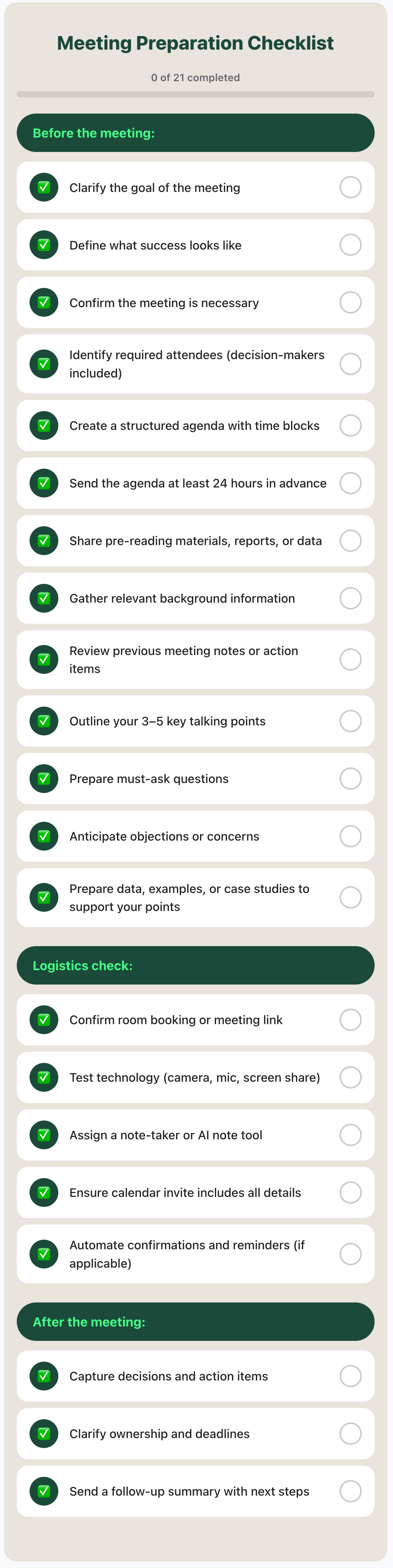
If you prefer something more practical, here’s a streamlined meeting prep checklist you can use before any meeting.
Last but not least, here are a few resources to help you prepare for meetings more efficiently and save valuable time.
If you want better meeting prep, you have to reduce the admin around it. Too often, preparation time gets eaten up by back-and-forth emails, calendar confusion, and last-minute reminders. And that’s when you’re better off using a scheduling tool like YouCanBookMe.
YCBM helps streamline the entire booking flow, so you can focus on meaningful preparation instead of logistics. Here’s how it supports better meeting prep:
- Customizable booking forms (intake forms). Collect important details at the moment of booking—goals, budget, timeline, expectations, or specific challenges. You can use required fields, conditional logic, and qualifying questions to make sure you walk into every meeting with context. Instead of guessing what a client (or teammate!) wants to discuss, you already know.
- Automated confirmations, reminders, and follow-ups. With automated email and SMS notifications, attendees receive confirmation messages, reminders, and prep instructions without you lifting a finger. You can personalize these messages using booking form data, restate the agenda, share documents, or explain how to prepare.
- Real-time calendar sync. YCBM syncs with Google, Microsoft, and Apple calendars to keep your availability accurate and prevent double bookings. Two-way sync ensures that when your schedule changes, your booking page updates instantly.
The biggest upside? Less mental load. Fewer logistical tasks. More time to review materials, refine talking points, and think strategically about the meeting itself.
Creating an agenda from scratch every time wastes energy. Instead, use tools like Notion or Google Docs and our agenda templates above, so you don’t have to reinvent the structure for every call. Templates help standardize expectations across client calls, team meetings, and project updates.
To avoid taking meeting minutes manually, we strongly recommend using an AI note-taker. There are many tools on the market, but some of the most popular ones include:
Using AI note tools allows you to focus fully on the conversation instead of scrambling to capture every detail.
Even the best checklist won’t help if your calendar is chaotic. Use time blocking to schedule dedicated prep time before important meetings. Treat preparation like a task—not an afterthought squeezed in five minutes before the call.
You can also build buffer time between meetings to avoid back-to-back meeting fatigue. Tools like YouCanBookMe allow you to set buffer rules automatically, so you’re not jumping from one meeting to the next without time to reset or prepare.
Be proactive when it comes to meeting preparation
Our best advice? Don’t leave meeting preparation to the last minute. If you run meetings with clients, showing up unprepared is simply unacceptable. The same goes for internal meetings within your organization.
Treat every meeting as a repeatable process instead of a last-minute task. Clarify the goal. Send the agenda early. Gather the right materials. Block prep time on your calendar. In short, create a system so meeting prep becomes less stressful.
And if you want to make that process even smoother, don’t forget to automate meeting scheduling with YCBM.
FAQs
What does meeting prep mean?

Meeting preparation is the process of planning and organizing everything needed before a meeting to ensure it's productive and achieves its objectives. Effective meeting prep includes clarifying the goal, defining what success looks like, identifying the right attendees, creating and sharing an agenda, gathering relevant materials, and preparing key talking points and questions.
How do you prepare for a meeting with no agenda?
If no agenda exists, create one yourself. Contact the meeting organizer to understand the purpose, identify key objectives, and share a proposed agenda. If that's not possible, prepare by reviewing likely topics, bringing questions, and being ready to take notes.
What should I do the night before an important meeting?
Review your agenda and confirm the meeting goal. Revisit key materials, reports, or previous action items so nothing gets repeated unnecessarily. Finalize your 3–5 core talking points and prepare responses to potential objections. Confirm logistics, such as meeting links, room booking, presentation files, and technology. If it’s client-facing, revisit your research and expectations. And don’t forget to have a good night’s sleep!
Should you prepare differently if you're leading vs. attending a meeting?
Yes. If you’re leading the meeting, you’re responsible for structure and outcomes. That means defining the goal, creating and sharing the agenda, gathering materials, anticipating objections, and planning follow-up. You also need to manage time and ensure decisions are captured. If you’re attending, your role is still important (after all, you were invited for a reason!): review materials in advance, prepare thoughtful contributions, and bring must-ask questions.

Written by
Paulina Major
Paulina Major is a freelance B2B content writer who has spent the last two years deep in the world of scheduling — writing about booking best practices, time management, and the tools that help small businesses run more efficiently. She writes from experience: as a solopreneur managing her own clients and calendar, she lives the challenges her readers are trying to solve.
Get started today
Join thousands of coaches, consultants, and entrepreneurs who use YouCanBookMe to power their business. Get your first booking in a few minutes.


 4.7 / 5 — Trustpilot

