
Academic Advising Software: Your Guide to Better Student Scheduling

-min.png?width=100&name=image%20(21)-min.png)
Create your free booking page
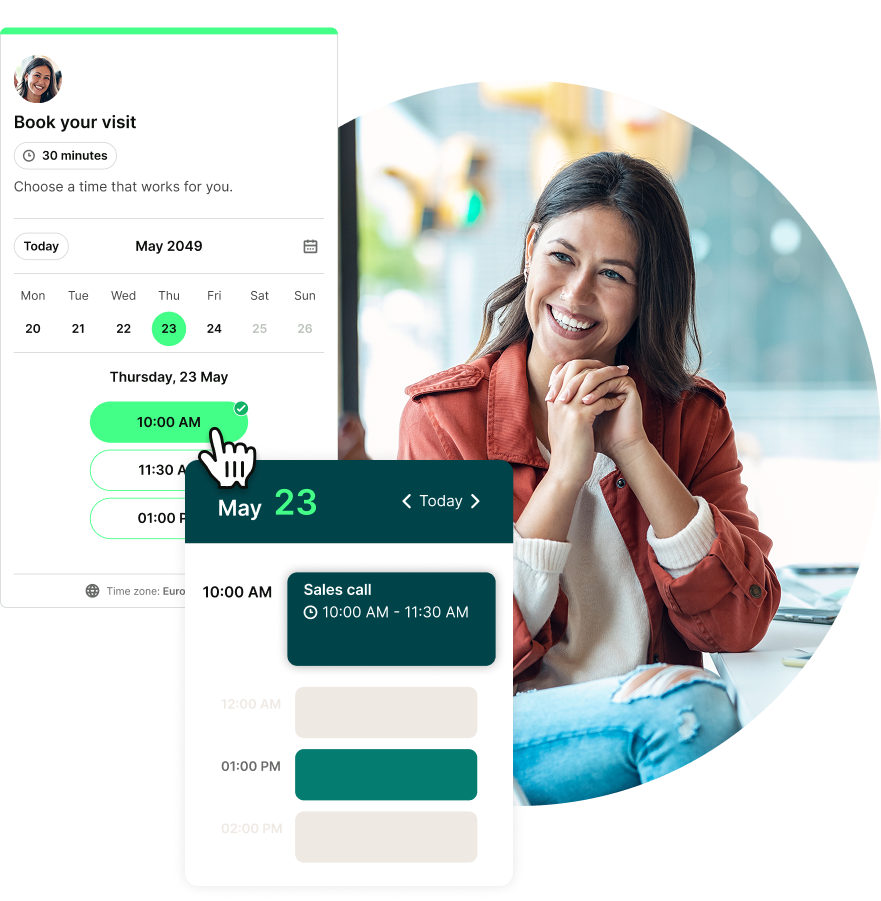
As an academic advisor, you know just how crucial your role is in helping students succeed. You guide them in figuring out their paths, picking the right courses, and steering clear of the common pitfalls that come with university life.
Yet only half of students know academic advising is available, and just 32% use it.

(Source)
At the same time, college and university advisors are also supporting more students with the same or fewer resources. As caseloads grow, managing calendars, chasing down meeting times, dealing with no-shows, and accommodating last-minute requests can start to feel like a full-time job of its own.
But more students shouldn't mean more admin, more chaos, or fewer students getting the support they need.
That's where academic advising software like YouCanBookMe (YCBM) steps in to help. It takes the back-and-forth out of coordinating advising sessions, reduces admin for advisors, and gives students a simple, flexible way to book support.
So, what does that look like in practice? Let’s get into it.
Scheduling might seem like a small administrative task, but it directly affects how easily students can access support.
With scheduling software for colleges and universities, you can reduce the work involved in arranging appointments while giving students a simpler way to find and book the help they need.
Academic advising software removes the need for back-and-forth emails or phone calls. With YouCanBookMe, you set your availability, students choose a suitable time, and the appointment is added to your calendar atuomatically.
Furthermore, you have access to a range of booking controls designed for educators to shape how those appointments fit into your day. You can add buffers between sessions, set minimum booking notice, limit the number of appointments available each day, and offer certain meeting types only at specific times or locations. This helps you group similar sessions together, reduce context switching, and avoid rushing from one campus building to another.

You can also set up a booking flow once and automate the scheduling-related messages that follow. Once a student books, YCBM can:
- Send an immediate confirmation email
- Send a reminder 48 hours before the appointment
- Send another reminder the morning of the meeting
- Send a tailored follow-up based on whether the student attended or missed the appointment
For example, students who attend can automatically receive relevant resources or next steps, whereas students who miss their appointment can receive a follow-up email with a link to rebook.
|
Example 👉 During peak periods like class registration or finals, your booking system takes the stress out of handling last-minute appointments, letting students find available times without needing to bug you with constant questions. |
One of the biggest benefits of education scheduling software is that it removes common barriers between students and academic support. How?
- 24/7 online scheduling: Students can access your education booking page at any time, whether they’re planning their week on a Sunday afternoon or distracting themselves from a paper at 3 AM. They can see your current availability and book an open slot without waiting for office hours or an email response.
- Easy booking through your LMS: Embedding your scheduling page in Moodle, Canvas, or another learning management system allows students to book directly from the portal they already use. They don't need to search for contact information or visit a separate website.

- Hybrid scheduling: Students can choose whether they would prefer an in-person or virtual appointment. This gives remote students and those balancing work, family responsibilities, disabilities, or long commutes a more practical way to access advising.
- No phone anxiety: Students who feel uncomfortable making phone calls can book an advising session online without having to speak to anyone first.
- 44+ language options: YCBM booking pages support more than 44 languages, making it easier for international students and non-native English speakers to schedule appointments in a language they’re comfortable using.
No-shows can wreak havoc on your day, but academic advising scheduling software helps eliminate them with automatic reminders.
Students receive timely email or SMS notifications before their appointment, so they’re far less likely to forget or miss it. This feature is a real lifesaver, especially during crunch times like midterms or finals when both you and your students are running in all directions.
|
Example 👉 Sending reminders 24 hours and one hour before an appointment gives busy students the extra nudge they need to avoid missing their meeting. |
Some students prefer the privacy of a one-on-one session, while others may feel more comfortable starting with a group advising session.
Academic advising software allows students to choose between different appointment types, including one-on-one advising, group sessions, walk-ins, and pre-scheduled appointments. You can also offer different session lengths, such as a short check-in or a longer degree-planning meeting, so students can book the amount of time they need.
Advising teams can use round-robin scheduling to distribute appointments among available advisors. This helps balance caseloads while connecting students with someone who can support them sooner.
|
Example 👉 Imagine you’ve got a first-year student who's feeling anxious about their first advising session. Offering them the option to attend a group session first can help ease their nerves. It also lets you share important information with multiple students at once, boosting student success and your reach! |
Students often balance classes, extracurricular activities, work, and other commitments. YCBM makes it easier to find a time to meet by allowing students to overlay their availability directly on your booking page.
With one click, they can connect their Google or Microsoft calendars to see when their availability matches yours. This removes the need to switch between your booking page and their calendar, helping them find a suitable advising time much faster.
It’s the start of the school year and you’re ready for another fantastic semester filled with advising sessions galore.
You’ve got your student advising software, office space, and resources all set up and ready to go. All that’s missing is the students. So, how do you get them to sign up for sessions?
The key is visibility! Studies show that 50% of community college students don’t even know academic advising is available to them.
Here are five tactical strategies to beat that statistic and get students booking:
One of the most effective ways to ensure students stay on track academically is to build advising sessions into their schedules. With proactive advising, students have a set number of mandatory advising sessions they need to attend before they can move forward in their degree program.
It’s not just about crisis management; it’s about making advising part of the student’s regular routine.
Today’s university students are incredibly tech-savvy. They’re mobile-first (which is a nice way of saying they’re always on their phones 😄), uber-connected, and expect the convenience of 24/7 access to resources, including advising.
For them, picking up the phone or walking across campus to make an appointment isn’t just outdated—it’s a barrier they might not be willing to cross. That’s why offering mobile-friendly, online booking pages is critical to reaching them.

Students get bombarded with information during orientation, but that’s exactly why you should include advising details in their welcome packages. Highlight how simple it is to schedule appointments with your academic advising scheduling software and explain why meeting with an advisor can help them avoid common mistakes and unnecessary stress.
With YouCanBookMe, you can even generate a QR code that links to your online booking page, meaning students can whip out their phones, scan the code, and schedule with you in seconds.
If you’re working on a college campus, you know bulletin boards are still a hot commodity. 🔥 Why not use them to advertise advising? Create eye-catching flyers with clear instructions on how to book advising sessions.
And remember that QR code we just mentioned in the point above? Add it to your posters for instant, on-the-spot scheduling. Students will notice it between classes and think, “Oh yeah, I need to schedule my advising meeting! Let me quickly do that while I wait for my lecture.”
Sometimes, students can be intimidated by the unknown. Take the time at the beginning of the semester to attend a few dorm meetings, orientation sessions, first-year seminars, or even club meetings.
Even a quick 5-minute hello lets students put a face to the name and shows you’re approachable. Then, when they see your name and photo on your advising booking page, they feel like they already know you. This personal connection can go a long way in boosting student engagement with advising services!

When it comes to advising, accessibility is key. If the process of booking time with you is complicated or slow, students may hesitate—or worse, skip it altogether.
Fortunately, YouCanBookMe offers features that remove these barriers, making it easy for students to get the help they need. 👏
Here are four ways you can make booking with you quick and painless:
Embed your YouCanBookMe booking page directly inside Moodle, Blackboard, or another learning management system you use. Students can schedule support from the portal they already use without searching for a separate link.
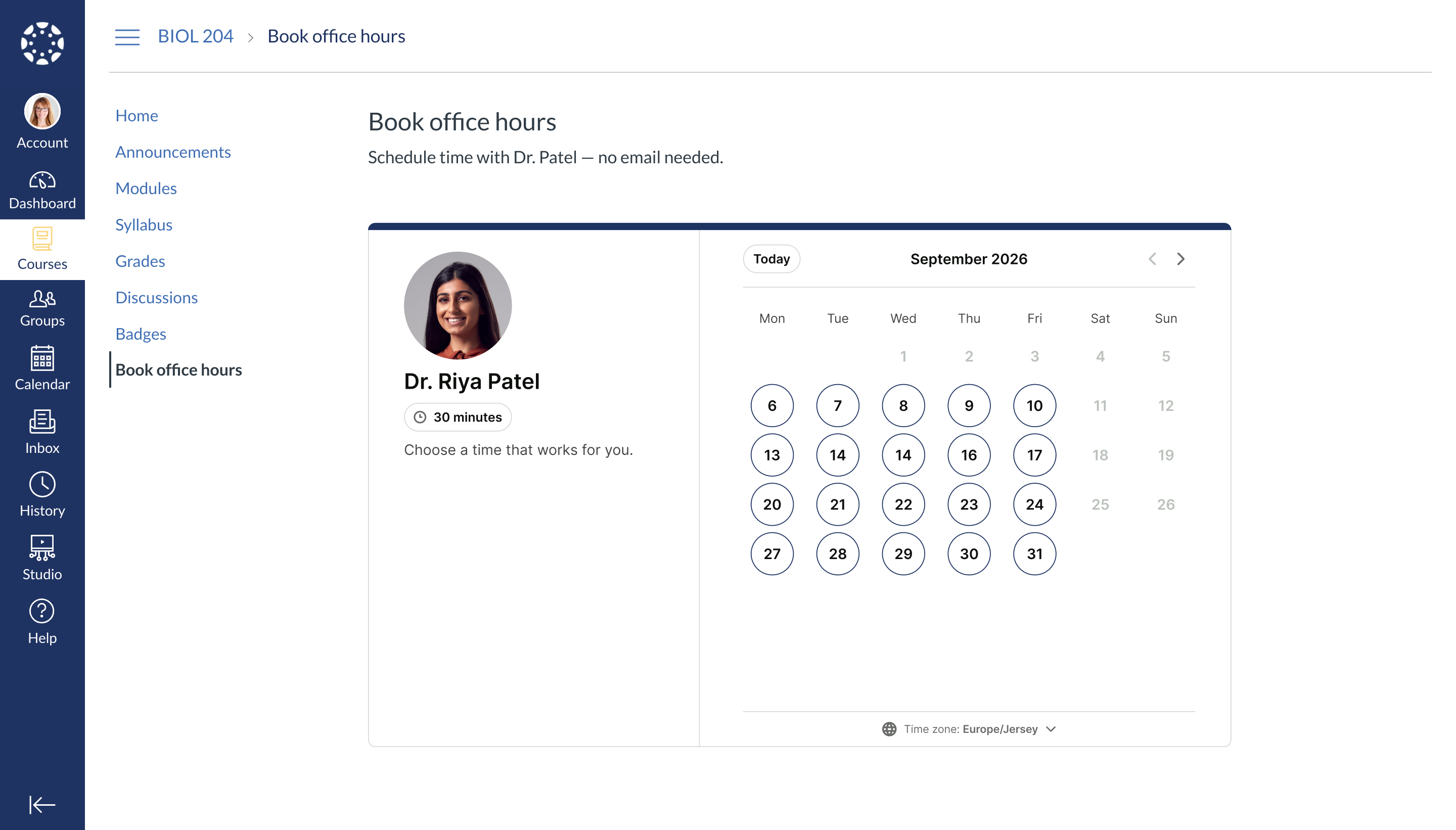
Booking an advising session shouldn’t feel like another assignment. So go ahead and set up an easy-to-use booking page where students can choose an available time from any device without waiting for an email response or phone call.
You can also use customizable booking forms (more on them down below👇) to collect details such as the student’s ID number, their program of study, the reason for the meeting, and other important information before the appointment.
Every student has different advising needs, so why not let them choose the type of session that works best for them? With YouCanBookMe, you can offer a range of options:
- Virtual or in-person: Let students pick whether they want to meet face-to-face or virtually, catering to both on-campus and remote students.
- Different advising types: Students can choose the type of meeting that fits their needs, whether they’re deciding on a major, exploring career options, or just looking for general academic advice.
- One-on-one or group sessions: Sometimes students might feel more comfortable in a group setting. Offering group sessions on topics like choosing classes or internships can be a great way to take the pressure off a one-on-one meeting, especially for newer students.
- Choose session length: Not all advising sessions are created equal—some students just need a quick check-in, while others might require a deeper discussion about long-term goals. With YCBM, you can offer different session lengths so students can select the amount of time they need!
- Advisor choice: If you work with a team of advisors, let students pick who they’d like to meet with based on availability, expertise, or just plain old vibes.
Encourage students to use YCBM’s calendar overlay feature to compare their existing commitments with your available times.

Not only does it make it easier to find a suitable appointment without switching between calendars, but it also prevents scheduling conflicts.
We’ve said it once and we’ll say it again—if you want to catch students’ attention, you need to meet them where they already are!
Share your booking page through the social channels your students use most. You can add your scheduling link to Linktree and share that from your social profiles, giving students an easy route from your latest post to an advising appointment.
Whether they find you through Instagram, TikTok, or another campus social channel, your booking page is just a couple clicks away.
Make academic support easier to access
Give students a simple way to book support whenever they need it. Create your YouCanBookMe booking page, connect your calendar, and schedule advising appointments with less admin.


Few things frustrate an advisor more than preparing for an appointment only to be met with crickets. A no-show also means a student misses out on support while calendar time that could have gone to someone else sits unused.
Academic advising scheduling software can help you reduce no-shows through automated reminders and flexible rescheduling. The results can be impressive: Illinois College reports a nearly 0% no-show rate and 25% fewer emails and calls. At Portland State University, where 99.8% of appointments are now booked online, the team also reported that “no-shows dropped after integrating YouCanBookMe.”
Here’s how to swap ghosted appointments with productive advising sessions. 👇
Once a student books a meeting, sending an immediate calendar invite or confirmation email helps solidify the appointment in their mind. Academic advising scheduling software can automatically do this for you, ensuring the meeting is locked into their calendar from the get-go.
The bonus? If your student adds the invite to their calendar app, they’ll get additional reminders as the appointment date approaches. This digital nudge is especially helpful for busy students juggling classes, extracurriculars, and part-time jobs.
YouCanBookMe, for example, allows you to automate both the email confirmation and the calendar invite, so students don’t need to manually set reminders—they’re already taken care of.
People forget things—it happens! But when it comes to advising appointments, those last-minute, “Oops, I forgot” moments can be minimized with timely meeting reminders! Your scheduling software can automatically send email or SMS reminders, so students never miss a beat.
Sending a reminder 24-48 hours before the appointment gives students enough time to make necessary arrangements. A second reminder, say an hour before the meeting, gives them that final prompt to stop what they’re doing and show up on time.
|
Pro tip 💡 Personalize these reminders! Including the student's name and the purpose of the meeting. For example: “Hey Alex, just a reminder about your advising session tomorrow at 2 PM to discuss choosing your major. See you soon!” This makes the reminder feel less robotic and more personal, making it more likely students will remember it. |
Here’s an education email template you can use for student appointment reminders. Anything enclosed in {brackets} is a shorthand code. When you send emails through a scheduling tool like YouCanBookMe, each code is automatically replaced with the relevant booking information.


Reminder about your meeting with {BOOKING-PAGE-TITLE}
Hi {FNAME},
Just a quick reminder that your appointment with {BOOKING-PAGE-TITLE} is scheduled for {START-TIME} on {START-DATE}.
Pick one:
It'll take place at [address]. OR
It'll take place on Google Meet via this link: {GOOGLEMEET} OR
It'll take place on Microsoft Teams via this link: {MSTEAMS} OR
It'll take place on Zoom via this link: {ZOOM}
Passcode: {ZOOM-PASSWORD}
To best prepare for our meeting, please remember to have your [insert item here: i.e., financial aid form, resume, career survey] ready.
If you have any questions, please contact our office at [phone number].
See you soon!
Best,
[Your name]
[Email signature]
Even with all the reminders in the world, some students might still ghost you. It happens—but you don’t have to let it slide! Sending a follow-up email for no-shows is a subtle yet effective way to hold students accountable.
Sometimes, students think skipping an appointment will just go unnoticed, but a simple follow-up can show them that you're still expecting to meet, and that their academic progress is important.
Let’s face it: sometimes life happens, and students need to reschedule. Instead of making them jump through hoops, use your academic advising software to make it super simple for them to update their booking.
With tools like YouCanBookMe, students can reschedule or cancel just as easily as they booked by clicking a link in their confirmation email.
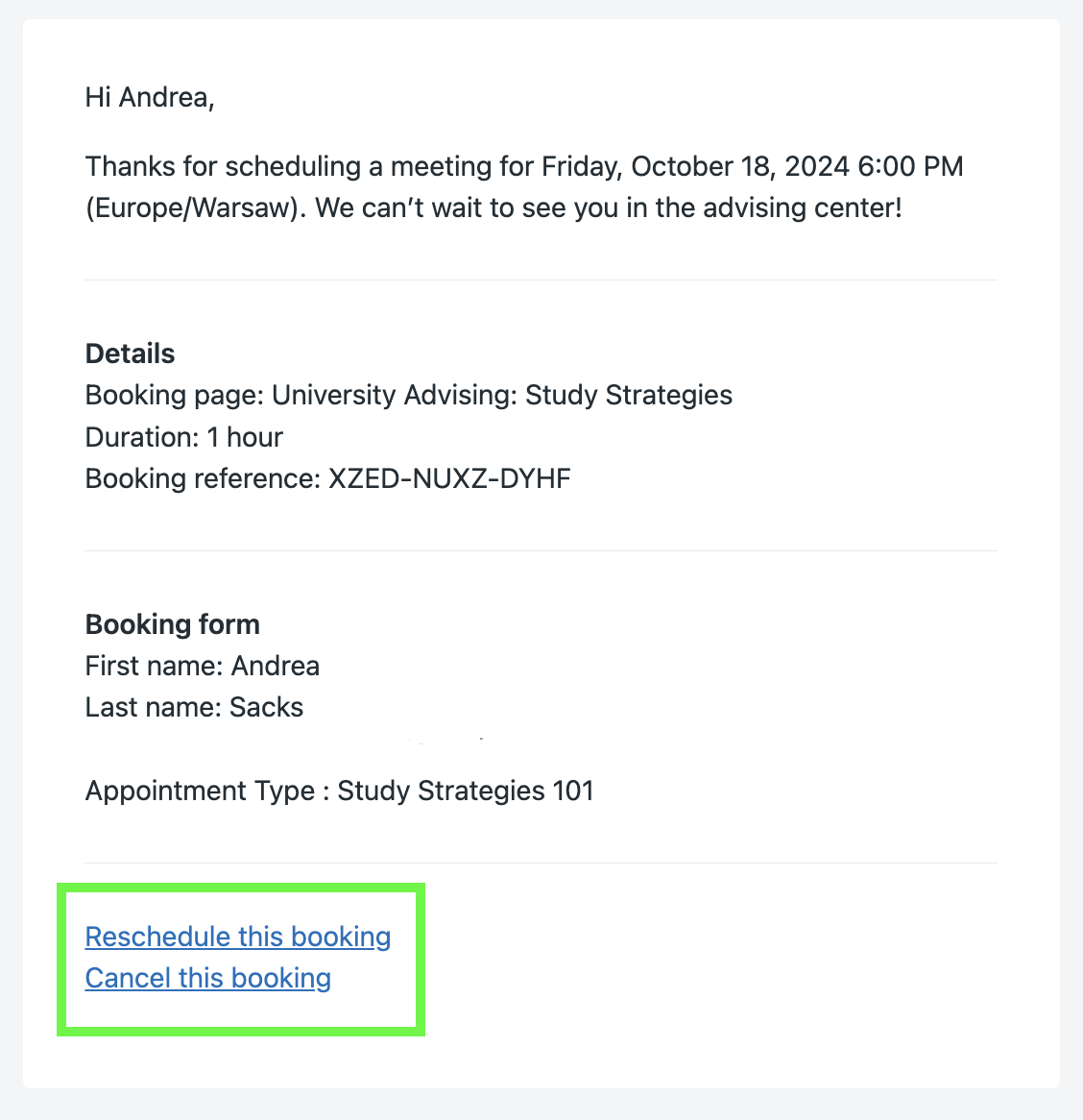
That saves your team time, too. Instead of manually finding a new slot every time a student’s plans change, rescheduling happens automatically within the rules you’ve set—all without any emails or phone calls.

Plus, by giving students the flexibility to manage their own appointment online, you make it more likely that they’ll cancel or reschedule instead of just not showing up. This, in turn, opens up that time slot for another student who’s ready and eager to meet.
|
Pro-tip 💡 Did you know you can use YouCanBookMe for more than just academic advising? Universities (like yours!) use it across their entire campuses—for office hour appointments, health clinic visits, admissions interviews, campus tours, faculty meetings, and more. |
Proper meeting preparation is key for both you and your students to get the most out of an advising session. Walking into a meeting without knowing the student’s needs—or them walking in without a clue what to expect—can lead to a lot of wasted time.
Here’s how you can easily set the stage for a meaningful, productive advising session:
One of the best features of YouCanBookMe’s academic advising software is the ability to create fully customizable booking forms. These forms are your secret weapon to gather all the important info you need before the meeting even happens. You can ask students questions like:
- What do you need help with?
- Are you meeting online or in person?
- What are your goals for the semester?
- How can I best support you?
- What’s your major?
When students fill out these forms during booking, you’re not only more prepared for your conversation, but they’re also more likely to arrive with a clear understanding of what they want to talk about.

When students fill out these forms during booking, you’re not only more prepared for your conversation, but they’re also more likely to arrive with a clear understanding of what they want to talk about.
Once the appointment is booked, follow up with a personalized email to help students prep.
Give them a heads-up on what to bring (e.g., a list of classes they’re interested in, financial aid forms, questions about their major, a draft of their resume), and provide all logistical details like Zoom links if needed.
These emails help students show up ready, so you can dive right into the important stuff without wasting time!
✨ Bonus: Automate your personalization ✨
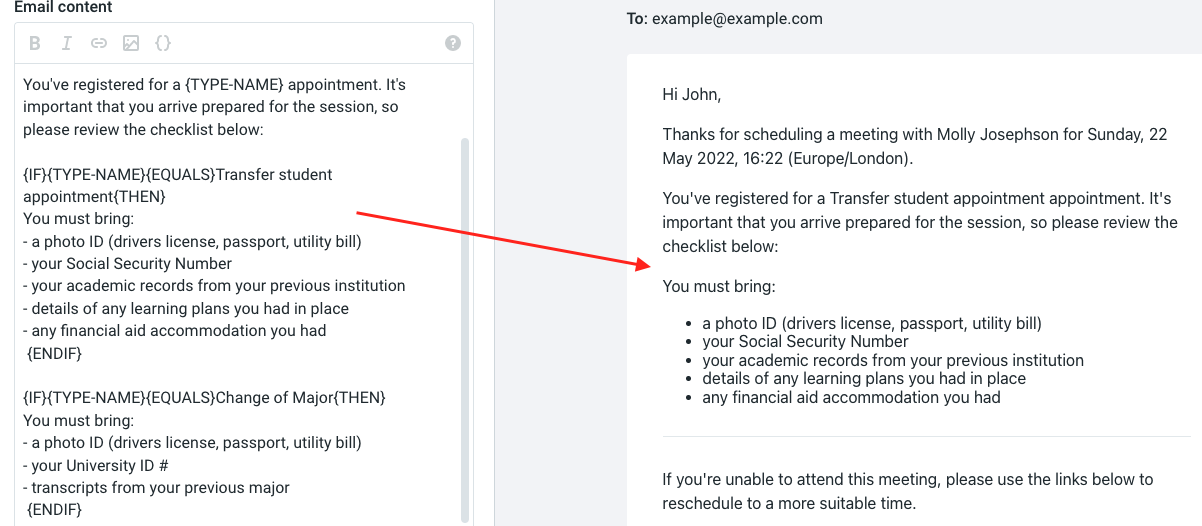
With YouCanBookMe’s education scheduling software, you can use conditional statements to automatically personalize your emails. This means different actions are triggered based on what the student selects in the booking form. For example:
- Did the student choose an online meeting? Great! A conditional statement can automatically add a Zoom link to their email.
- Does the student want to change their major? You can set up a conditional statement to instantly send them the necessary paperwork.
- Is the student a new transfer? Use a conditional statement to include details about what they should bring to the meeting.
Conditional statements make your emails more relevant and helpful without any extra work on your part. You essentially set them up once, and you’re good to go.
Bottom line: you can’t give good academic advice if there’s no one to hear it!
Educators using scheduling software are seeing students more engaged, processes that actually flow, and an all-around better experience for everyone involved—staff and students alike. 👇
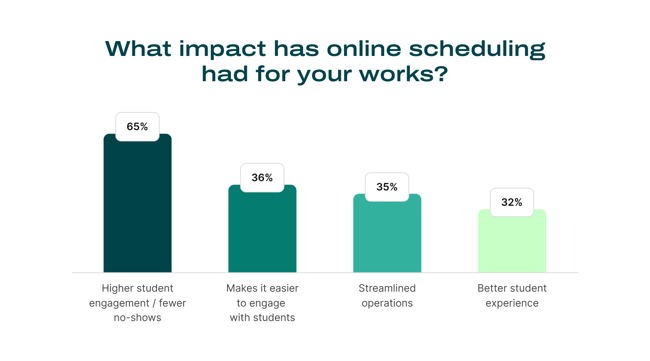
Scheduling software for higher education makes it easier for students to succeed because it’s:
- Available 24/7: Students can book when it’s convenient for them, anytime, anywhere.
- Accessible and easy to use: No complicated steps, just quick and easy scheduling.
- Streamlined: It simplifies your booking process, cutting out time-wasting tasks.
- Data-driven: It collects data so you can spot trends, fill gaps, and improve student outcomes.
- Time-saving: You get more time to focus on meaningful, impactful student meetings.
Curious if YouCanBookMe is the right fit for your team? Try it free for 14 days! We’ll even throw in a 30% education discount. 😉
FAQs
Can I embed my booking page into a learning management system like Canvas or Moodle?

Yes. You can embed your YouCanBookMe booking page into Canvas, Moodle, or any LMS that supports iframes, so students can book without leaving their course page.
Does YouCanBookMe work for a whole advising department, not just one advisor?
Yes. YouCanBookMe’s college scheduling software can support an entire advising department from one account. Each advisor can have their own booking page and availability, or you can bring multiple advisors together on a shared team page. From there, students can choose who they want to meet with, or YouCanBookMe can automatically assign them to the next available advisor using round-robin scheduling.
Department admins can also use role-based permissions to manage who can access and edit different parts of the account, while keeping team oversight and billing centralized. And for larger rollouts, YouCanBookMe offers onboarding and training to help teams get set up.
-min.png)
Written by
Gabriela Łaba
Gabriela is Editor-in-Chief at YouCanBookMe and a SaaS copy and content writer with over a decade of experience. Since 2021, she’s written 100+ articles on scheduling, personally tested and compared 38 booking tools, and helped businesses make sense of scheduling, automation, and productivity.
Get started today
Join thousands of coaches, consultants, and entrepreneurs who use YouCanBookMe to power their business. Get your first booking in a few minutes.


 4.7 / 5 — Trustpilot

