
I Tested 5 Cal.com Alternatives to Find the Best Scheduler

Create your free booking page
If you’ve tried Cal.com, you already know it offers plenty of scheduling and customization options. But it’s not the only option out there. Its range of settings can feel overwhelming at first, especially if you want a simple way to start taking bookings, or you may simply want a platform that better fits your workflow.
Different teams need different things from a scheduling tool, and comparing all the available options can take time. To make that decision easier, I tested five leading Cal.com alternatives and compared their features, pricing, ease of use, and overall booking experience.
Let’s take a closer look at what I found.
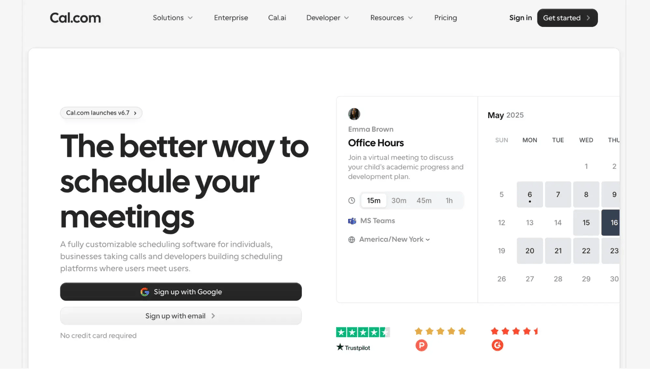
Cal.com is a scheduling platform that gives you plenty of control over how you take bookings. You can set your availability, connect your preferred online calendar, and integrate with video conferencing tools. Once everything is configured, you can share a scheduling link and let customers choose a suitable time.
Cal.com used to be open source, but as of April 2026, its production platform is closed source. Its open-source offering now continues separately as Cal.diy, a self-hosted community edition that doesn’t include several commercial and team features, such as insights and automated workflows.
Like any scheduling app, Cal.com brings value in certain areas but also falls short in ways that prompt teams to explore alternatives. The most common concerns include:
- Client-facing experience: While Cal.com’s backend is functional, many users find the customer-facing booking flow clunky and less polished compared to other appointment scheduling tools. For businesses where first impressions matter, this can undermine the professional image they want to project.
- Calendar invite customization: Cal.com’s invites are fairly rigid. They can’t be customized in terms of design or messaging, and they often appear poorly formatted in Microsoft 365. Competing platforms typically allow richer branding options and more control over what customers actually receive.
- Flexibility in scheduling rules: Users frequently mention the inability to apply advanced rules to calendar links. For example, restricting booking types, tailoring availability, or layering approval steps is difficult or impossible. By contrast, other scheduling tools make these adjustments much easier.
- Customer support responsiveness: Some users report long wait times or slow resolutions when contacting Cal.com’s support team, which isn’t ideal when you’re paying for a service.
Not every scheduling tool is designed for the same type of user. Some focus on simple one-to-one meetings, while others offer more advanced features for enterprise companies, client bookings, and complex booking workflows.
To make the comparison fair, I created accounts and tested each platform by setting up sample booking pages and configuring key features. I then rated them using the same core criteria:
- Ease of use: I looked at how straightforward each platform was to set up, navigate, and use without additional guidance.
- Customization: I looked at how much you can personalize booking pages, meeting invites, and emails so they reflect your brand.
- Integrations: I checked how easily each tool connected with calendars, video conferencing platforms, payment providers, and other business software.
- Scheduling flexibility: I reviewed how well each platform adapted to different meeting types, availability rules, booking preferences, and team arrangements.
- Value for money: Price isn’t everything, but it matters. I considered whether each tool’s features match the cost, and if the pricing plans give you fair value.
- Scaling for teams: As your business grows, your scheduling needs grow too. I checked how well each tool supports teams, including shared calendars, group bookings, and reporting features.
I also selected three features from each platform that best demonstrate what makes it different. The product images throughout this guide come from the pages, forms, and workflows I created during testing!
YouCanBookMe (YCBM) is designed for businesses that care about how their booking experience looks and feels. Setting up YCBM was easy. I was able to whip up a branded booking page and connect my main calendar in just a few minutes. Unlike Cal.com, which often demands technical know-how to get the most out of it, YCBM gives you branded booking pages, appointment types, and payment options straight out of the box.
Clients can choose between different services, pay upfront through Stripe, and even request tentative slots you approve before confirming. It’s not overloaded with features you’ll never use, but it covers the essentials (and then some), including scheduling, payments, meeting confirmations, reminders, and follow-ups, without making things complicated.
|
💡 YouCanBookMe just got even better! Check out 16 new features inspired by requests from business owners like you. |
Branded booking pages and appointment types
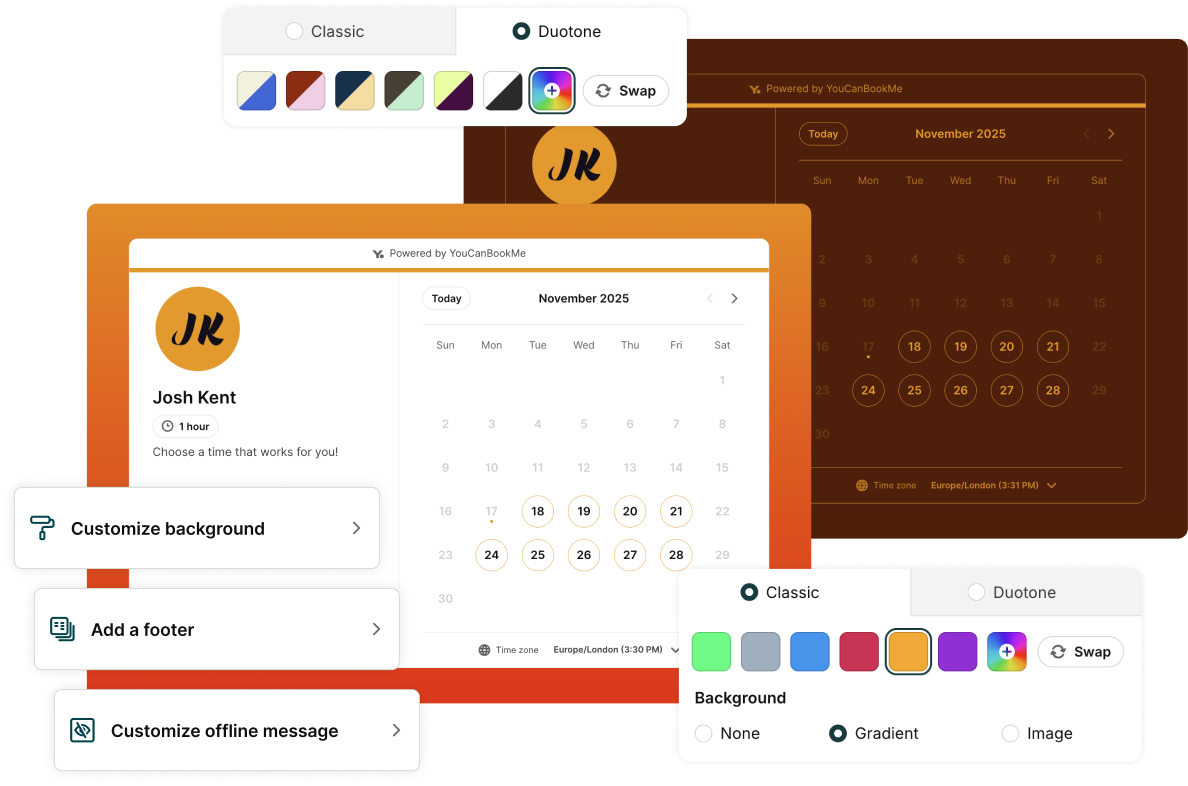
One of YouCanBookMe’s biggest strengths is the control it gives you over how your booking page looks and how your services are presented. On the same page, you can offer several appointment types, each with its own name, image, description, duration, price, location, and booking settings.
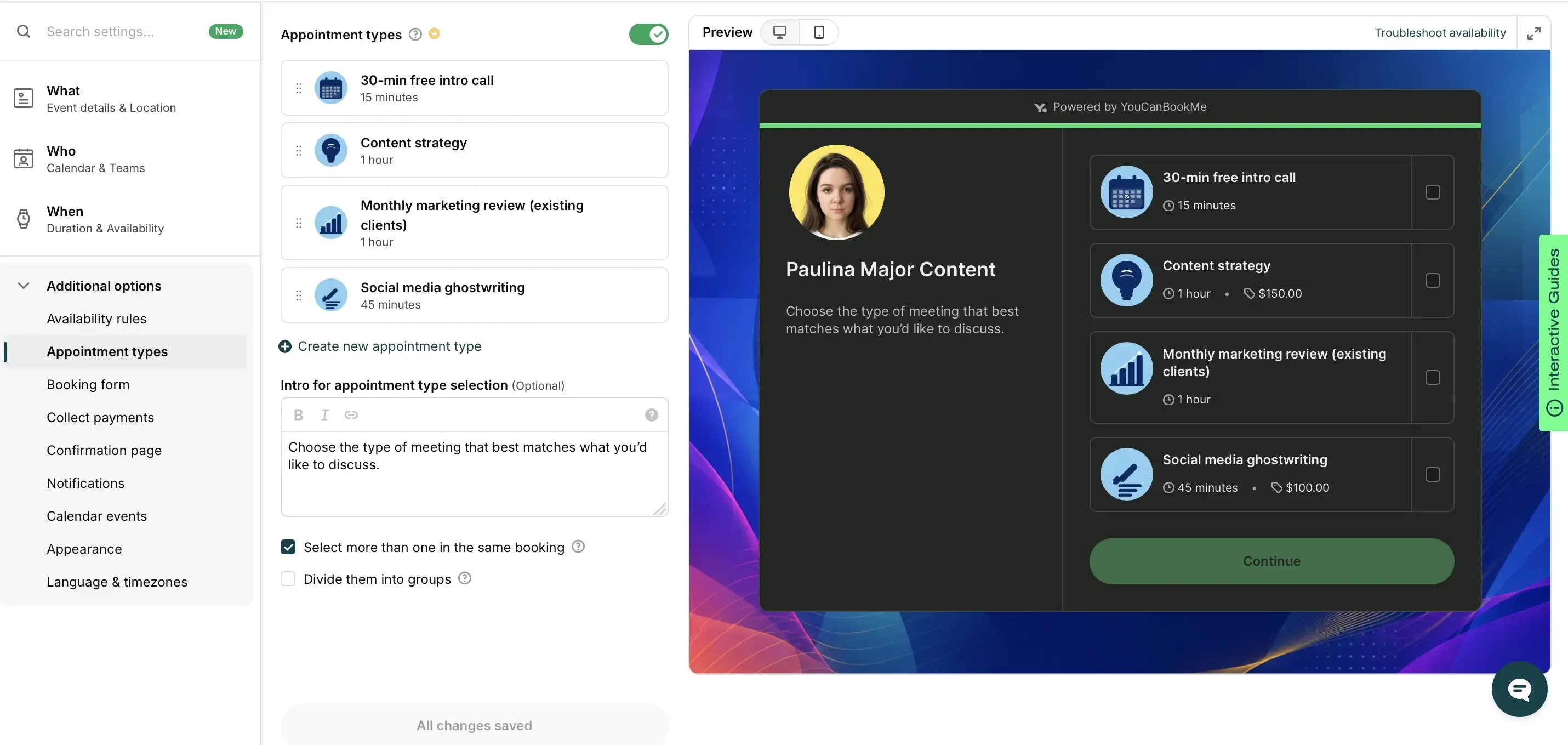
In my test, I set up an Intro Call, Content Strategy Call, Marketing Review, and Social Media Ghostwriting consultation without needing to create four separate booking links. I could also customize the page with my logo, text, colors, and background image. This made the page feel organized while still giving bookers enough information to choose the right meeting.
Calendar overlay
Calendar overlay solves a small but surprisingly common annoyance. Bookers can view your availability, but they can also connect their own calendar and immediately see when both sides are free.
Bookers can connect a Google or Microsoft Calendar, as well as their YouCanBookMe or Calendly account. YouCanBookMe then highlights matching times and flags potential clashes, removing the need to keep switching between the booking page and another calendar tab.
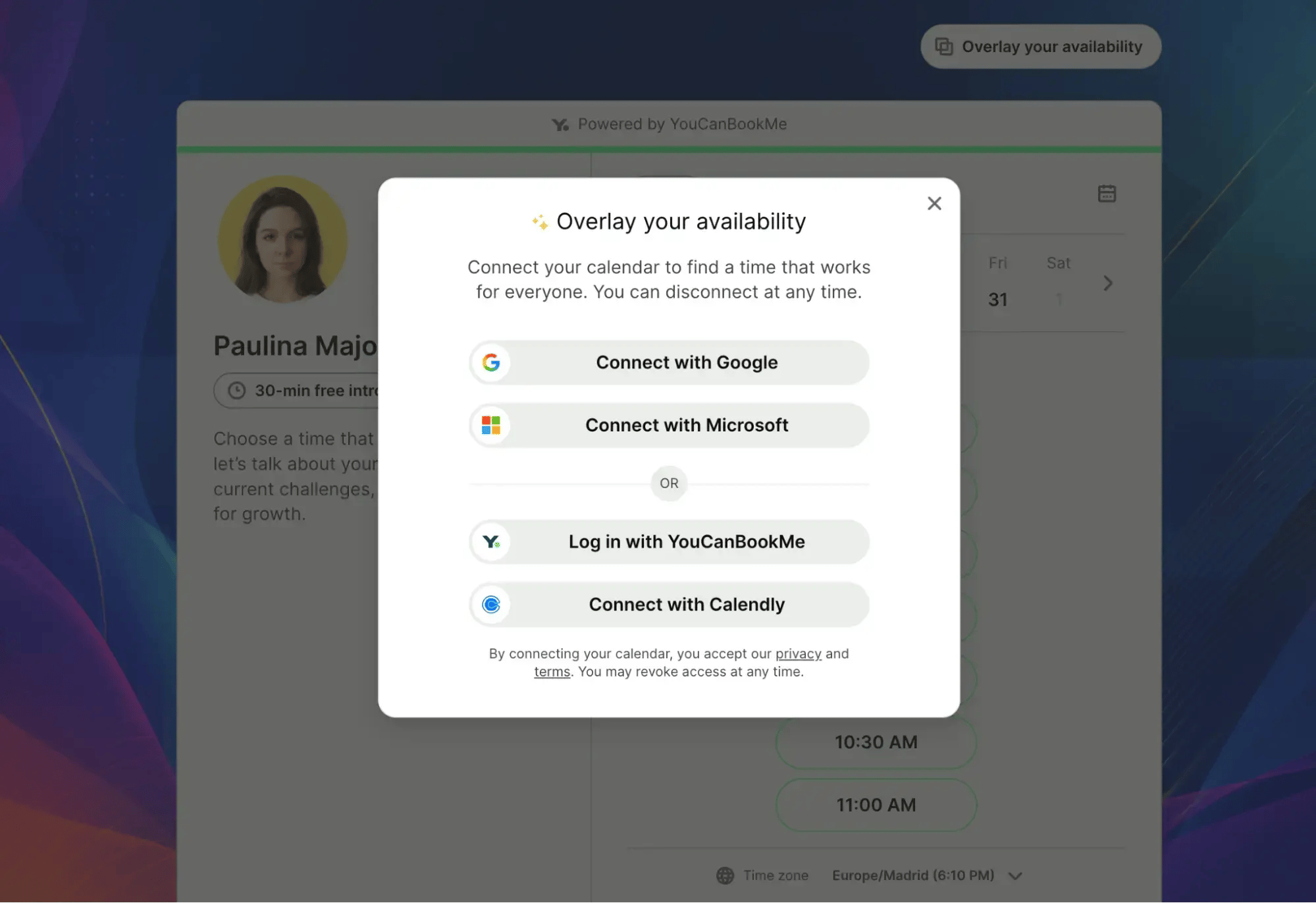
This was one of my favorite features because it improves the experience without making the booking process more complicated. Once activated, the overlay can also work automatically on other YouCanBookMe pages and when rescheduling an appointment.
Advanced booking rules
Not every appointment request should be confirmed automatically, especially for high-value services or selective client work. YouCanBookMe is the only tool on this list that allows you to review each booking request before deciding whether to accept or reject it!
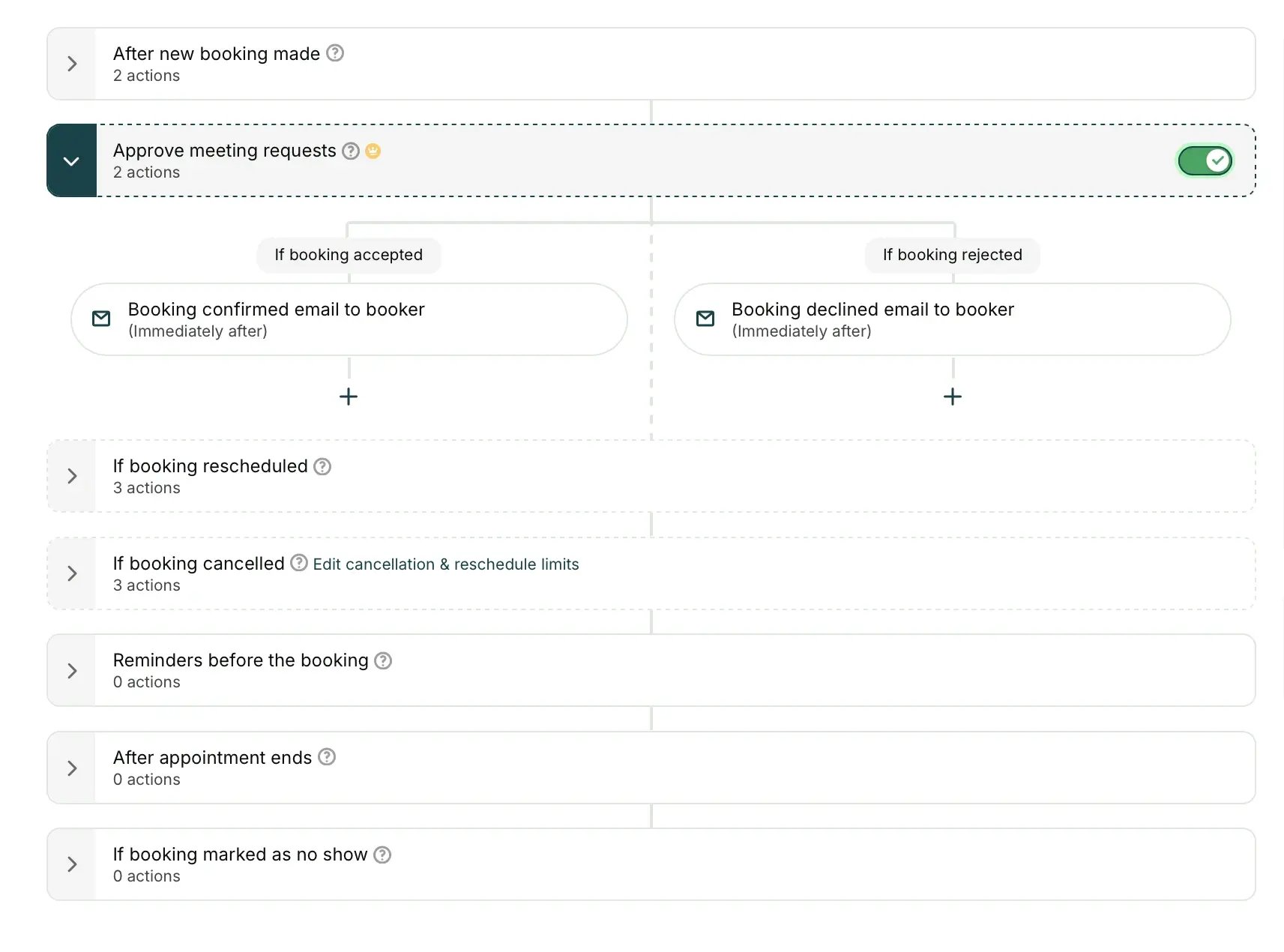
With Meeting Requests turned on, the meeting slot is held while you make that decision. I liked that I could respond directly from my email or the Bookings Dashboard without risking someone else taking the slot.
In addition, YCBM also provides controls for:
- Minimum notice to prevent last-minute bookings
- Buffers between appointments
- Password-protected booking pages
- Single-use links that expire after one booking
- Blocking questions in your booking form
Together, these settings give you more control over who reaches your calendar and how closely meetings can be scheduled.
YouCanBookMe vs. Cal.com
YouCanBookMe and Cal.com both offer customizable booking pages, automated communications, payments, integrations, and team scheduling. However, they emphasize different parts of the scheduling process.
Here’s a quick side-by-side comparison:
In short, Cal.com may suit technically experienced teams that are comfortable spending more time configuring their scheduling setup. YouCanBookMe is the stronger choice when you want to shape the experience around your bookers without dealing with complex configuration.
Make a great first impression
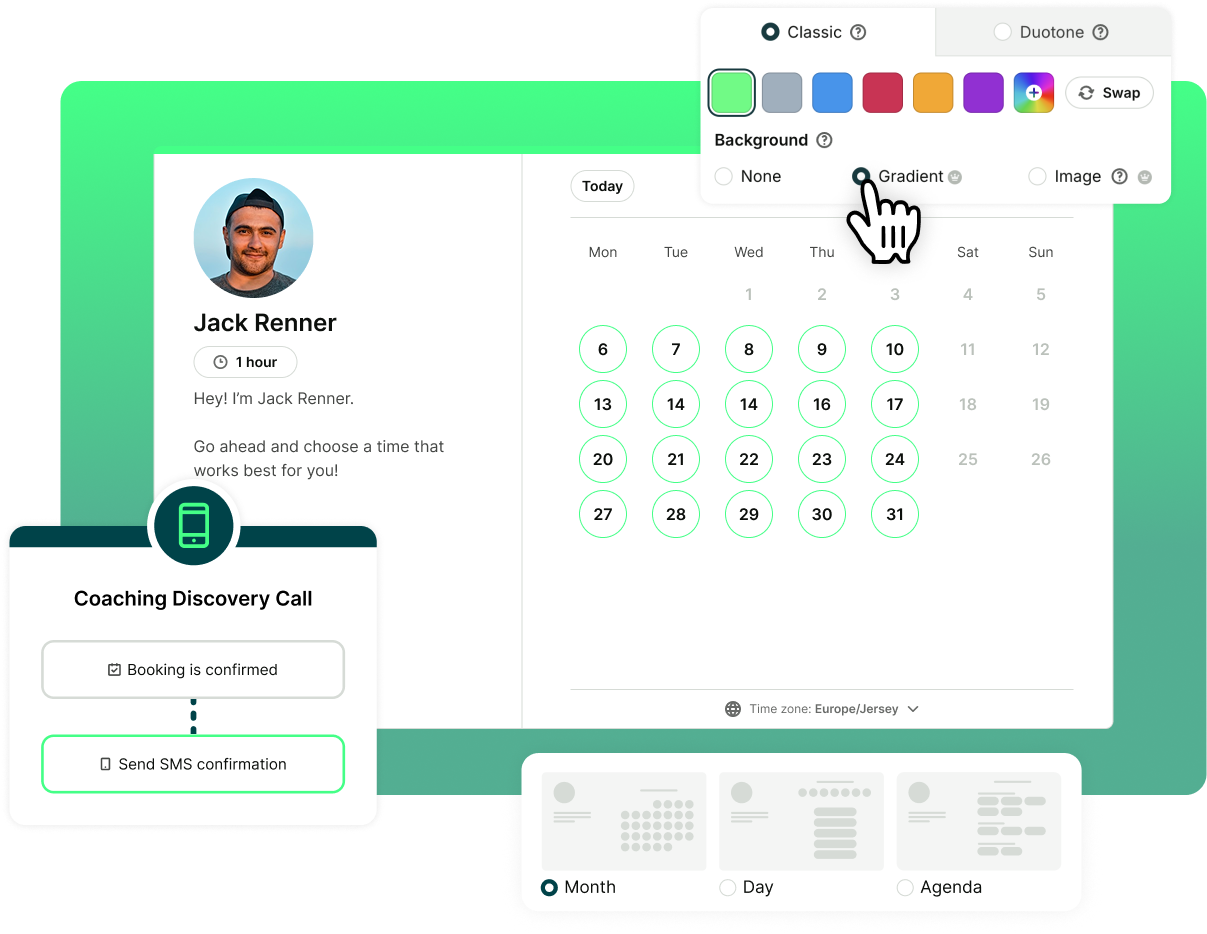
Get started with the most personalized meeting scheduler to build your business.

YouCanBookMe vs. Cal.com: Pricing
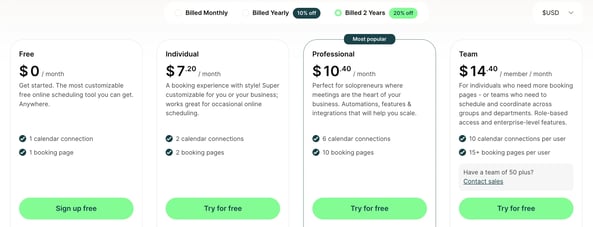
YouCanBookMe offers a free-forever plan that includes branded booking pages, calendar sync, customizable notifications, and even Stripe payments. Its paid tiers start at $8.10/month for the Individual plan, rising to $11.70 for Professional and $16.20 per user for Team. Each plan adds clear value, like more calendar connections, group sessions, advanced workflows, analytics, and role-based team management. There are also monthly, yearly, and 2-yearly billing options, providing discounts when you commit for longer.
Cal.com also has a free plan, but its strength lies in flexibility rather than polish. To unlock features like team scheduling, advanced routing, or enterprise compliance, you’ll need to move into higher tiers, starting at $12/month per user and going up to $28/month per user. That makes it better suited to developer-heavy teams or large organizations.
💬 What users have to say about YouCanBookMe:
I'm doing quite a lot of comparison of different kinds of software and I'm always interested in new solutions, but I really haven't met a real competitor for YouCanBookMe. I believe that it improves the experience because it’s so customizable and adjustable that we can really make it look like us—not just visually but the wording, how it feels."
Use YouCanBookMe if you:
- Want to showcase your brand through your booking page
- Need to offer different appointment types, meeting lengths, or group sessions
- Value advanced scheduling controls like tentative bookings, buffers, and password protection
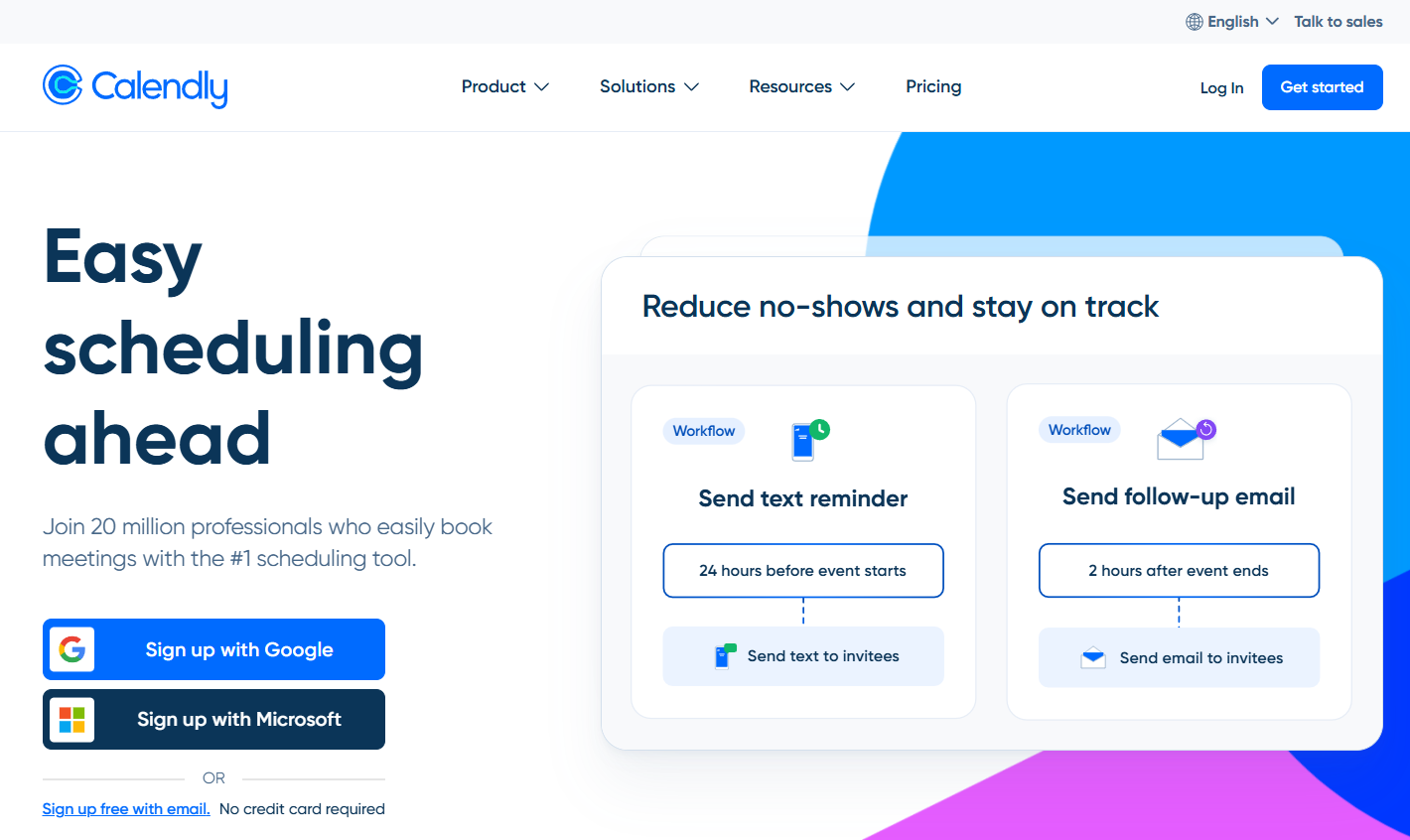
Calendly is a scheduling automation tool designed primarily for larger teams and enterprise organizations, with advanced routing, integrations, and administrative features.
Getting started was easy—I was able to create a basic booking page in just a few minutes. Setting up more advanced workflows required navigating additional menus and settings, so it took a little more time to understand how everything worked.
Let’s take a look at the three key features that I tested out.
Lead routing based on booker’s answers
Lead routing is one of Calendly’s strongest features. For my test, I created a discovery call form asking for each lead’s contact details, budget, and some other information. Adding and editing my lead qualification questions was straightforward, and I could preview the form before publishing it.
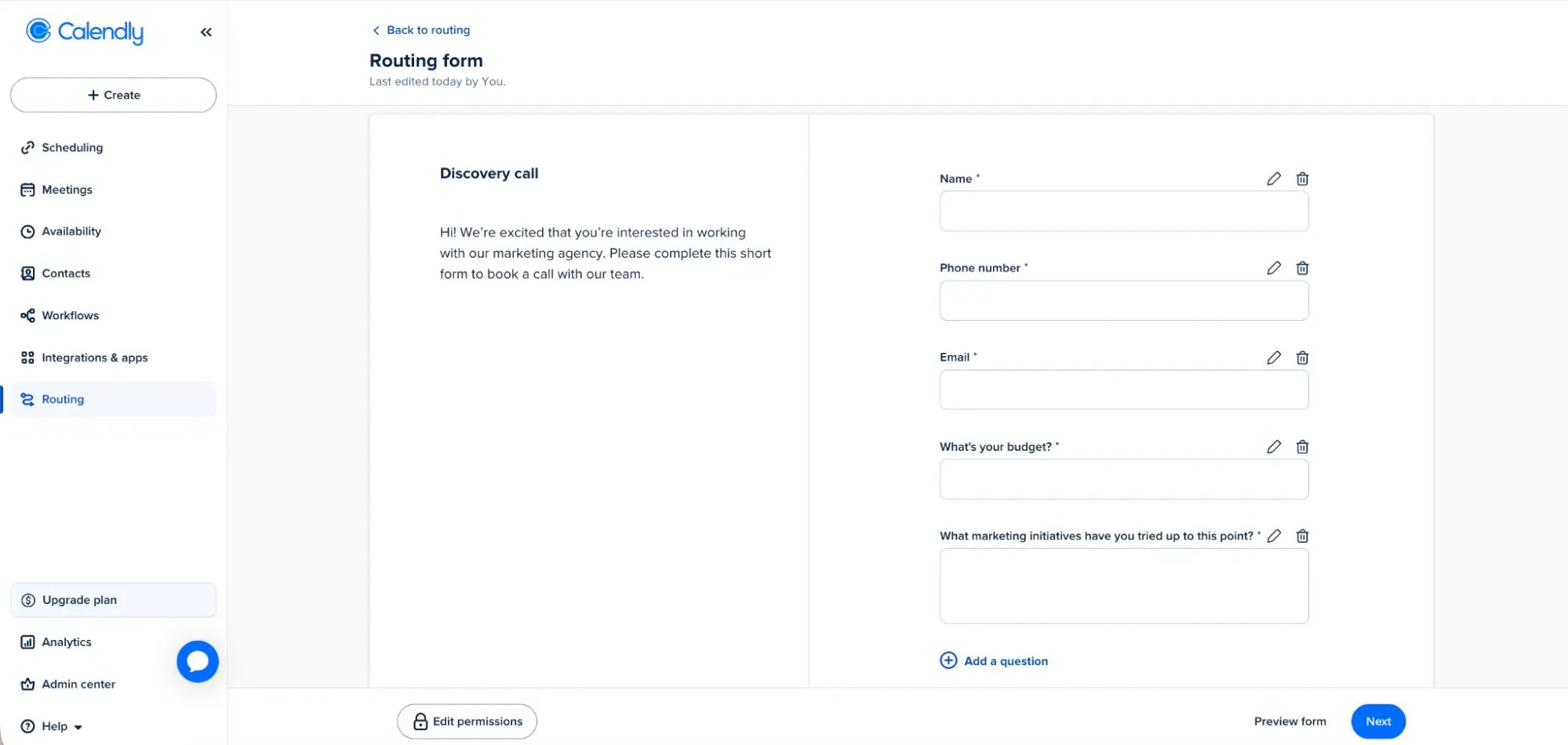
I could then create rules that used those answers to send each visitor to a particular event type, an external page, or a custom message. There was also a fallback route for anyone who didn’t meet the conditions I had set. I can see this being especially valuable for larger sales teams that need to qualify leads and direct them to the right person automatically.
Round-robing scheduling
Calendly supports round-robin scheduling, which allows a business to share incoming meetings among several team members. When I created a rotating host pool, I could choose between two distribution methods: maximizing availability or giving each host a roughly equal number of meetings.
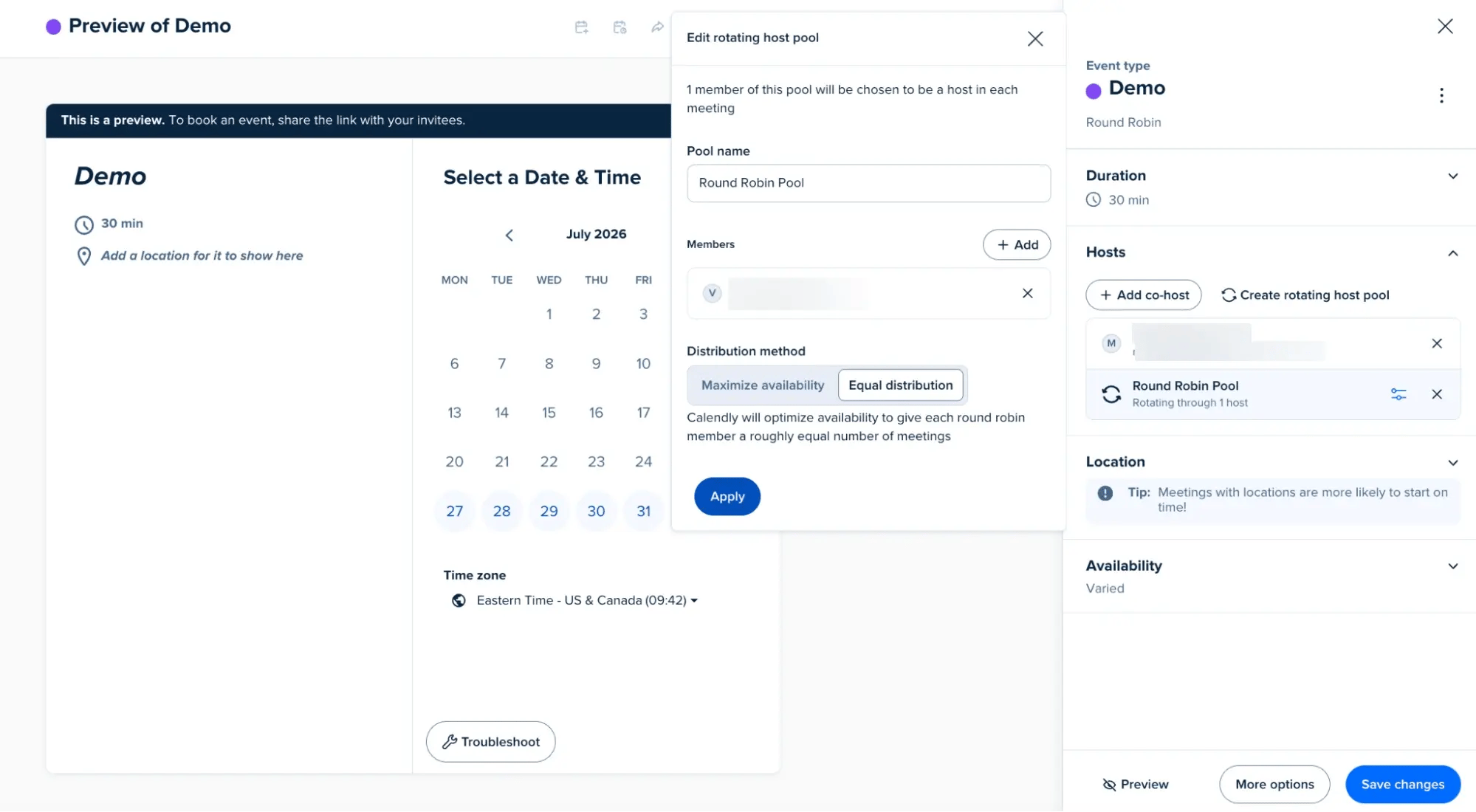
Maximizing availability prioritizes offering bookers as many appointment times as possible. Equal distribution is more useful when you want to divide opportunities fairly among sales reps or other team members.
User groups
Calendly nails team organization and admin compared to most Calendly alternatives. I was able to set up different user groups based on department, team, or location, which would make it easier to manage a large workforce from one account.
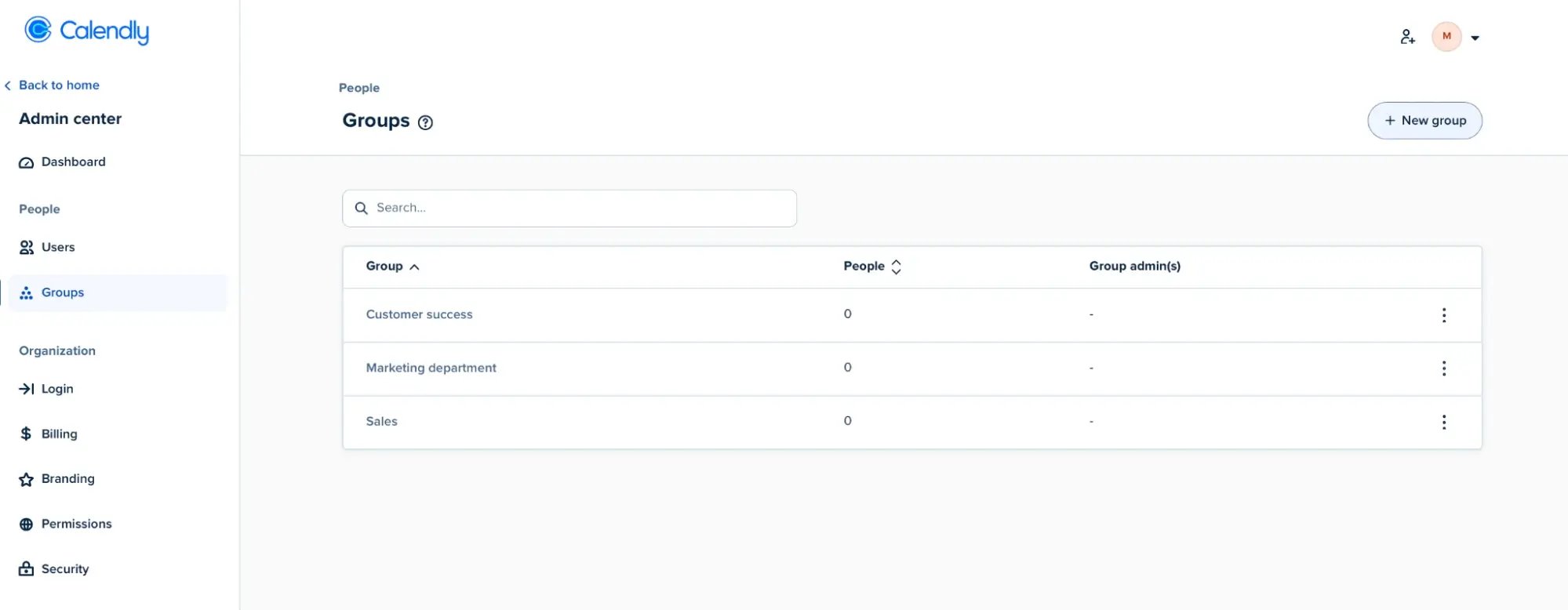
I could also assign group admins to manage members, create routing forms, and track activity without giving them control over the entire organization. Calendly supports group-level reporting too, while Enterprise customers can use SCIM to assign users to the appropriate groups automatically.
Calendly vs. Cal.com
The reason many users prefer Calendly over Cal.com is its speed and simplicity. You can be up and running in minutes, with a clean interface and native integrations that just work with tools like Google Calendar, Zoom, and CRMs. Cal.com offers the same core scheduling power, but setup can feel more hands-on, especially if you’re tailoring it to complex workflows.
The difference is more noticeable in how each platform approaches control. Calendly keeps branding, workflows, routing, and integrations relatively guided, while Cal.com offers more advanced configuration through custom APIs, attribute-based routing, custom subdomains, and enterprise options such as regional hosting and dedicated databases. That added flexibility can also require more time to configure.
Another Calendly strength is how smoothly it scales for teams with round-robin, routing forms, and admin roles. Cal.com scales too, but with more manual setup in exchange for deeper flexibility and compliance options.
Calendly vs. Cal.com pricing
Both Calendly and Cal.com offer free plans, but Cal.com’s is more generous with unlimited calendars, event types, workflows, and Stripe payments, while Calendly limits you to one calendar and one event type.
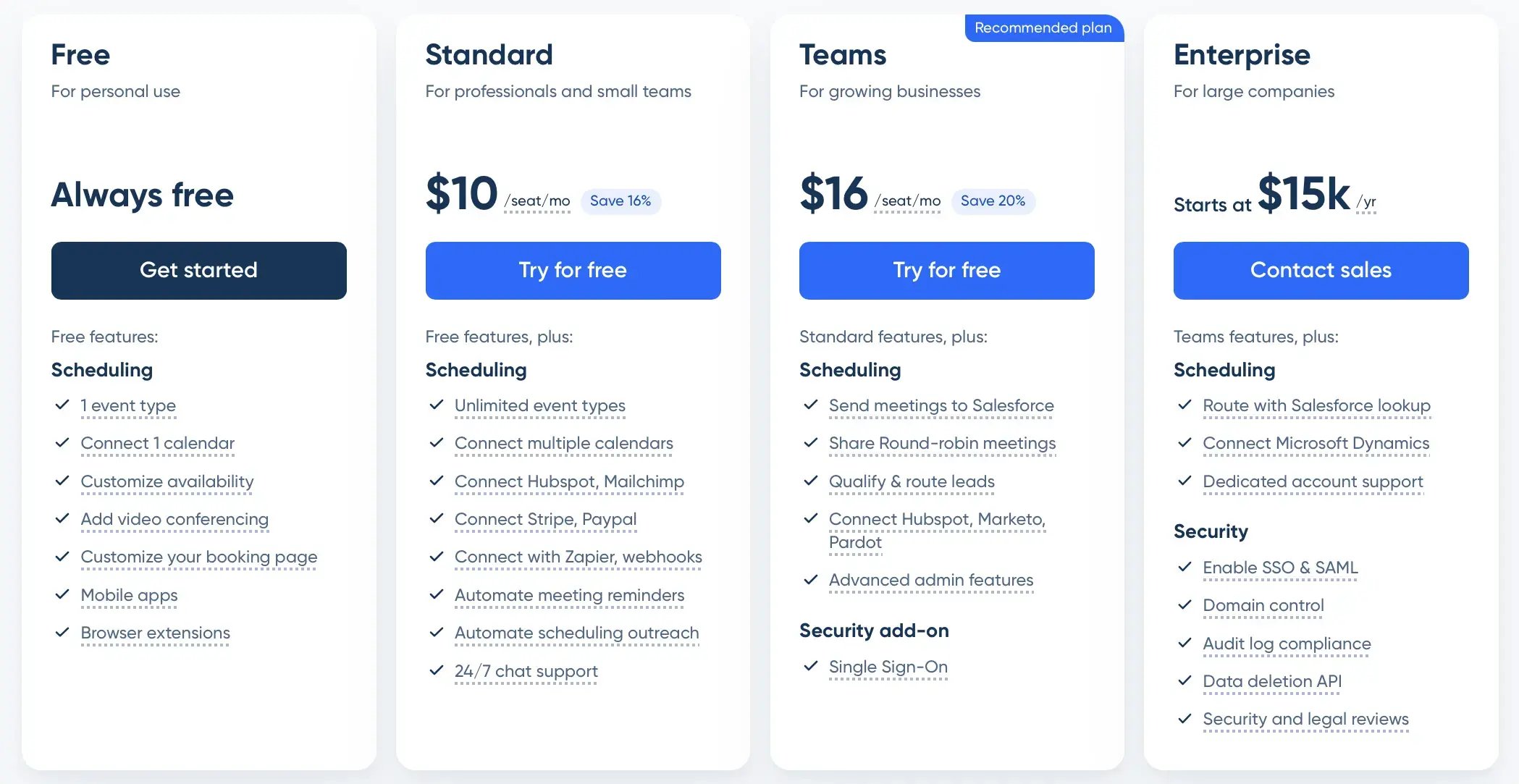
Calendly’s entry-level Standard plan costs $10 per user per month when billed annually. Cal.com doesn't offer a direct equivalent, moving straight from its free plan to Teams. Comparing the two Teams plans, Calendly costs $16 per user per month, while Cal.com costs $12.
Use Calendly if you:
- Value a clean, beginner-friendly interface that requires no technical setup
- Need routing forms to qualify and track leads and direct them to the right person or meeting
- Manage a large organization with separate user groups and delegated administrators
💬 What users have to say about Calendly:
I love how easy and intuitive Calendly is to use, both for me and for the people booking with me. The automatic time zone adjustment, calendar syncing, and custom availability features have saved me hours of back-and-forth emails.”
– Pily U.

Acuity Scheduling is designed around managing client appointments rather than simply scheduling meetings. They offer useful tools for collecting client information, offering packages and subscriptions, and coordinating appointments across different locations.
The initial setup was fairly straightforward, although configuring services, payments, and availability took longer than creating a basic meeting link.
Flexible intake forms
Since Acuity is designed primarily for service-based businesses such as salons and wellness providers, it does offer a decent intake form builder. It supports:
- Textboxes
- Dropdown menus
- Checkboxes
- Checkbox lists
- Yes-or-no questions
- File uploads
- Addresses
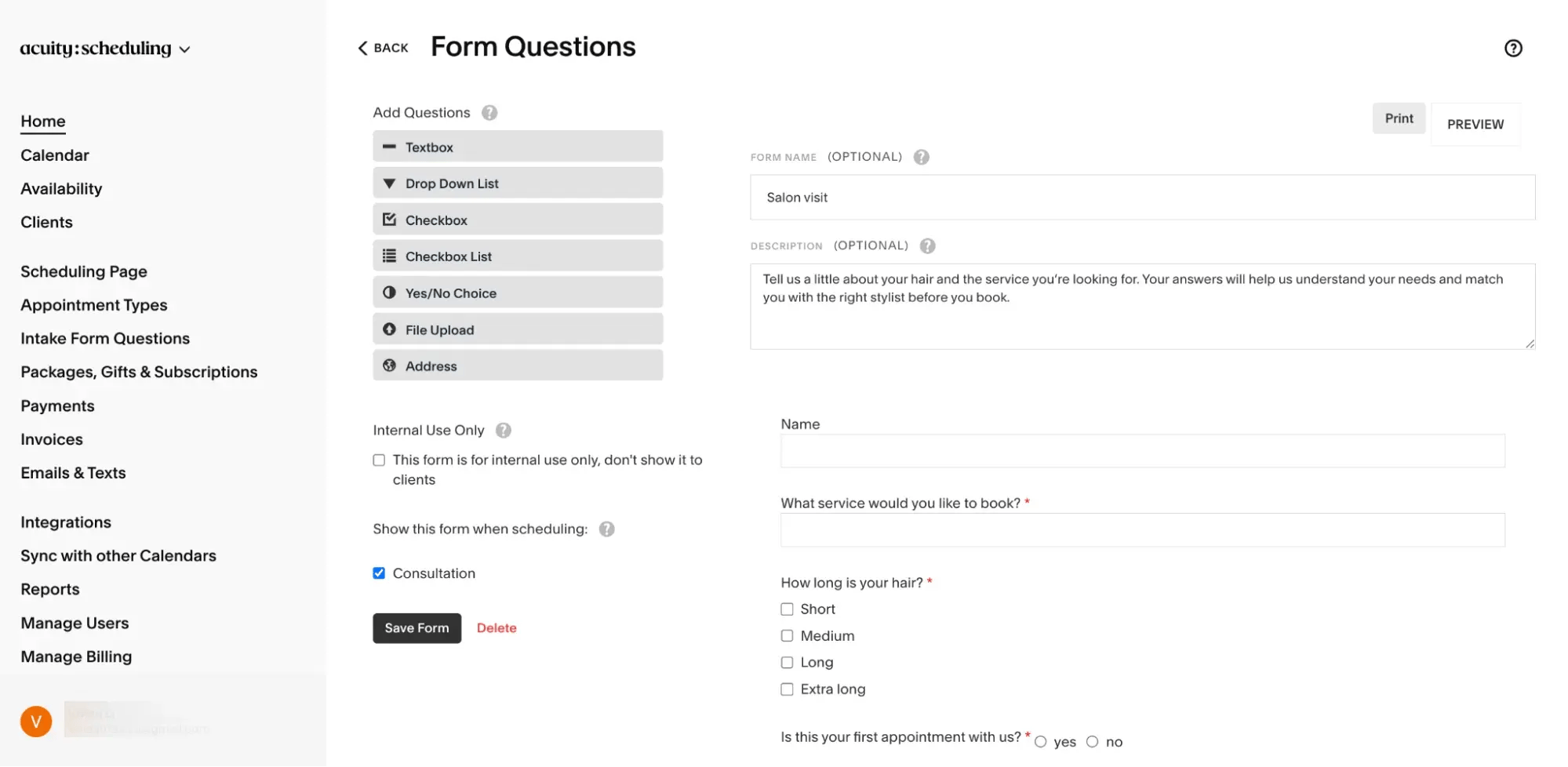
I liked that the interface was clean and that I didn’t need to navigate through several menus to build a form. I could make questions required, rearrange their order, and assign different forms to specific appointment types from the same screen.
Packages, gift certificates, and subscriptions
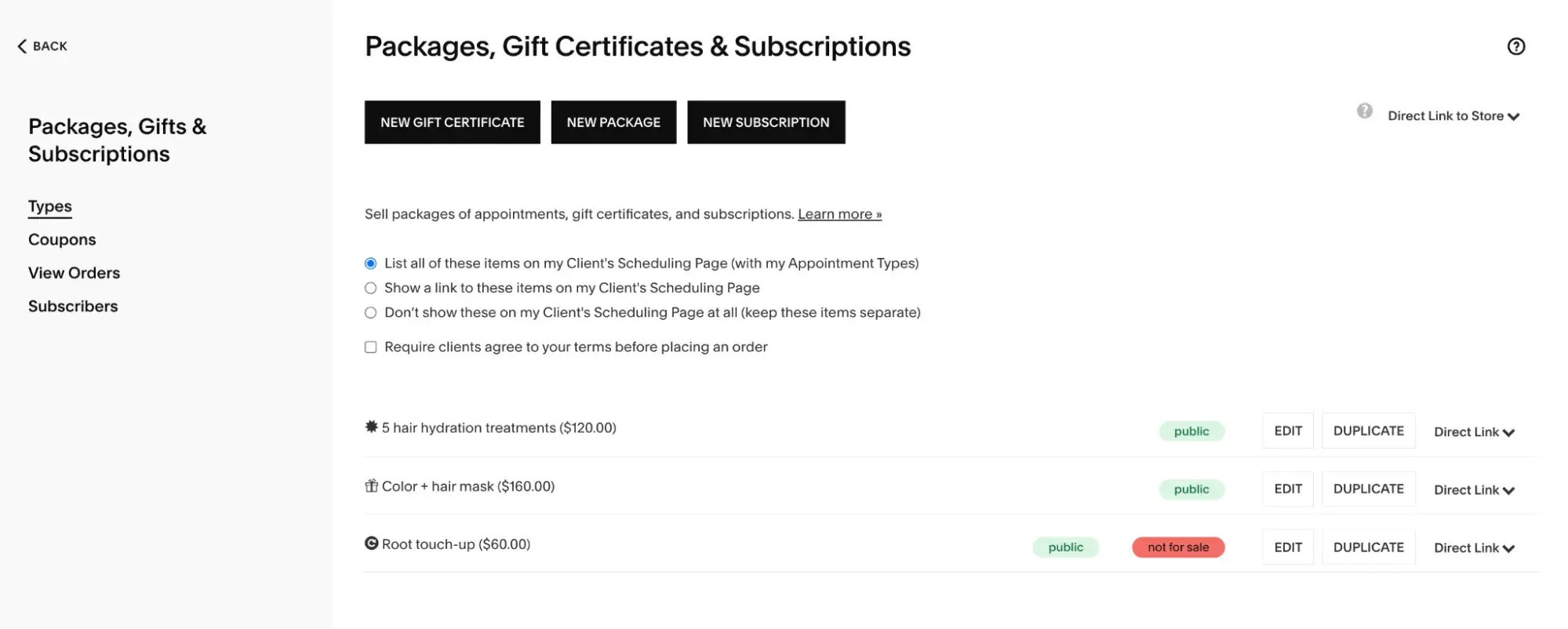
Acuity also stood out for the different ways businesses can package their services. As a test, I created a five-appointment hair treatment package, a gift certificate for a color and hair mask service, and a recurring root touch-up subscription.
I could display these options alongside my appointment types, link to them from the booking page, or keep them separate using a direct store link. While the flexibility was useful, I struggled with the logic of the actual configuration. It took me some time to understand how payment schedules and redemption settings worked together, so if you’re not familiar with setting up packages or recurring services, you might spend quite a lot of time getting everything configured correctly.
Multiple locations and shared resources
With Acuity, you can also create separate calendars for different employees or branches, each with its own availability, location, and scheduling link, which is helpful for multi-location businesses like salons and wellness centers.
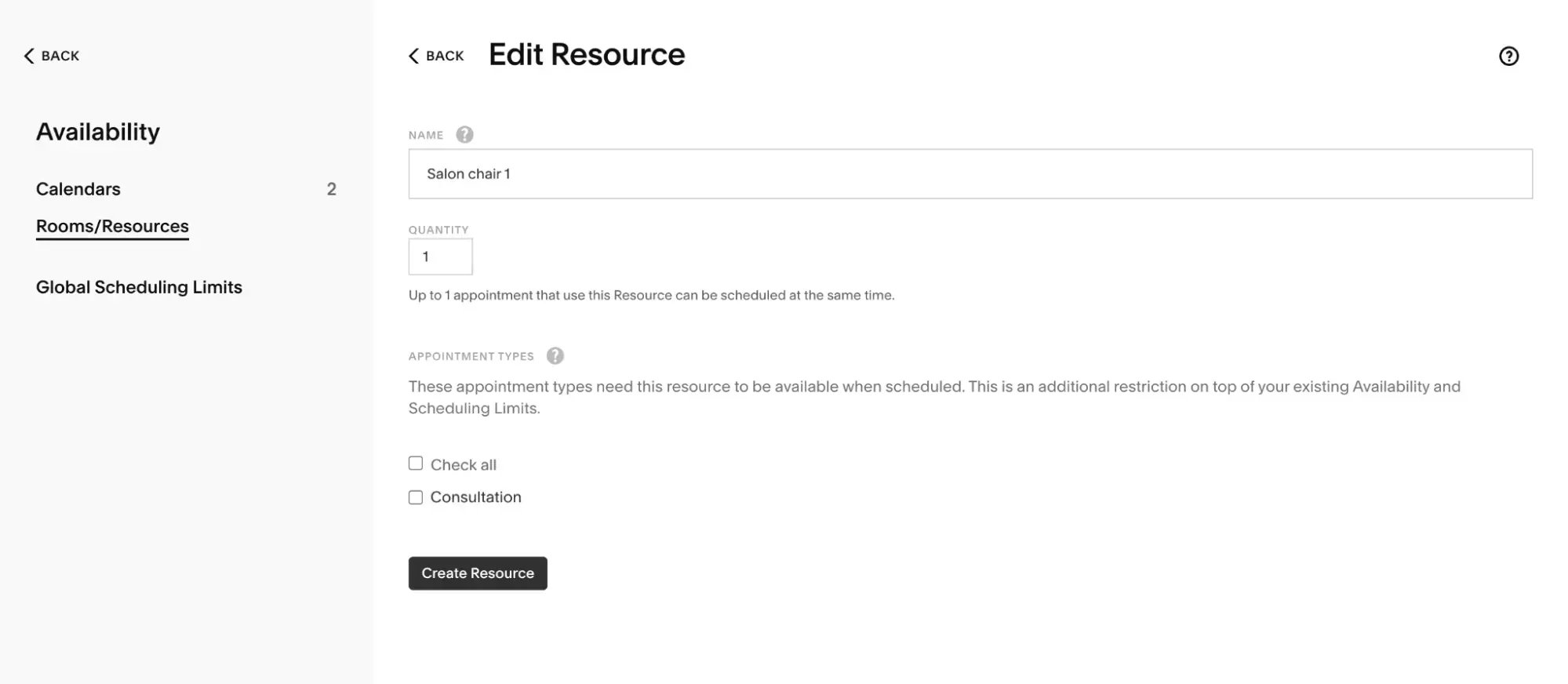
Shared resources add another useful layer. When testing the tool, I could specify which services required a room, chair, or piece of equipment. Once every available resource is assigned, Acuity automatically prevents another client from booking that service at the same time.
Acuity vs. Cal.com
Acuity is built to be simple and easy, especially for service providers like salons, coaches, or wellness businesses. It gives you ready-to-use tools like branded booking pages, custom intake forms, and various payment options. Everything works smoothly without needing extra setup. Scaling is easy too—you can manage multiple staff, services, and locations all from one dashboard.
Cal.com, on the other hand, is better suited to teams coordinating meetings across departments. It offers routing forms, managed events, round-robin and collective scheduling, custom APIs, and more than 100 integrations. This gives teams more control over meeting distribution and workflows, although the wider range of settings can take longer to configure.
Acuity vs. Cal.com pricing
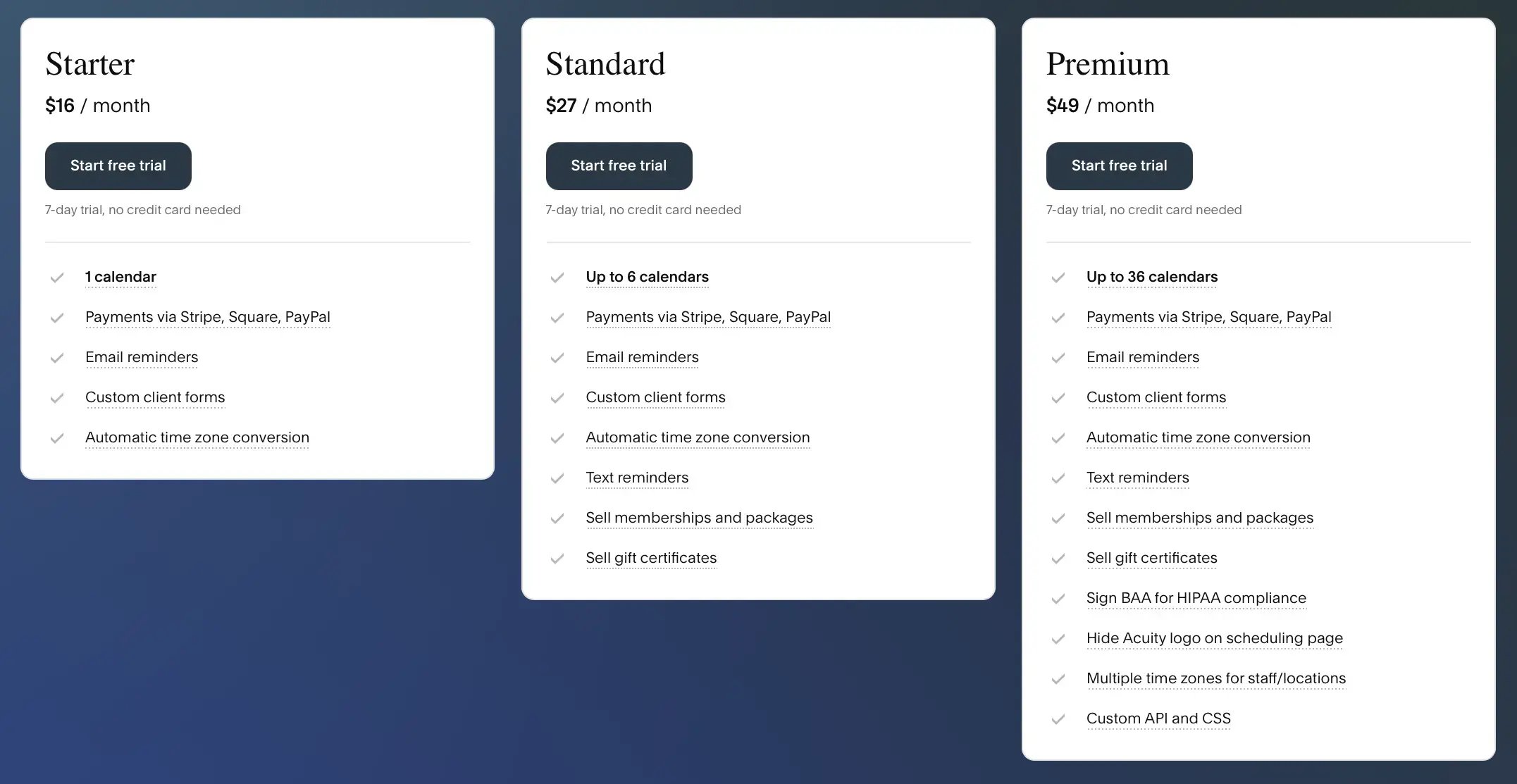
Acuity has no free option. Its entry plan starts at $16/month, while Cal.com offers a free plan and then a Teams plan at $12/month per user that already includes team scheduling and routing. Acuity’s Standard ($27) and Premium ($49) plans add extras like reminders, packages, and subscriptions, while Cal.com’s Organizations plan ($28/user) is built for larger teams with compliance, analytics, and white-labeling.
Use Acuity Scheduling if you:
- Are more focused on taking appointments rather than booking meetings
- Need stronger client-facing features, such as custom intake forms, subscriptions, packages, and gift cards
- Want an easier setup than Cal.com
💬 What users have to say about Acuity:
I find it really easy to use Acuity Scheduling when I am scheduling for meetings, whether with work colleagues or with my clients. It is very easy to use and takes less time to schedule, especially with the auto-scheduling function. Acuity Scheduling has offered me the most impeccable experience I could have ever asked for.”
– Shari R.
Next up, we have SavvyCal, a scheduling tool designed to make coordinating meetings more collaborative. It offers personalized scheduling links, meeting polls, preferred-time controls, and automated workflows for confirmations and follow-ups. Its features are particularly well suited to professionals who regularly arrange meetings with clients, partners, or larger groups.
Setup was quick. After connecting my calendar, I could create and organize different scheduling links from one dashboard.
Personalized scheduling links
SavvyCal gives you one tidy dashboard for creating and managing your scheduling links. You can set up separate links for different meetings, each with its own name, URL, duration, availability, and booking settings.
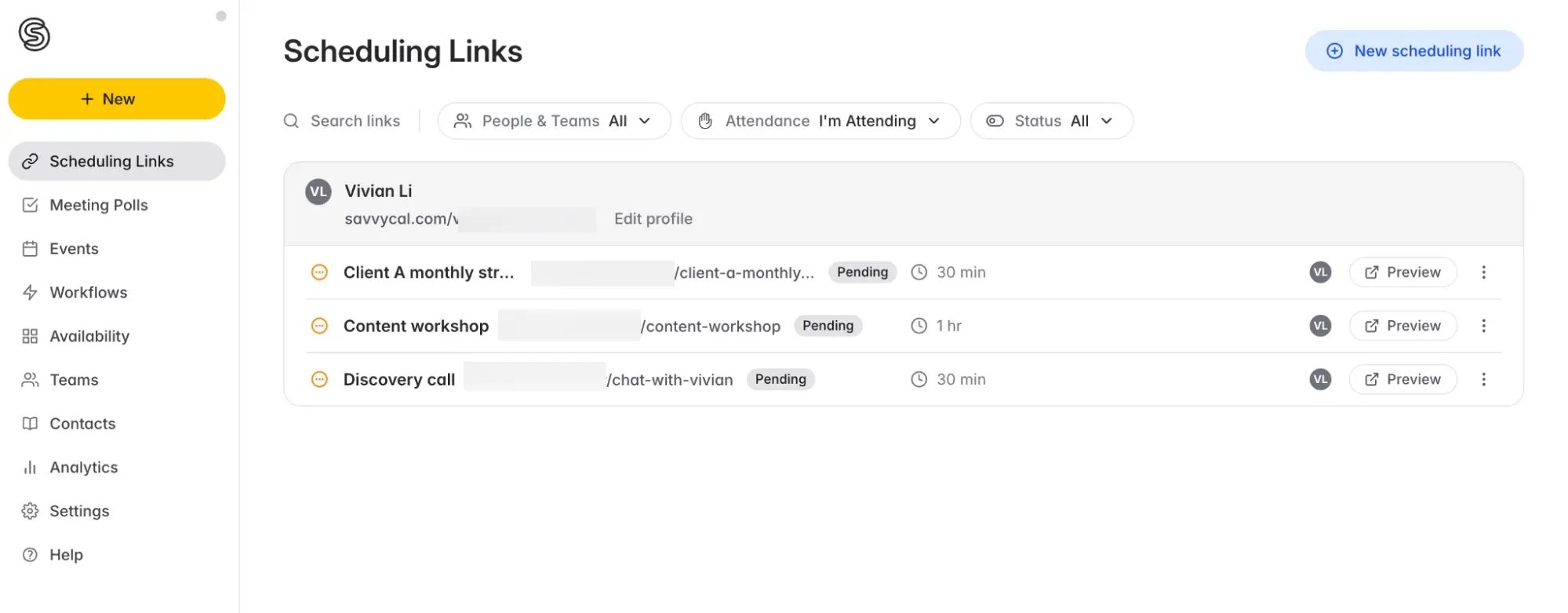
I liked that I was able to quickly review each link’s details from the dashboard, which kept everything easy to scan. SavvyCal also lets you personalize links for individual recipients by prefilling their information, which is useful for consultants, account managers, and client-facing teams that arrange recurring one-to-one meetings and want each invitation to feel less generic.
Preferred meeting times
SavvyCal’s preferred-time controls were the feature I found most interesting. Rather than displaying every available slot equally, I could highlight the times I actually wanted someone to choose.
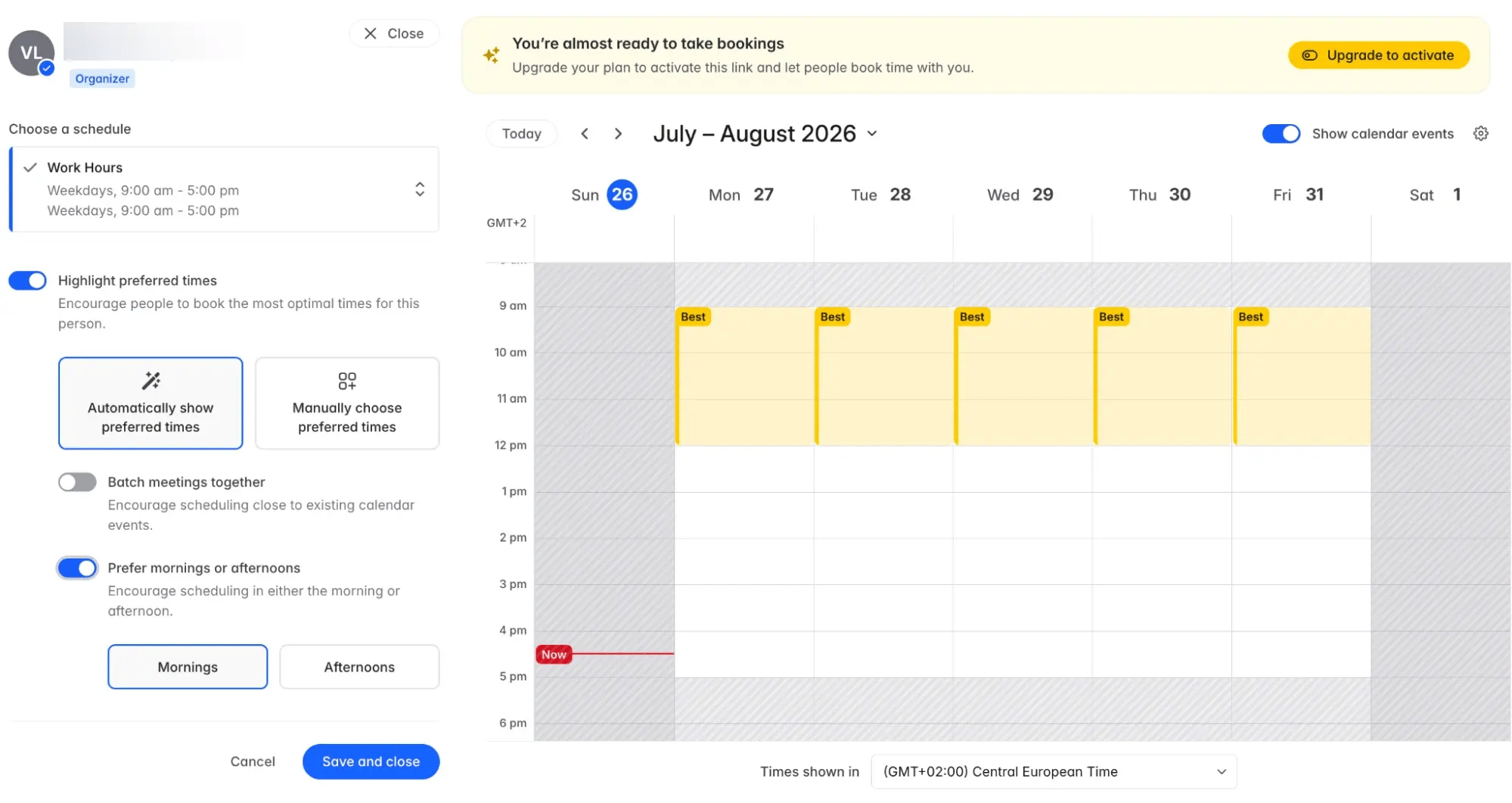
SavvyCal can select preferred times automatically or let you choose them manually. The automatic settings can favor mornings or afternoons and encourage people to book close to existing calendar events, helping to group meetings together. Other available times remain bookable, so the feature guides the booker without removing their flexibility.
Meeting polls
SavvyCal’s meeting polls let you propose several times and ask attendees to vote for the options that work for them. I could select time slots directly from my calendar, choose the meeting length and location, and share a single poll with the group.
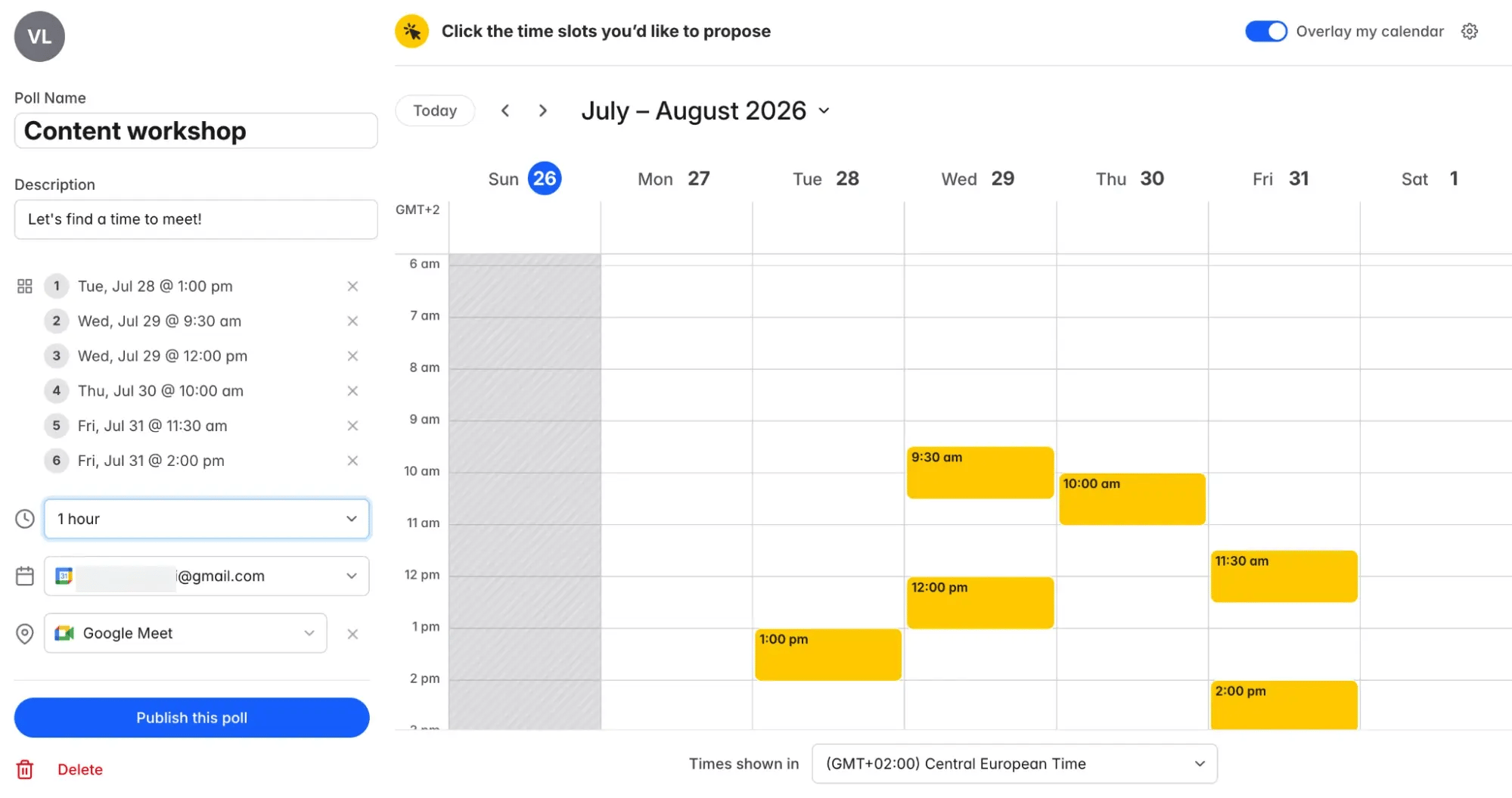
Invitees see the options in their own time zone, and I could finalize the best time once everyone responded. The meeting polls are free and ad-free, making them useful for workshops, group interviews, and other meetings that can’t be arranged through a standard booking link.
Your bookers deserve better
Create a scheduling experience for clients that feels like you.
SavvyCal vs. Cal.com
Looking at SavvyCal vs Cal.com, they each offer flexible scheduling features, although they suit different types of users.
If you’re after a tool that feels effortless, you’ll likely prefer SavvyCal. Setup takes minutes, and the booking experience is smooth for invitees. Features like meeting polls, preferred meeting times, and polished links make scheduling feel simple instead of stressful. Team options like round robin or group scheduling are ready to go, so you don’t have to fuss with extra setup. SavvyCal is the choice if you want scheduling that simply works right out of the box.
But if you want more advanced team scheduling and administrative controls, Cal.com is the stronger option, with managed events, subteams, attribute-based routing, SSO, and SCIM.
SavvyCal vs. Cal.com pricing
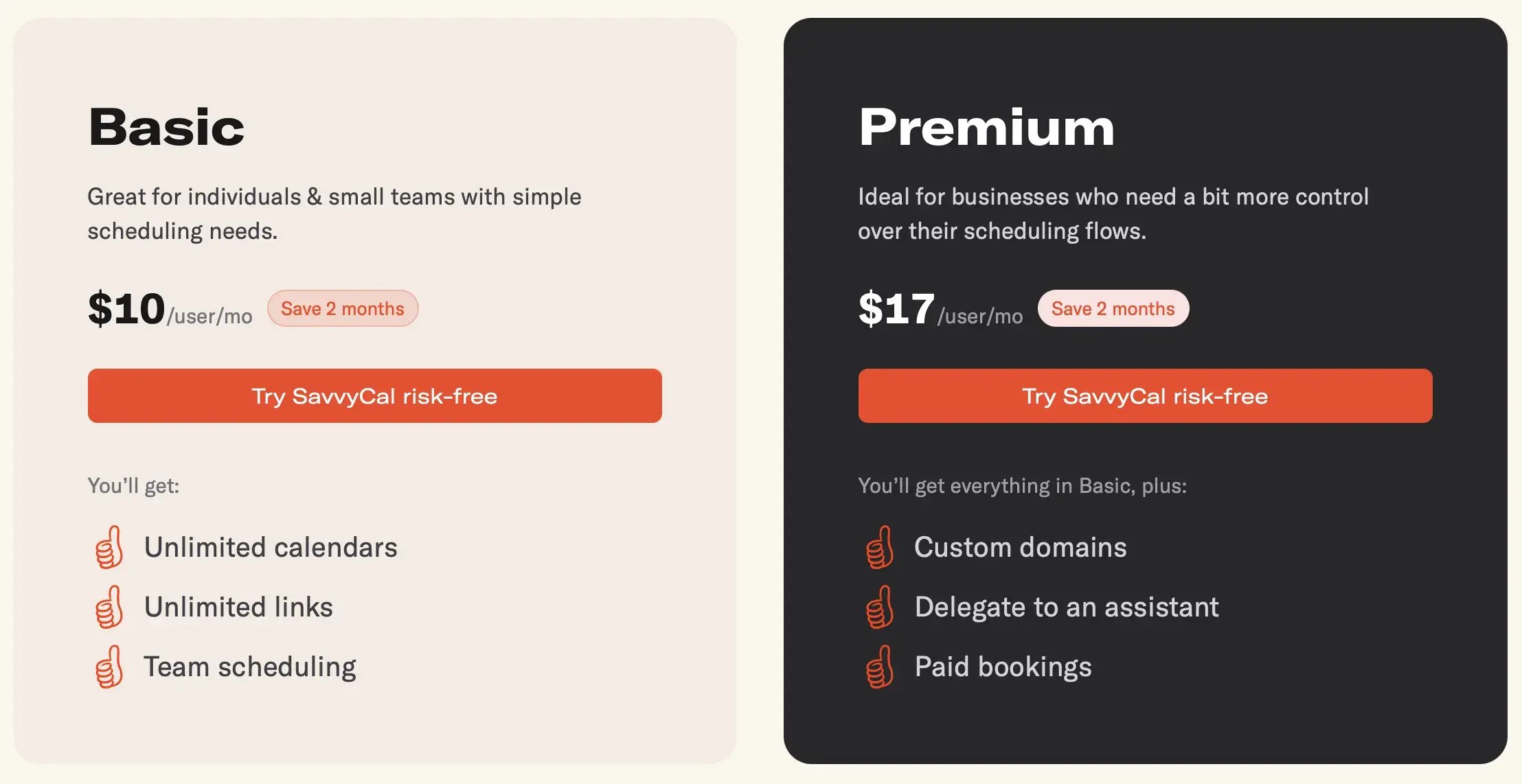
Unlike Cal.com, SavvyCal doesn’t offer a free scheduling plan. Their entry-level plan starts at $10/month per user, with the Premium plan at $17/month. Cal.com’s paid tiers start at $12/month per user for team scheduling and routing, and the Organizations plan at $28/month with advanced compliance, analytics, and white-labeling.
Use SavvyCal if you:
- Want a cleaner booking experience with personalized scheduling links and preferred meeting times
- Like straightforward pricing with just two simple plans
- Need a lightweight tool that’s easy for invitees to use
💬 What users have to say about SavvyCal:
When using SavvyCal, I noticed that its prices are somewhat high, but I must admit that it offers satisfactory and effective features. You may sometimes experience some delays in accessing the service. But in other respects, it is excellent and easy to use.”
– Osama R.
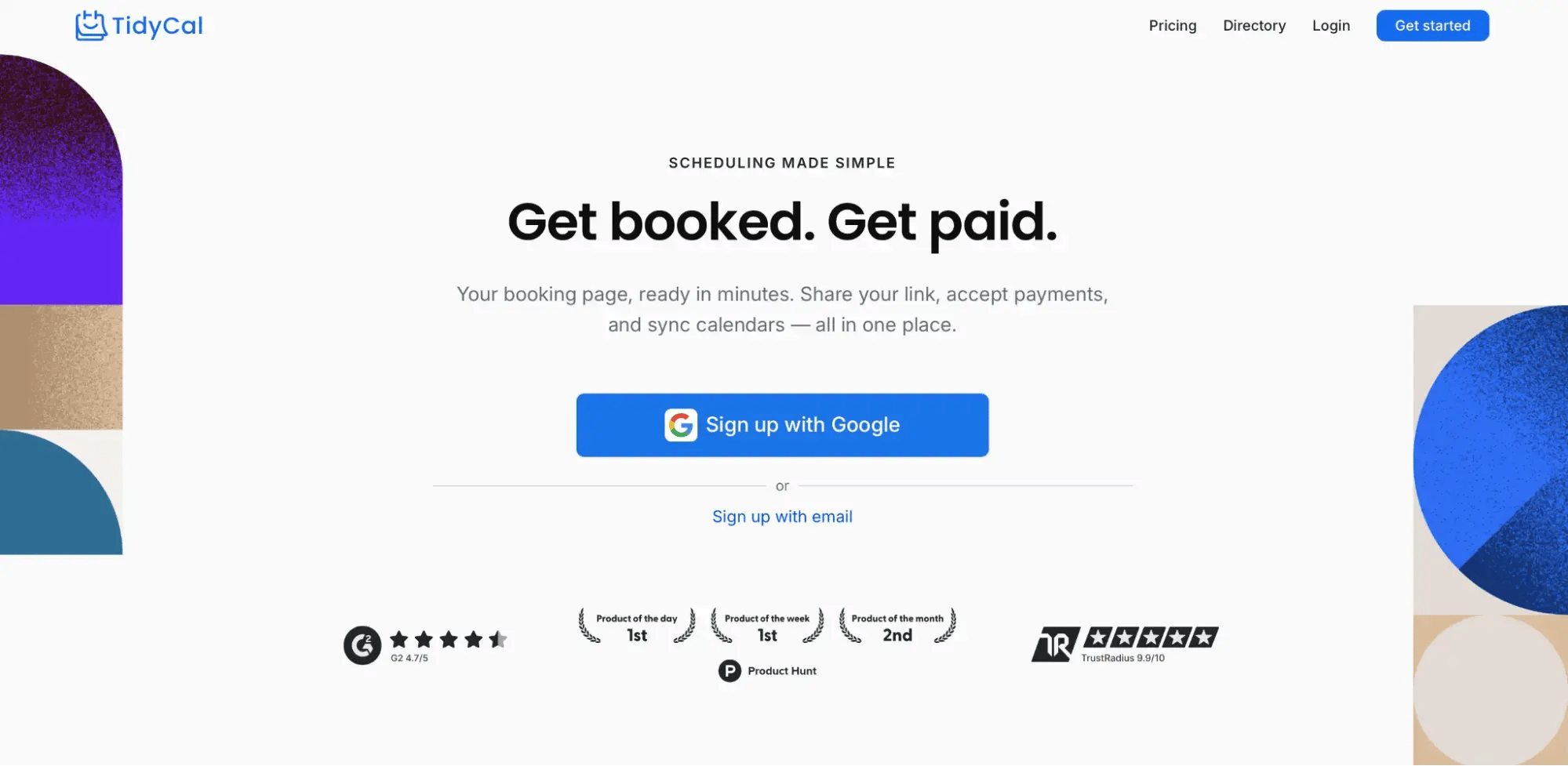
Last but not least, we have TidyCal, a simple scheduling platform aimed at freelancers and small businesses. It covers the standard booking essentials while adding business-focused tools such as a website builder, customer reviews, and a digital store. Its free plan and one-time payment options make it appealing to users who want to avoid another monthly subscription.
AI-assisted booking page setup
TidyCal made the initial setup surprisingly quick. I only had to describe what my business did, and the platform generated a simple booking website with suggested copy, services, and a basic layout.
The result gave me a useful starting point. I could then switch between the classic booking list and the fuller website layout, which supports sections for a hero image, bio, booking types, testimonials, FAQs, social links, and calls to action.
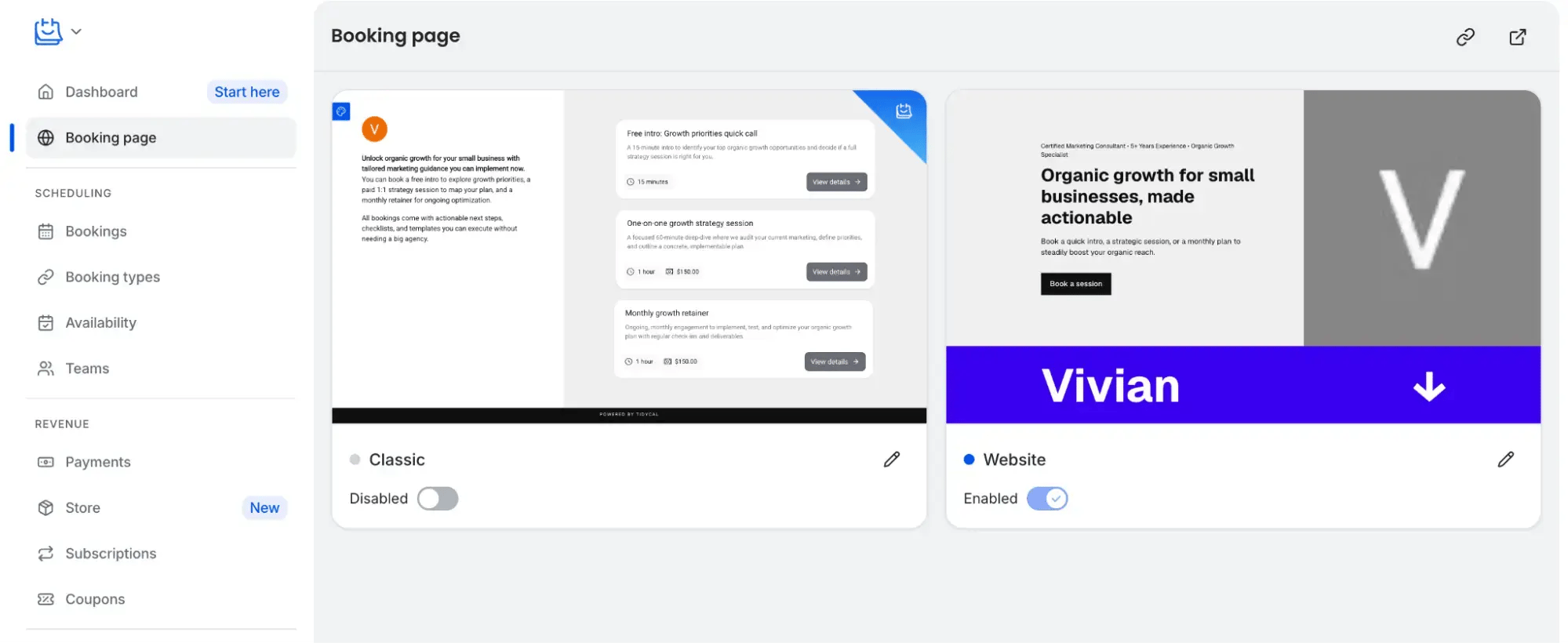
I wouldn’t personally use the generated version without editing it, as the copy and design were fairly basic. Still, it could save freelancers and new businesses time when they want something basic but functional!
Built-in customer reviews
The built-in review system was one of TidyCal’s more unusual features. I could copy a general review link for my entire profile or use separate links to collect feedback for individual booking types.
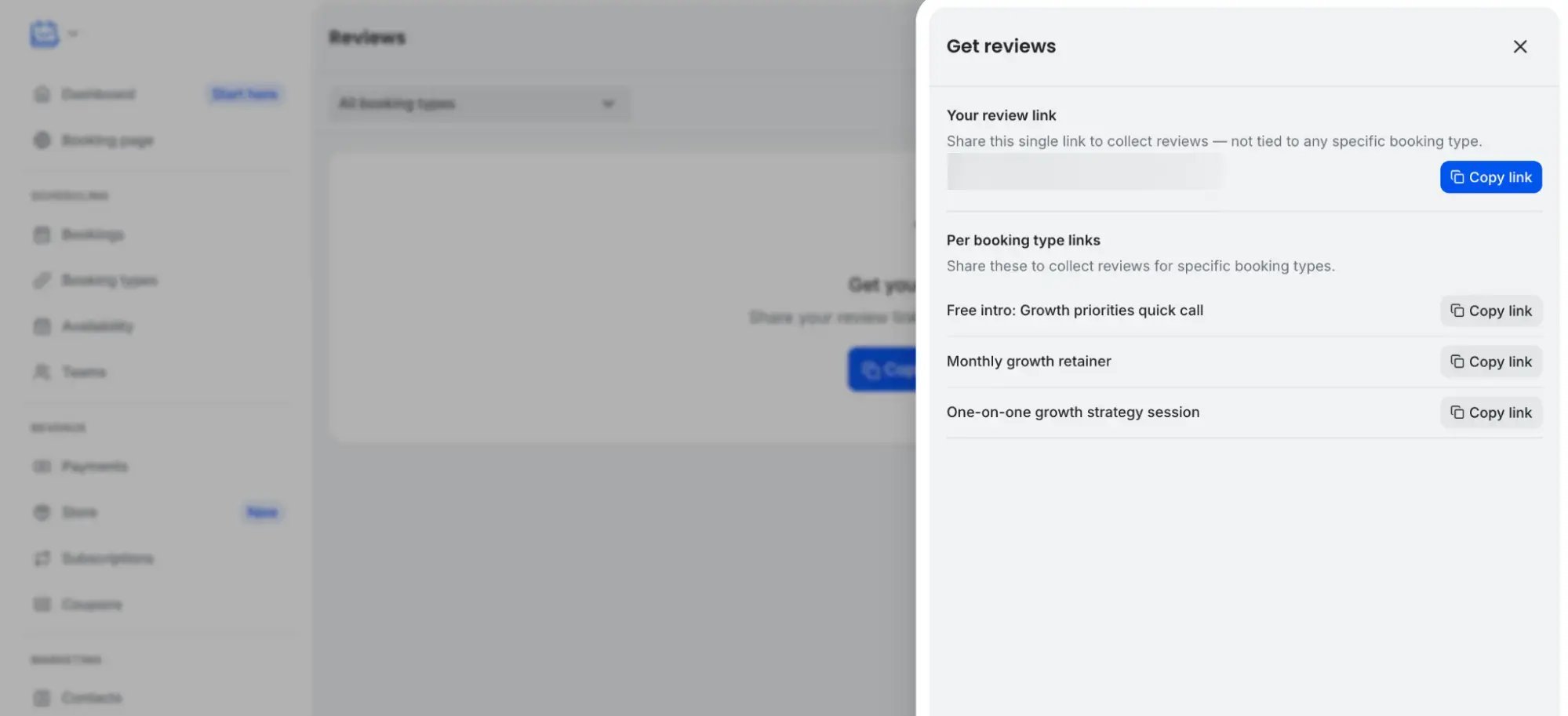
TidyCal can also email customers automatically after a completed booking. Reviews can include a star rating and written feedback, and you can display them directly on the relevant booking page or respond from the reviews dashboard.
I can see this being valuable for coaches, consultants, and other service providers who rely on social proof to secure new clients.
Sell products alongside bookings
TidyCal’s Store lets businesses create products and sell them alongside their appointments. Products can be managed as drafts or published listings, while a separate sales area keeps track of purchases.
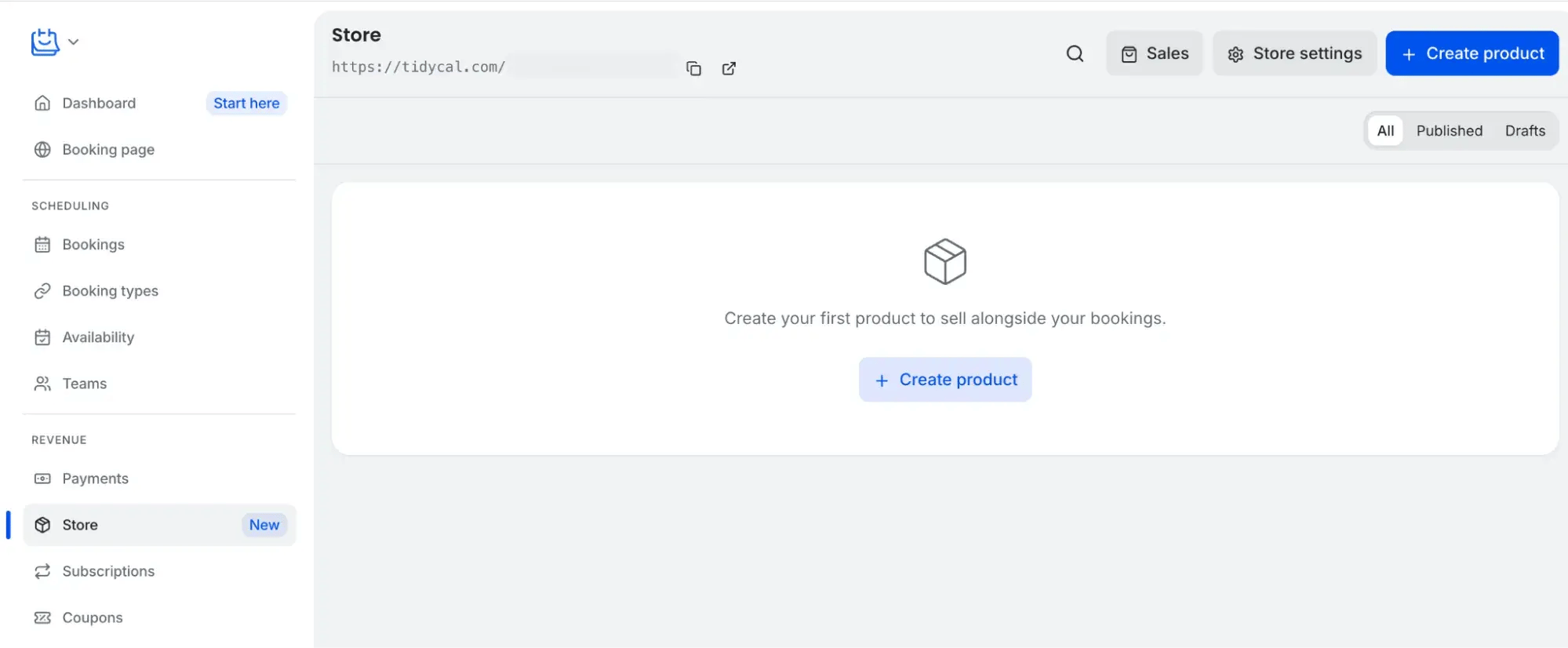
When testing it, I could attach up to three published products as optional add-ons to a paid booking. Is it a world-beating feature? Perhaps not, since scheduling tools like YouCanBookMe also offer add-ons. Still, it’s useful for anyone who wants to sell digital products, such as a consultant offering a workbook or a photographer adding prints to a session!
TidyCal vs. Cal.com
TidyCal is a super affordable option if you just need the basics. It offers unlimited booking types, calendar connections, group scheduling, reminders, and even paid bookings—all in a simple interface that’s easy for anyone to set up. If you’re a freelancer who doesn’t need advanced features, TidyCal is ideal.
That said, it falls short on integrations, compliance, and customizations that larger teams often require. Cal.com is a stronger choice if you need enterprise-grade compliance, extensive customization, and detailed routing. Of course, that power comes with more setup and a steeper learning curve.
TidyCal vs. Cal.com pricing
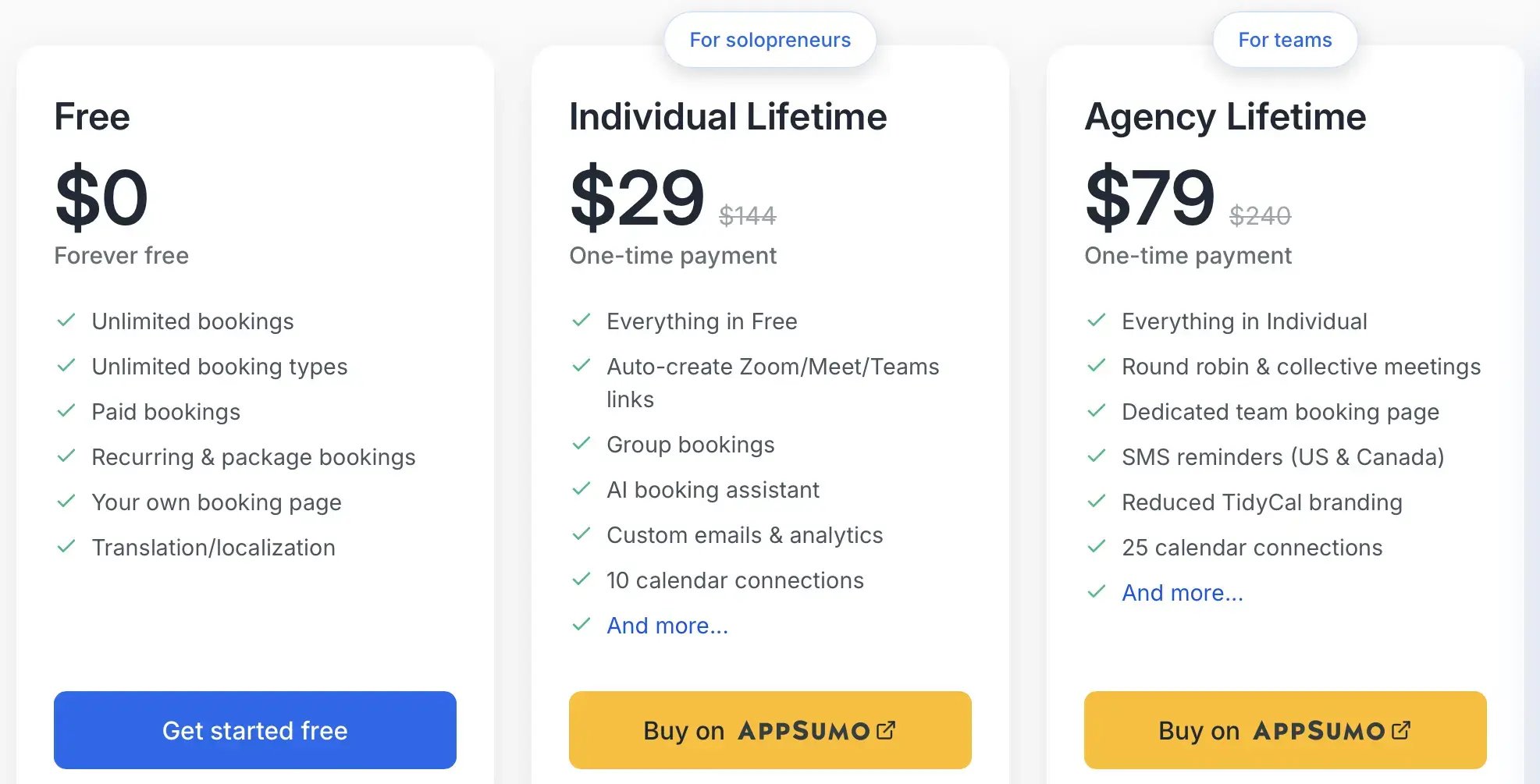
TidyCal keeps pricing simple with a Free plan, a one-time $29 Individual plan for freelancers and consultants, and a one-time $79 Agency plan with team features like round robin and collective meetings. Compared to Cal.com’s ongoing subscription model, TidyCal is the far more affordable choice if you only need the basics.
Use TidyCal if you:
- Are a freelancer and don’t want to spend much
- Typically have appointments that are all the same length
- Don’t expect the tool to have lots of customization options
💬 What users have to say about TidyCal:
The #1 best thing about TidyCal is its affordability. It does all the basic things, plus a little extra that would be needed with a calendaring tool. I appreciate the simplicity of sharing a link, embedding information on a website or in an email, and the ability to create meeting pools. It was very simple to set up and use.”
– Wil D.
The final verdict
After testing all five platforms, I found plenty to like about each one. That said, the best Cal.com alternative depends on what you want to improve about your scheduling process.
Calendly is the strongest option for large organizations that need lead routing and centralized user management. Acuity Scheduling is better suited to service-based businesses that rely on packages, subscriptions, and shared resources. SavvyCal focuses on personalized and group scheduling, while TidyCal offers a growing range of business features at an affordable price.
YouCanBookMe offers the best overall balance for small businesses that care about the complete booker experience. I could create a branded page with several appointment types, help bookers compare their calendars with mine, and personalize the confirmations, reminders, and follow-ups sent around each meeting.
Of course, we’re YouCanBookMe, and you are on our blog. Our tool might not suit everyone, but if you want a customizable booking experience that is easy for you and your bookers, we invite you to try it for free and decide for yourself.
Frequently Asked Questions
What’s the easiest Cal.com alternative to set up if I don’t have technical skills?

If you’re a non-technical user, tools like TidyCal and YouCanBookMe are the easiest to get started with. TidyCal is built for simplicity, with lifetime pricing and a clean interface, while YCBM adds more polish, branding, and automation without complicating setup. Both save time compared to Cal.com’s more hands-on configuration.
Which Cal.com alternatives offer unlimited bookings on their free plans?
YouCanBookMe (YCBM), Calendly, and TidyCal all allow unlimited bookings on their free plans, but YouCanBookMe offers the strongest booker experience. YCBM’s free plan includes a customizable booking page, configurable booking forms and confirmations, calendar overlay, video conferencing integrations, and Stripe payments.
Calendly’s free plan is more basic, with one event type and one calendar connection. TidyCal includes unlimited booking types, but several customization and automation features require a paid plan. If you want unlimited bookings with more control over how the experience looks and feels to bookers, YouCanBookMe is the most complete free option.

Written by
Paulina Major
Paulina Major is a freelance B2B content writer with six years of experience. Since 2024, she has written 100+ articles on scheduling and personally tested and reviewed 30+ booking tools, helping small business owners choose software and simplify their booking processes. As a solopreneur managing her own clients and calendar, she brings firsthand experience to her advice on scheduling, time management, and running a business.
Get started today
Join thousands of coaches, consultants, and entrepreneurs who use YouCanBookMe to power their business. Get your first booking in a few minutes.


 4.7 / 5 — Trustpilot

